
 Arabic
  English
  Turkish
  Chinese
  Japanese
  Russian
  Spanish
  German
  French
  Hindi
Hindi Download Aescripts Beziyay 1.1 for Windows
Download Aescripts Beziyay 1.1 for Windows.
Aescripts Beziyay Overview
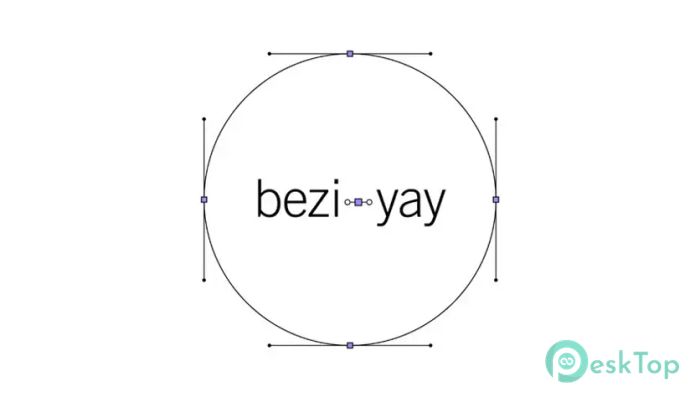
Working with Bezier curves in After Effects can sometimes feel like trying to shape invisible strings. This is where the software steps in and completely changes the experience. It brings hidden handles into clear view by generating shape layers that visually display them. Instead of guessing how your curves behave, you actually see what’s happening behind the scenes. The tool is especially useful for designers and motion artists who want precision. Whether you are working on typography, logos, or animations, it makes everything more understandable. It acts like a magnifying glass for your curves, helping you fine-tune every little detail with confidence.Features of Aescripts Beziyay
Visualizing Bezier Handles Made Simple
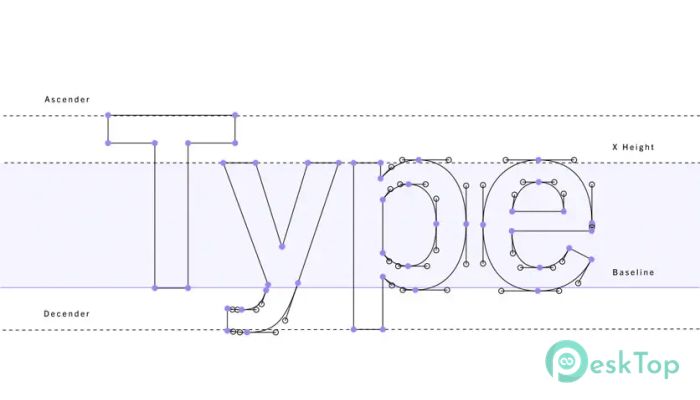
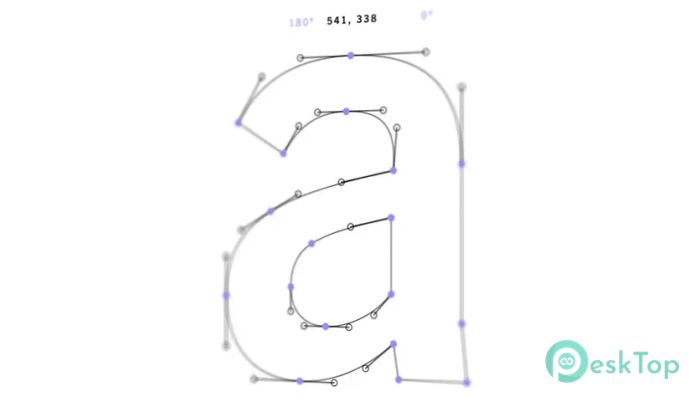
One of the biggest challenges in design work is understanding how Bezier handles affect shapes. Without proper visualization, it becomes a guessing game. The tool solves this by creating clear shape layers that represent vertices, tangents, and handles.
This means you no longer need to imagine how a curve is behaving. Instead, you can see every point and line directly on your screen. It feels like turning on the lights in a dark room where everything suddenly becomes clear and easy to control.
Intuitive Styling Controls
Designers love flexibility, and this software delivers it in spades. It offers easy-to-use styling controls that allow you to customize how vertices, tangents, and handles appear. You can adjust colors, sizes, and styles to match your workflow.
This level of control is not just about looks. It helps you focus on specific elements without distractions. Think of it like highlighting important notes in a book. You immediately know where to look and what to adjust.
Real-Time Data Display
Another powerful feature is the ability to display text information directly on your workspace. You can see vertex positions, tangent angles, and lengths in real time. This gives you a deeper understanding of how your shapes are constructed.
Instead of switching between panels or calculating values manually, everything is right in front of you. It feels like having a smart assistant that constantly shows you important details while you work.
Boosts Creative Workflow
Time is everything when working on creative projects. The tool saves hours by eliminating guesswork and reducing trial-and-error. You can make precise adjustments quickly and move forward without delays.
It allows you to focus more on creativity rather than technical struggles. Imagine driving a car with a clear GPS instead of guessing directions. That’s how smooth your workflow becomes with this solution.
Perfect for Multiple Design Projects
The software is not limited to one type of project. It works beautifully across different creative fields. Whether you are designing typography, creating logos, building data visualizations, or crafting illustrations, it fits right in.
Its versatility makes it a valuable addition to any designer’s toolkit. You can switch between projects without needing different tools for each task. Everything stays consistent and easy to manage.
Enhances Learning and Understanding
For beginners, Bezier curves can feel confusing and overwhelming. This tool makes learning much easier by showing exactly how everything works. It turns abstract concepts into visible elements that you can understand instantly.
Even experienced designers benefit from this clarity. It helps refine skills and improve precision. Over time, you develop a stronger sense of control and confidence in your work.
Lightweight and Efficient Performance
Despite its powerful features, the software remains lightweight and efficient. It does not slow down your system or interrupt your workflow. You can run it alongside your projects without any performance issues.
This balance between power and performance is what makes it practical for everyday use. It feels smooth, responsive, and reliable at all times.
Behind-the-Scenes Case Studies
If you enjoy showcasing your design process, this tool is a changer. It helps you create detailed behind-the-scenes visuals that explain how your work was built. This is especially useful for presentations, portfolios, and tutorials.
You can clearly demonstrate your process, making your work more engaging and professional. It’s like turning your design journey into a story that others can easily follow and appreciate.
System Requirements and Technical Details
Operating System: Windows 11 / 10 / 8.1 / 7
Processor: Minimum 1 GHz Processor (2.4 GHz recommended)
RAM: 2GB (4GB or more recommended)
Free Hard Disk Space: 200MB or more is recommended

-
Program size747.03 KB
-
Version1.1
-
Program languagemultilanguage
-
Last updatedBefore 5 Month
-
Downloads20
 Paragon Hard Disk Manager 18 Business
 Aescripts MaskMotion
 Aescripts AE Glass
 Aescripts PreFlight
 Aescripts Risograph
 Aescripts Folder Fanatic