
 Arabic
  English
  Turkish
  Chinese
  Japanese
  Russian
  Spanish
  German
  French
  Hindi
Hindi Download Aescripts - ChronoKeys 1.0 for Windows
Download Aescripts - ChronoKeys 1.0 for Windows.
Aescripts - ChronoKeys Overview
This powerful utility is designed for motion designers who want full authority over timing without breaking their animations. It focuses on syncing keyframes with layer in-points and out-points, making retiming feel natural and predictable. Instead of manually dragging elements around the timeline, everything moves together in a clean and logical way. What This Tool Is All About Think of animation timing like a rubber band stretched across a frame. When you pull one end, everything shifts smoothly instead of snapping apart. That is exactly how the software behaves. When a layer’s duration changes, keyframes intelligently follow, keeping motion intact and curves untouched. Why Timing Control Matters Animation lives and breathes on timing. Even a small shift can ruin the rhythm of a scene. The software removes the frustration of fixing broken motion after retiming. It keeps your creative flow moving forward, like adjusting the length of a song without throwing the beat off.Features of Aescripts - ChronoKeys
Lock In for Clean Starting Points
The Lock In option ties keyframes to the layer’s in-point. When you move or extend the beginning of a layer, the animation follows instantly. This is ideal for intros, entrances, or moments where the start timing must always stay aligned.
Lock Out for Perfect Endings
Lock Out does the same job at the end of a layer. When the out-point changes, keyframes shift with it. This is extremely useful for outros and finishing motions where the ending needs to land perfectly, no matter how long the layer becomes.
Stretch Mode Explained
Stretch mode allows the spacing between keyframes to change while keeping their relative order. Imagine stretching dough without tearing it. The animation speeds up or slows down naturally, making it ideal for global timing adjustments across scenes.
Protect Mode for Precision Work
Protect mode maintains the distance between keyframes while still adapting to the layer's duration. This is perfect when motion accuracy matters, such as mechanical movements or synced visual beats. Nothing drifts, nothing compresses, and the feel stays consistent.
Smart Retiming for Precomps
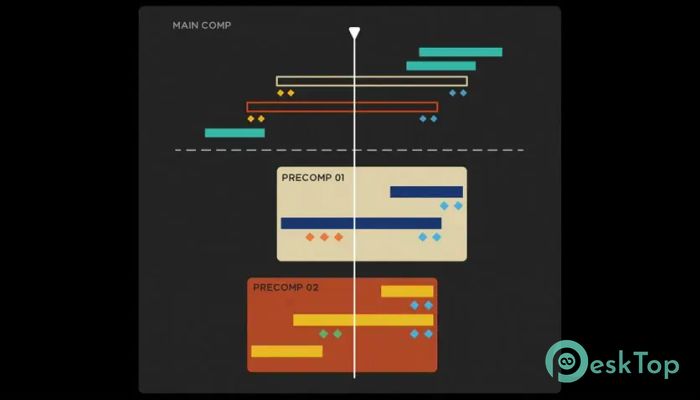
Nested compositions often become a headache when timing changes. The software handles these situations smoothly by adjusting internal keyframes alongside the parent layer. It feels like the timeline finally understands your intent.
Effortless Nudging and Fine-Tuning
Sometimes timing issues are subtle. A few frames here or there can make all the difference. The tool lets you nudge neighboring layers and keyframes with confidence, knowing everything stays aligned and accurate.
Who Should Use It
This solution fits motion designers, editors, and animators who value precision and speed. Beginners will appreciate the simplicity, while professionals will enjoy the depth and reliability during complex projects.
Workflow Benefits You Will Notice
Less manual cleanup, fewer broken animations, and faster revisions become part of your daily routine. It is like upgrading from pushing blocks by hand to using magnets that always snap into place.
System Requirements and Technical Details
Operating System: Windows 11 / 10 / 8.1 / 7
Processor: Minimum 1 GHz Processor (2.4 GHz recommended)
RAM: 2GB (4GB or more recommended)
Free Hard Disk Space: 200MB or more is recommended
After Effects: 2026, 2025, 2024

-
Program size78.29 MB
-
Version1.0
-
Program languagemultilanguage
-
Last updatedBefore 8 Month
-
Downloads18
 Paragon Hard Disk Manager 18 Business
 Aescripts MaskMotion
 Aescripts AE Glass
 Aescripts PreFlight
 Aescripts Risograph
 Aescripts Folder Fanatic