
 Arabic
  English
  Turkish
  Chinese
  Japanese
  Russian
  Spanish
  German
  French
  Hindi
Hindi Download Aescripts Fluxion Warp 1.0 for Windows

Download Aescripts Fluxion Warp 1.0 for Windows.
Aescripts Fluxion Warp Overview
This tool is designed for motion designers and video editors who want more control over how their visuals move and distort. Instead of relying on basic warp effects, it builds a smart system that uses vector fields generated from masks. Think of it like drawing a path, then letting your image flow naturally along it. It fits perfectly into creative workflows where organic motion is important. Whether you're working on abstract visuals, transitions, or stylized animations, this plugin gives you a flexible way to shape movement with precision.Features of Aescripts Fluxion Warp
Generate a Vector Field from a Mask
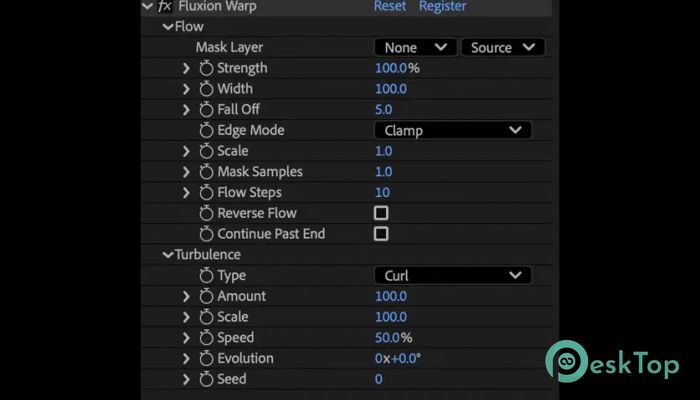
At the core of this tool is its ability to turn a simple mask into a powerful vector field. You just draw a path, and the software calculates how pixels should move along it. It’s like turning a static line into a dynamic flow map.
This feature removes the need for complex setups. Instead of manually animating distortions frame by frame, you can rely on this automated system to do the heavy lifting while still keeping creative control in your hands.
Advect Pixels Based on the Flow
The real magic happens when pixels start moving along the generated field. This process, often called advection, allows the image to stretch, twist, and flow smoothly. It feels almost like watching liquid flow with the current.
The result is not just a simple distortion but a fluid transformation. This makes it ideal for effects like smoke-like motion, flowing textures, or seamless transitions between scenes.
Control the Field Width and Strength
One of the best parts is the level of control you get. You can adjust how wide the flow spreads and how strong the effect becomes. Want a subtle ripple? Keep it low. Need a dramatic warp? Increase the strength.
This flexibility lets you match the effect to your project’s tone. Whether you're going for a gentle movement or a bold visual impact, the settings give you the freedom to experiment.
Add Natural Warping with Turbulence
To avoid mechanical-looking results, the tool includes turbulence options. This adds randomness and variation to the flow, making it feel more organic. It’s like adding wind to water; the movement becomes unpredictable and lively.
This is especially useful when creating effects that need to feel alive, such as energy waves, heat distortion, or artistic motion graphics.
Simple and Intuitive Controls
Despite its advanced capabilities, the interface remains simple. You don’t need to be a technical expert to use it. The controls are straightforward, allowing you to focus on creativity rather than complexity.
It feels more like adjusting sliders on a creative tool rather than programming a complex effect. This makes it beginner-friendly while still offering depth for professionals.
Reverse the Flow Direction
Sometimes you want the motion to go the opposite way. Instead of redrawing everything, you can simply reverse the flow. This small feature saves time and adds flexibility to your workflow.
It’s like rewinding a river and watching it flow backward, opening up new creative possibilities without extra effort.
Control Mask Endpoint Behavior
The way the flow behaves at the start and end of a mask can greatly affect the final look. This tool lets you control those endpoints, ensuring smooth transitions and avoiding unwanted distortions.
You can fine-tune how the effect begins and ends, giving your animations a polished and professional finish.
Adjust Flow Width Falloff
Another useful feature is the ability to control how the effect fades from the center outward. This is known as falloff. By adjusting it, you can create sharp edges or soft transitions.
This is similar to painting with a brush whose softness is adjustable. It helps you blend the effect naturally into the rest of your composition.
Creative Use Cases
This plugin is perfect for a wide range of creative projects. You can use it for dynamic text animations, fluid transitions, abstract visuals, or even subtle motion enhancements.
It works especially well in motion graphics, where smooth, organic movement can make a big difference. It’s like giving your visuals a sense of life and direction.
Performance and Workflow Integration
The tool integrates smoothly into After Effects, making it easy to use within existing projects. It doesn’t require a complicated setup, so you can start experimenting right away.
Performance is optimized to handle complex warps without slowing down your workflow. This means you can focus on creativity without worrying about lag or delays.
System Requirements and Technical Details
Operating System: Windows 11 / 10 / 8.1 / 7
Processor: Minimum 1 GHz Processor (2.4 GHz recommended)
RAM: 2GB (4GB or more recommended)
Free Hard Disk Space: 200MB or more is recommended
After Effects: 2026, 2025, 2024, 2023

-
Program size131.02 KB
-
Version1.0
-
Program languagemultilanguage
-
Last updatedBefore 4 Month
-
Downloads12
 Paragon Hard Disk Manager 18 Business
 Aescripts MaskMotion
 Aescripts AE Glass
 Aescripts PreFlight
 Aescripts Risograph
 Aescripts Folder Fanatic