
 Arabic
  English
  Turkish
  Chinese
  Japanese
  Russian
  Spanish
  German
  French
  Hindi
Hindi Download Aescripts - Nexanim 1.0.4 for Windows
Download Aescripts - Nexanim 1.0.4 for Windows.
Aescripts - Nexanim Overview
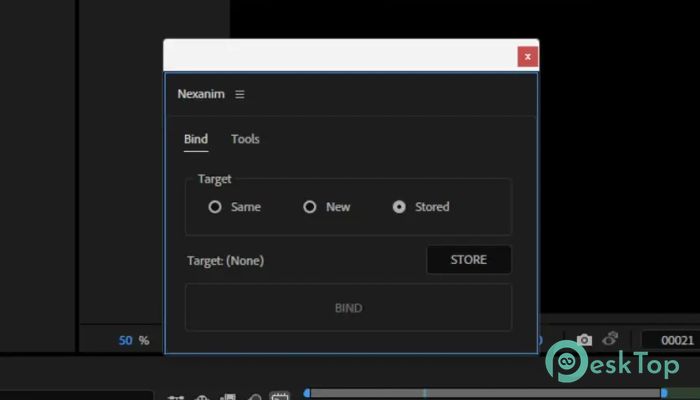
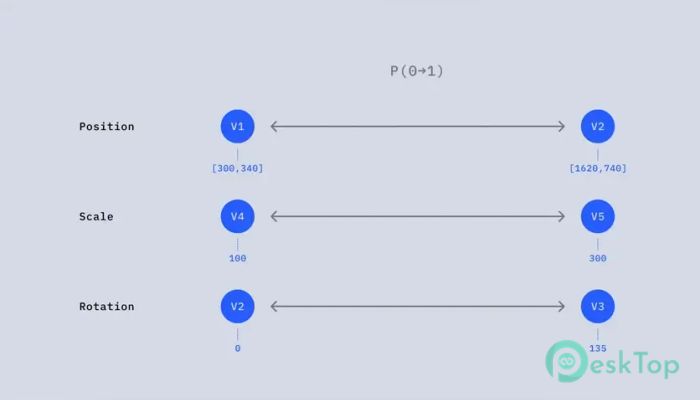
This tool is designed to completely rethink how animation works inside After Effects. Instead of tying animation directly to fixed values on the timeline, it separates progress from value. That simple shift changes everything. It allows you to adjust animations freely without damaging curves, breaking timing, or starting over. If you have ever struggled with adjusting keyframes, syncing elements, or maintaining smooth motion, this solution feels like a breath of fresh air. It introduces a modern system that focuses on flexibility and precision while keeping your workflow clean and efficient. What Makes This Tool Different Traditional animation often feels like working with rigid building blocks. Once you set keyframes, making changes can quickly turn messy. Curves get distorted, timing shifts unpredictably, and syncing multiple elements becomes frustrating. This software changes that by separating how animation progresses from what values are being animated. Think of it like controlling the speed of a car separately from its direction. You gain more control without affecting the entire system.Features of Aescripts - Nexanim
Non-Destructive Animation Workflow
One of the biggest advantages is its non-destructive nature. You can make changes anytime without ruining your previous work. This means you are free to experiment, tweak, and refine animations without fear.
Imagine editing a video where every change overwrites the original footage. That would be stressful. This tool avoids that completely. It keeps your animation structure intact while allowing unlimited adjustments.
Solving Curve Distortion Issues
In traditional systems, changing values often leads to distorted curves. This can ruin the smoothness of motion and require extra time to fix. It becomes a cycle of adjusting and correcting.
With this approach, curves remain stable even when values change. You can update positions, scales, or rotations without affecting the animation flow. It keeps everything smooth and predictable, which saves both time and effort.
Freedom from Fixed Timeline Values
Another common problem in animation is being locked into fixed values on the timeline. Once something is set, changing it later can feel like untangling a knot.
This tool removes that limitation. It allows values to stay flexible, so you can update them at any point. It is like having a dynamic system that adapts to your changes instead of resisting them.
Easy Synchronization Across Elements
Synchronizing multiple elements is often one of the hardest parts of animation. Small timing mismatches can throw off the entire scene.
Here, synchronization becomes much easier. Since progress is separated from value, you can align multiple elements using the same timing logic. This keeps everything in sync without manually adjusting each layer.
Improved Workflow Efficiency
Time is everything when working on creative projects. This software speeds up your workflow by reducing the need for constant fixes and adjustments.
You spend less time correcting mistakes and more time focusing on creativity. It feels like switching from manual tools to automated ones. The difference is instantly noticeable.
Better Control Over Animation Timing
Timing is the heart of animation. Even small changes can affect how natural or engaging something feels.
This tool gives you precise control over timing without affecting the values. You can adjust speed, delay, or rhythm independently. It is like fine-tuning music where tempo and notes are controlled separately.
Flexible and Scalable System
Whether you are working on a small project or a complex animation, this system scales easily. You can apply it to simple transitions or large compositions without losing control.
It adapts to your needs instead of forcing you to adapt to it. That flexibility makes it suitable for both beginners and advanced users.
User-Friendly Experience
Despite its powerful features, the interface remains simple and easy to understand. You do not need to learn complicated steps to start using it.
The design focuses on clarity and usability. Even if you are new to advanced animation techniques, you can quickly get comfortable and start creating better results.
Perfect for Motion Designers
This tool is especially useful for motion designers who work with complex animations. It simplifies tasks that usually take hours and turns them into quick adjustments.
It also helps maintain consistency across projects, which is important for professional work. Once you get used to it, going back to traditional methods feels limiting.
Why It Feels Like a Next-Gen Solution
Most tools improve existing systems, but this one redefines how animation works. By separating progress from value, it introduces a smarter way to handle motion.
It feels like upgrading from a basic calculator to a smart device. You still perform the same tasks, but everything becomes faster, smoother, and more efficient.
System Requirements and Technical Details
Operating System: Windows 11 / 10 / 8.1 / 7
Processor: Minimum 1 GHz Processor (2.4 GHz recommended)
RAM: 2GB (4GB or more recommended)
Free Hard Disk Space: 200MB or more is recommended
After Effects: 2026, 2025

-
Program size633.69 KB
-
Version1.0.4
-
Program languagemultilanguage
-
Last updatedBefore 6 Month
-
Downloads12
 Paragon Hard Disk Manager 18 Business
 Aescripts MaskMotion
 Aescripts AE Glass
 Aescripts PreFlight
 Aescripts Risograph
 Aescripts Folder Fanatic