
 Arabic
  English
  Turkish
  Chinese
  Japanese
  Russian
  Spanish
  German
  French
  Hindi
Hindi Download Aescripts Pixion 1.0 for Windows
Download Aescripts Pixion 1.0 for Windows.
Aescripts Pixion Overview
This plugin is designed for motion designers who want more control over particle effects inside After Effects. Instead of relying on random emission, it uses real pixel data from layers to generate stunning visuals. That means every particle can react to brightness, color, and movement directly from your footage. It feels like turning your images into living, breathing motion graphics. Whether you're working on cinematic visuals or social media animations, this tool gives you creative freedom without making things overly complicated.Features of Aescripts Pixion
Layer-Based Particle System
Unlike traditional tools that emit particles from fixed points, this one builds everything from layers. You can use text, shapes, images, or even video as a source. The particles follow the structure of your layer, making the effect look more natural and meaningful.
Think of it like breaking your design into thousands of tiny pieces and then bringing them to life. Each pixel becomes a particle, opening the door to endless creativity.
Pixel Data Control
One standout feature is how it uses pixel data to control behavior. Bright areas can emit more particles, darker areas can fade out, and colors can define motion direction or size. This level of control makes your animations feel intelligent rather than random.
It’s almost like giving your visuals a brain. Instead of manually adjusting everything, the software reads your design and reacts accordingly.
GPU Acceleration for Faster Performance
Speed matters when working with heavy effects. This plugin uses GPU acceleration to ensure smooth performance even with complex particle systems. You can preview changes quickly and render projects without long waiting times.
This makes it perfect for professionals who need both quality and efficiency. You don’t have to sacrifice performance to get beautiful results.
Customizable Particle Behavior
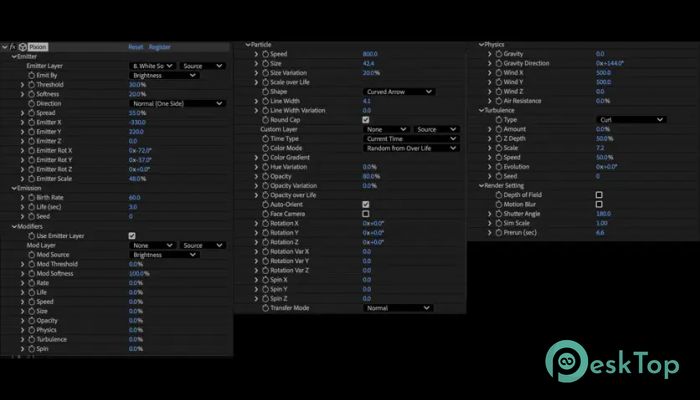
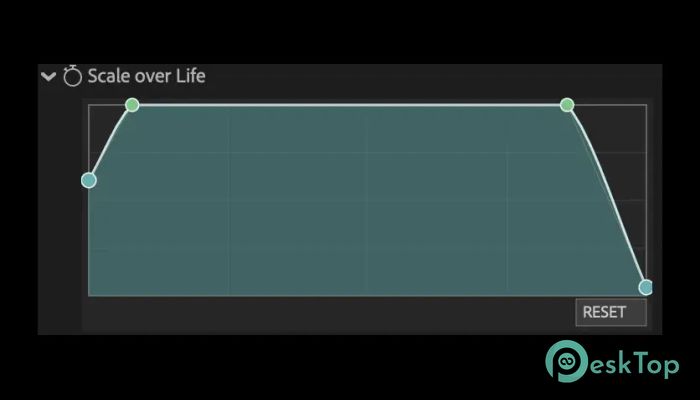
You have full control over how particles move, fade, and interact. Adjust velocity, direction, size, and lifespan with simple settings. You can create subtle motion or explosive effects depending on your needs.
It’s like having a toolbox where every knob changes the personality of your animation. Small tweaks can create completely different outcomes.
Seamless Integration with After Effects
This tool works directly inside After Effects, so there’s no need for external software. It blends smoothly with your existing workflow and supports standard features like keyframes and layers.
If you already know After Effects, you’ll feel right at home. The learning curve is gentle, and you can start creating impressive visuals almost instantly.
Creative Use Cases
This plugin is ideal for logo reveals, text animations, music visualizers, and cinematic effects. You can turn static designs into dynamic motion pieces that grab attention.
Imagine your logo dissolving into particles or your text forming from glowing pixels. These effects are not just visually appealing; they also add depth and storytelling to your work.
User-Friendly Controls
Despite its powerful features, the interface is clean and easy to understand. You don’t need to be a technical expert to use it. Controls are organized so experimentation is fun rather than frustrating.
It feels more like playing with a creative tool than struggling with complex settings. That balance between power and simplicity is what makes it stand out.
Real-Time Preview
Seeing changes instantly helps you stay in the creative flow. This tool allows real-time previews so you can adjust settings and immediately see the results.
This saves time and keeps your ideas moving forward. You’re not stuck waiting for renders every time you try something new.
System Requirements and Technical Details
Operating System: Windows 11 / 10 / 8.1 / 7
Processor: Minimum 1 GHz Processor (2.4 GHz recommended)
RAM: 2GB (4GB or more recommended)
Free Hard Disk Space: 200MB or more is recommended
After Effects: 2026, 2025, 2024, 2023

-
Program size179.98 KB
-
Version1.0
-
Program languagemultilanguage
-
Last updatedBefore 4 Month
-
Downloads12
 Paragon Hard Disk Manager 18 Business
 Aescripts MaskMotion
 Aescripts AE Glass
 Aescripts PreFlight
 Aescripts Risograph
 Aescripts Folder Fanatic