
 Arabic
  English
  Turkish
  Chinese
  Japanese
  Russian
  Spanish
  German
  French
  Hindi
Hindi Download Aescripts Spraydelic Photoshop Plugin 1.0.0 for Windows
Download Aescripts Spraydelic Photoshop Plugin 1.0.0 for Windows.
Aescripts Spraydelic Photoshop Plugin Overview
This creative plugin is designed for artists who love adding raw texture and character to their work. Instead of spending hours manually creating grain, noise, or stencil effects, it delivers everything instantly with a single click. Think of it like a digital spray can that lets you paint chaos onto perfection. The tool focuses on distressing visuals in a controlled yet expressive way. Whether you want subtle film grain or heavy grunge textures, it gives you the flexibility to explore both ends of the spectrum. It feels less like a technical tool and more like a creative playground where imperfections become art.Features of Aescripts Spraydelic Photoshop Plugin
Simple Yet Powerful Interface
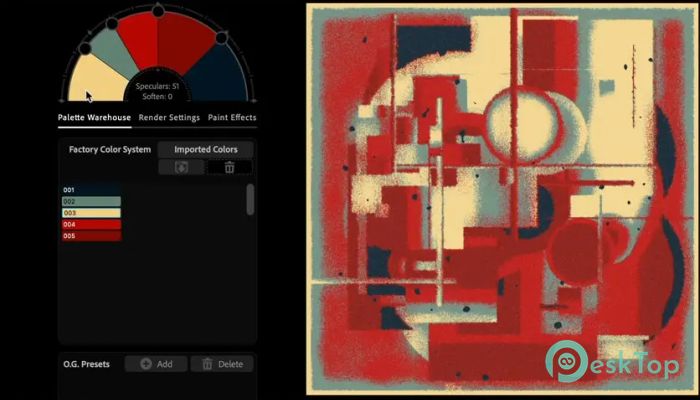
One of the best things about the software is how easy it is to use. You do not need to dig through complicated settings or menus. Everything is presented in a clean, natural interface that feels intuitive, even for beginners.
It works like flipping switches on a creative machine. You adjust sliders, hit apply, and instantly see your image evolve. This simplicity saves time and lets you focus more on creativity rather than on technical steps.
One-Click Grain and Texture Effects
This plugin shines in grain simulation. It can quickly add film-like textures, gritty noise, or dusty overlays that give images a vintage or cinematic feel.
Instead of stacking multiple layers and filters, it compresses the entire workflow into one action. The result feels organic, not artificial, which is often hard to achieve manually.
Spray Paint and Stencil Effects
If you enjoy urban or street-style designs, this feature will grab your attention. The tool can create spray paint-like visuals and stencil patterns that mimic real-world graffiti.
It feels like holding a spray can, except you have full control over intensity, spread, and texture. You can go from light mist to heavy splatter in seconds.
Advanced Distressing Controls
The software is built to destroy pixels in the most artistic way possible. It includes options like threshold, crushing, and texture layering that help break down clean images into raw, expressive results.
Imagine taking a polished photo and running it through a creative storm. What comes out is something unique, full of depth and emotion. That is the kind of transformation it offers.
Perfect for Designers and Creators
This tool is ideal for graphic designers, photographers, and digital artists. Whether you are working on posters, album covers, or social media visuals, it adds that extra layer of personality.
It is especially useful when you want your designs to stand out. Clean designs are great, but sometimes they need a bit of chaos to feel alive. This plugin delivers exactly that.
Time-Saving Workflow
Creating complex textures manually can take a lot of time. You have to use multiple filters, masks, and blending modes. With this tool, everything is streamlined.
It reduces hours of work into minutes. This means you can experiment more, try different styles, and still finish your projects faster.
Customizable Output
Even though it offers one-click effects, you still get plenty of control. You can adjust intensity, density, and texture type to match your vision.
This balance between automation and control makes it suitable for both beginners and professionals. You get speed without losing creative freedom.
Seamless Integration with Photoshop
The plugin works smoothly inside Photoshop, so you do not need to switch between different tools. It becomes part of your workflow, like an extra brush or filter.
Once installed, it feels like a natural extension of the software. You can apply effects, tweak settings, and continue editing without any interruptions.
System Requirements and Technical Details
Operating System: Windows 11 / 10 / 8.1 / 7
Processor: Minimum 1 GHz Processor (2.4 GHz recommended)
RAM: 2GB (4GB or more recommended)
Free Hard Disk Space: 200MB or more is recommended
Photoshop: 2026, 2025, 2024

-
Program size19.88 MB
-
Version1.0.0
-
Program languagemultilanguage
-
Last updatedBefore 4 Month
-
Downloads30
 Paragon Hard Disk Manager 18 Business
 Aescripts MaskMotion
 Aescripts AE Glass
 Aescripts PreFlight
 Aescripts Risograph
 Aescripts Folder Fanatic