
 Arabic
  English
  Turkish
  Chinese
  Japanese
  Russian
  Spanish
  German
  French
  Hindi
Hindi Download AEscripts SVG2Premiere 1.0 for Windows
Download AEscripts SVG2Premiere 1.0 for Windows.
AEscripts SVG2Premiere Overview
Working with vector graphics inside Premiere Pro can sometimes feel like trying to fit a square peg into a round hole. Many editors struggle when importing SVG files because Premiere Pro does not always handle them smoothly. This is where this smart extension makes things easier and more efficient. The software allows users to import SVG images directly into Premiere Pro without complicated conversions or external tools. Instead of manually converting files one by one, the tool automatically converts SVG files into 4000px transparent PNGs. This ensures high quality while saving time and effort. It is designed for editors, motion designers, and content creators who want a smoother workflow. Whether you are creating YouTube videos, advertisements, or professional edits, the tool helps streamline your workflow like a well-oiled machine. With drag-and-drop functionality, automatic import, and batch processing support, it becomes easier to handle multiple SVG files quickly. This makes it especially useful for professionals working with logos, icons, graphics, and vector-based assets.Features of AEscripts SVG2Premiere
Import SVG Files Directly into Premiere Pro
Importing SVG files has always been tricky in Premiere Pro. Many editors had to rely on third-party tools or manually convert files. This extension removes those obstacles and provides a seamless experience.
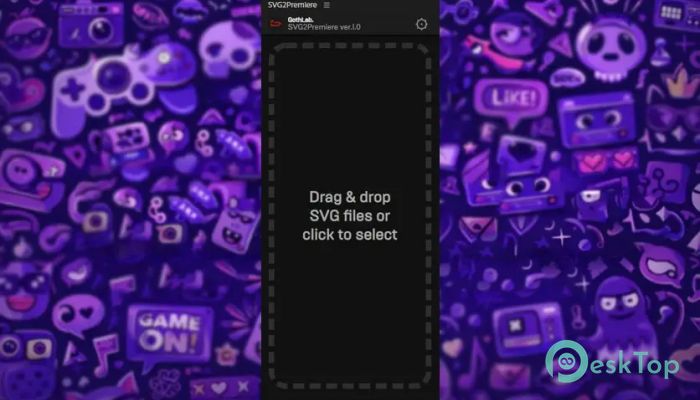
You can simply open the panel and drag SVG files directly into it. The tool then automatically converts them into high-resolution PNG images. These converted images are then imported into the project panel, ready for immediate use.
This process feels smooth and effortless. It is similar to dropping files into a folder, but instead of storing them, the tool automatically prepares them for editing. This eliminates unnecessary steps and improves productivity.
Drag and Drop Functionality
The drag-and-drop feature is one of the most useful aspects of the tool. You do not need to navigate complex menus or settings. Simply drag your SVG files into the panel.
Once dropped, the software automatically converts them to PNG files. These PNGs are generated at 4000px resolution, ensuring crisp visuals and professional quality. The transparent background also makes them perfect for overlays and graphic elements.
This simple workflow saves time and makes the editing process smoother. Even beginners can use it without any learning curve. It works like magic behind the scenes while you focus on creativity.
Batch Processing Support
Handling multiple SVG files manually can take a lot of time. This extension solves that problem with batch processing support. You can drop multiple SVG files at once, and the tool converts all of them automatically.
This feature is particularly helpful when working on large projects. For example, if you have dozens of icons or logos, you can process them in one go. This reduces repetitive tasks and increases efficiency.
Batch processing works smoothly without slowing down your workflow. It ensures consistent output quality while saving valuable editing time.
Automatic Save and Import
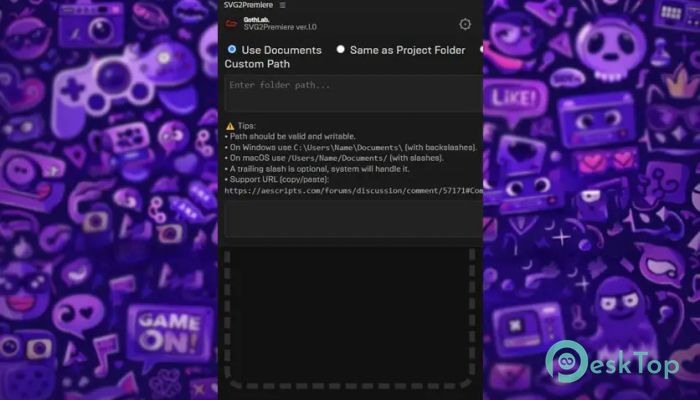
The software does not just convert files. It also saves them automatically to your chosen location. You can select from multiple save locations, including the Documents folder, the Project folder, or a custom path.
Once saved, the PNG files are automatically imported into the Premiere Pro project panel. This means you do not need to search for files manually. Everything appears ready to use immediately.
This feature improves workflow efficiency and reduces file management headaches. It keeps everything organized and accessible.
Simple Workflow Steps
The tool is designed with simplicity in mind. The workflow is straightforward and easy to follow. Even new users can start using it instantly without confusion.
Here is how the process works:
Open the panel inside Premiere Pro
Choose output location
Drag and drop SVG files
PNG files are saved and imported automatically
This streamlined process simplifies workflows and speeds up editing. It is like having an assistant working quietly in the background.
High Quality PNG Conversion
Quality matters when working with graphics. The tool converts SVG files into 4000px transparent PNG images. This ensures sharp visuals and professional output.
Transparent PNGs are perfect for overlays, logos, and design elements. They blend seamlessly into videos and maintain high quality during editing.
This high resolution also allows scaling without losing clarity. Whether you use small icons or large graphics, the output remains clean and professional.
User-Friendly Interface
The interface is simple and intuitive. It does not overwhelm users with unnecessary options. Everything is designed to be accessible and easy to understand.
The clean layout helps users focus on tasks without distractions. Even beginners can navigate the panel easily. It feels lightweight and responsive.
This simplicity makes it suitable for both beginners and professionals. Everyone can benefit from its efficiency.
Improved Editing Workflow
Editing projects often involve multiple graphics and assets. Managing these elements manually can slow down productivity. This extension helps streamline the entire workflow.
By automating conversions and imports, the tool reduces manual tasks. Editors can focus more on creativity instead of file management.
This improved workflow saves time and enhances productivity. It makes editing smoother and more enjoyable.
Lightweight and Efficient
The software is lightweight and does not slow down Premiere Pro. It runs smoothly in the background without affecting performance.
This efficiency makes it suitable for both small and large projects. You can use it without worrying about system performance.
Its lightweight design ensures smooth operation and reliable performance.
System Requirements and Technical Details
Operating System: Windows 11 / 10 / 8.1 / 7
Processor: Minimum 1 GHz Processor (2.4 GHz recommended)
RAM: 2GB (4GB or more recommended)
Free Hard Disk Space: 200MB or more is recommended
Premiere Pro: 2026, 2025, 2024, 2023, 2022

-
Program size521.49 KB
-
Version1.0
-
Program languagemultilanguage
-
Last updatedBefore 4 Month
-
Downloads13
 Paragon Hard Disk Manager 18 Business
 Aescripts MaskMotion
 Aescripts AE Glass
 Aescripts PreFlight
 Aescripts Risograph
 Aescripts Folder Fanatic