
 Arabic
  English
  Turkish
  Chinese
  Japanese
  Russian
  Spanish
  German
  French
  Hindi
Hindi Download AKK CineLibrary 3.1.3 for Windows
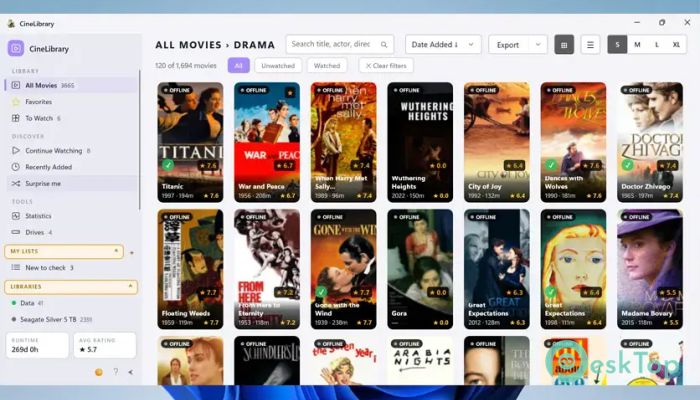
Download AKK CineLibrary 3.1.3 for Windows.
AKK CineLibrary Overview
This handy application is built for movie lovers who want a simple way to manage large collections stored on different drives. Developed as an open-source Windows utility, it provides users with a smooth, native desktop experience without slowing down the system. The software works especially well with MediaElch-scraped movie collections, making organization feel effortless. The tool focuses on speed, simplicity, and convenience. Instead of digging through endless folders, users can quickly browse posters, search by title, and launch movies directly from a single clean interface. It feels like having a personal digital cinema shelf right on your computer.Features of AKK CineLibrary
Simple and Clean Interface
One of the best things about this software is its clean layout. Everything is arranged in a straightforward way, so even beginners can start using it without confusion. The menus are responsive, and the navigation feels smooth like flipping through a well-organized movie library.
Unlike bulky media managers that consume excessive resources, this lightweight solution remains fast even with large collections. It opens quickly and keeps everything accessible with minimal effort.
Fast Movie Browsing Experience
Browsing through hundreds of movies becomes easy and enjoyable. Posters, movie information, and details are displayed neatly, giving the collection a polished and professional look. Searching for a title is quick, helping users find content in seconds instead of wasting time scrolling through folders.
The search engine inside the software acts like a smart librarian. Whether users remember a movie by title, genre, or year, the tool helps narrow down results rapidly.
Support for Multiple Drives
Many users keep movies stored across several external hard drives or SSDs. Managing them manually can feel messy and frustrating. This application solves that problem by allowing collections across multiple drives to be accessed from a single location.
It creates a centralized viewing experience without forcing users to move files around. That means collections stay organized while saving valuable storage space and time.
Perfect for MediaElch Collections
The software works smoothly with MediaElch-scraped movie libraries. Metadata, posters, fan art, and movie details can be displayed properly, creating a rich viewing experience. Everything feels connected and organized, almost like using a private streaming platform.
This compatibility makes the application a great choice for users who already maintain carefully scraped movie databases and want a dedicated Windows cataloging tool.
Quick Movie Playback
Playing movies directly from the catalog is another useful feature. Instead of opening separate folders and searching manually, users can launch content instantly. It removes unnecessary steps and keeps the viewing experience smooth.
The playback support feels natural and convenient. It turns a scattered movie archive into a polished entertainment center that is easy to access anytime.
Lightweight Performance
Heavy software can slow down older computers, but this tool keeps resource usage low. It is optimized for Windows and performs well without consuming excessive RAM or CPU. Even systems with modest hardware can run it comfortably.
The application's lightweight design makes it ideal for users who want efficiency without sacrificing functionality. It behaves more like a quick utility than a bloated media suite.
Open-Source Advantage
Being open source gives the software a significant advantage. Users can trust a project that is transparent and community-driven. Developers and enthusiasts can contribute improvements, making the application evolve over time.
This also means users are not locked into expensive subscriptions or complicated licensing systems. The focus stays on performance and user experience rather than unnecessary restrictions.
Useful Features
Fast native Windows performance
Supports MediaElch movie collections
Browse movies with posters and details
Works across multiple external drives
Quick search and filtering options
Direct movie playback support
Lightweight and responsive interface
Open-source and free to use
Simple setup process
Smooth navigation experience
Why Users Like It
Movie collectors often manage large libraries spread across folders, drives, and backup devices. Keeping everything organized can become stressful. This software simplifies that process by acting as a single control center for movie management.
Its speed and simplicity are what set it apart. Instead of drowning users in complicated menus, it focuses on delivering a fast and enjoyable cataloging experience.
Ideal for Personal Movie Archives
This application works especially well for users who maintain offline movie collections. People who prefer storing media locally rather than relying entirely on streaming services will appreciate the convenience it offers.
It transforms scattered files into a clean, professional digital library that's easy to explore. For collectors, it can feel like building a personal cinema database right at home.
System Requirements and Technical Details
Operating System: Windows 11 / 10 / 8.1 / 7
Processor: Minimum 1 GHz Processor (2.4 GHz recommended)
RAM: 2GB (4GB or more recommended)
Free Hard Disk Space: 200MB or more is recommended

-
Program size50.80 MB
-
Version3.1.3
-
Program languagemultilanguage
-
Last updatedBefore 4 Month
-
Downloads9Ralated programs
![ChrisPC VideoTube Downloader Pro]() ChrisPC VideoTube Downloader Pro
ChrisPC VideoTube Downloader Pro![TranscribeKit]() TranscribeKit
TranscribeKit![Vision Search]() Vision Search
Vision Search![DVDFab]() DVDFab
DVDFab![Crynet Showcase]() Crynet Showcase
Crynet Showcase![OVRLEY]() OVRLEY
OVRLEY
 ChrisPC VideoTube Downloader Pro
 TranscribeKit
 Vision Search
 DVDFab
 Crynet Showcase
 OVRLEY