
 Arabic
  English
  Turkish
  Chinese
  Japanese
  Russian
  Spanish
  German
  French
  Hindi
Hindi Download Astral Crow Games AniVoxel 1.11.0 for Windows
Download Astral Crow Games AniVoxel 1.11.0 for Windows.
Astral Crow Games AniVoxel Overview
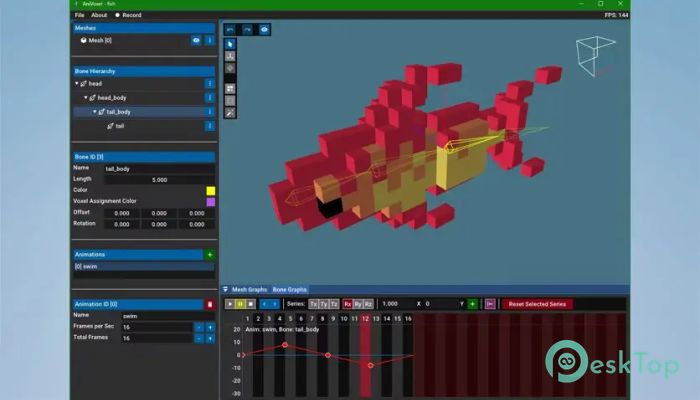
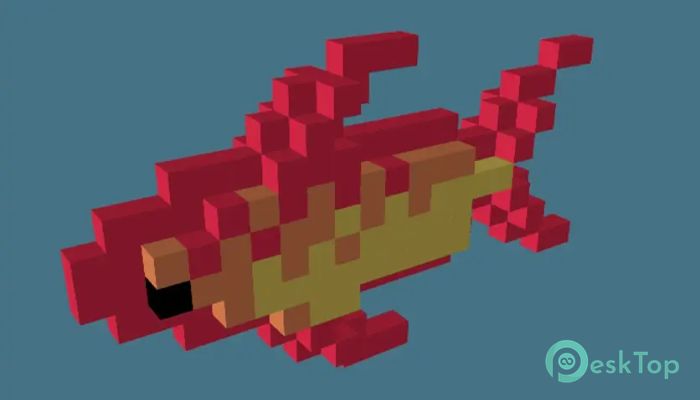
It is a specialized animation editor built specifically for voxel creators who want smooth skeletal animations while preserving grid-based precision. Traditional voxel animation methods often required frame-by-frame editing, which could be time-consuming and repetitive. Alternatively, users had to rely on non-grid animation tools that sometimes removed the unique voxel look. This software bridges that gap by providing bone-based animation while maintaining voxel-grid constraints. The software allows creators to import voxel models from popular tools like MagicaVoxel and Qubicle, rig them using bones, and animate them with flexibility and accuracy. This workflow significantly speeds up animation production and makes it easier to create professional-quality voxel animations. Whether you are working on games, digital art, or animations, this tool simplifies the entire process.Features of Astral Crow Games AniVoxel
Grid-Constrained Skeletal Animation
One of the biggest advantages of this editor is its grid-constrained skeletal animation system. Think of it like moving a puppet on a precise grid instead of free-floating movement. This ensures animations maintain the crisp, block-style appearance that voxel art is known for.
Instead of manually adjusting each frame, you can rig your model with bones and animate it naturally. This approach saves time and provides smoother animation results. It also allows for easier adjustments and refinements without rebuilding frames from scratch.
Import From Popular Voxel Editors
The tool supports importing models directly from MagicaVoxel and Qubicle. This means you can design your voxel model in your favorite editor and then bring it into the software for animation. It creates a smooth workflow between modeling and animation.
This flexibility helps both beginners and professionals. New users can experiment quickly, while experienced creators can integrate it into their production pipeline without changing their workflow.
Bone Rigging Made Simple
Setting up bone rigs is straightforward and intuitive. You can easily assign bones to different parts of your model and start animating instantly. It works similarly to character animation tools but is tailored specifically for voxel art.
Bone mirroring is also included, making character animation even easier. For example, if you animate one arm, the other can automatically follow. This feature dramatically speeds up character animation and reduces repetitive work.
Advanced Animation Features
The software includes several advanced animation features that improve creativity and efficiency. Smear frames allow smoother motion effects, while per-frame visibility gives you full control over animation timing. These features help create dynamic and expressive animations.
Animation tileset generation is another helpful addition. It allows creators to quickly generate sprite sheets for game development. This makes the tool especially useful for indie developers and pixel-style game creators.
Multiple Export Options
Export flexibility is essential for modern workflows, and this editor delivers multiple export formats. Supported formats include VOX, PLY, OBJ, FBX, glTF, and ABC. This allows seamless integration into game engines and other creative tools.
Whether you are exporting for Unity, Unreal Engine, or other platforms, the process is simple and efficient. This ensures your animations remain compatible across various development environments.
GIF Recording and Preview Tools
GIF recording support makes it easy to quickly preview animations. Instead of rendering complex files, you can instantly create preview animations for testing or sharing. This feature is useful for artists who want fast feedback during development.
Preview tools also help refine animation timing and movement. This ensures your final animations look polished and professional.
Animation Tileset Generation
Tileset generation is especially valuable for game developers. You can convert animations into sprite sheets quickly, reducing manual work. This feature lets you turn a complex animation into ready-to-use game assets with just a few clicks.
It simplifies development workflows and allows developers to focus more on creativity instead of repetitive tasks.
User-Friendly Interface
The interface is designed to be clean and intuitive. Beginners can quickly understand the layout, while professionals can easily access advanced tools. Everything is organized logically, making the animation smooth and efficient.
The workflow feels natural and responsive. This helps creators focus more on animation instead of learning complicated controls.
Performance and Optimization
The software is optimized for performance and stability. Even large voxel models run smoothly, allowing creators to work without interruptions. Efficient memory handling ensures reliable performance across different systems.
This makes it suitable for both small projects and complex animation workflows.
Who Should Use This Tool
This editor is ideal for game developers, voxel artists, animators, and digital creators. Whether you are building indie games or creating animated voxel characters, the tool provides everything needed for efficient animation.
It is also useful for beginners learning voxel animation. The simple interface and powerful features create a balanced learning experience.
System Requirements and Technical Details
Operating System: Windows 11 / 10 / 8.1 / 7
Processor: Minimum 1 GHz Processor (2.4 GHz recommended)
RAM: 2GB (4GB or more recommended)
Free Hard Disk Space: 200MB or more is recommended

-
Program size20.79 MB
-
Version1.11.0
-
Program languagemultilanguage
-
Last updatedBefore 6 Month
-
Downloads16
 Paragon Hard Disk Manager 18 Business
 Aescripts MaskMotion
 Aescripts AE Glass
 Aescripts PreFlight
 Aescripts Risograph
 Aescripts Folder Fanatic