
 Arabic
  English
  Turkish
  Chinese
  Japanese
  Russian
  Spanish
  German
  French
  Hindi
Hindi Download AudioLabel CD DVD Labeler 7.0.0.7 for Windows
Download AudioLabel CD DVD Labeler 7.0.0.7 for Windows.
AudioLabel CD DVD Labeler Overview
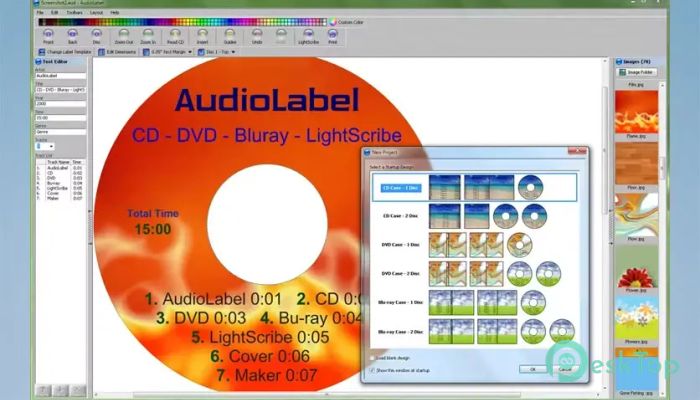
It is designed for users who want clean, attractive, and well-organized disc labels in just a few clicks. It focuses on ease of use while still offering enough tools to create polished results. Whether you are working with music discs, video collections, backups, or personal projects, you have complete control over how your discs and cases look.Features of AudioLabel CD DVD Labeler
Simple and User-Friendly Interface
The first thing you notice is how friendly the layout feels. Everything is placed where you expect it to be, so you do not waste time searching for tools. The learning curve is short, even if you have never used label design software before. It feels like arranging items on a desk: simple, straightforward, and intuitive.
Drag and Drop Design Experience
It allows you to add images, photos, and backgrounds using a smooth drag-and-drop system. You can move, resize, and position elements with precision. This makes the design process feel natural, like placing stickers on a page until everything looks right.
Smart Text Editing Tools
The built-in text editor makes writing titles, track lists, and notes quick and flexible. You can change fonts, sizes, colors, and alignment without digging into complex menus. Text wraps neatly around other elements, keeping everything clean and readable.
Automatic CD Information Import
One of the most helpful features is automatic disc data importing. It can read CD information and instantly populate details such as album name, artist, and track list. This saves time and reduces errors, especially when working with extensive music collections.
Support for Multiple Disc Types
The software supports CD, DVD, Blu-ray, and LightScribe formats. It also includes layouts for disc covers, inlays, and case inserts. This flexibility makes it useful for both personal and professional needs, whether you are archiving family videos or organizing a studio library.
Custom Backgrounds and Images
You can personalize your labels using custom backgrounds, gradients, and high-quality images. Photos can be adjusted for brightness and contrast to help them appear balanced in the final print. The result feels polished, like something made by a professional designer.
Precise Layout and Alignment
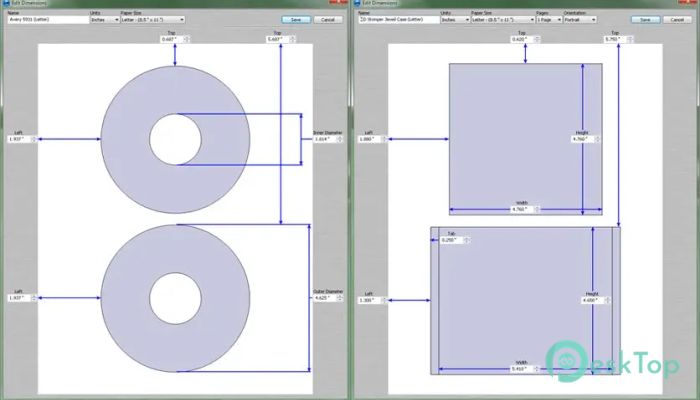
Alignment tools help keep everything neat. Guides and snapping features ensure that text and images line up properly. This attention to detail helps prevent misprints and wasted discs, saving time and materials.
High-Quality Printing Output
Printing is handled with accuracy in mind. The tool ensures designs align with the actual disc size, reducing misalignment. It supports a wide range of printers and label paper types, delivering consistent, reliable results every time.
Ideal for Home and Professional Use
It fits nicely in many situations. Home users can label personal collections, while businesses can create branded discs for presentations or deliveries. It acts like a digital workshop where ideas turn into tangible results.
System Requirements and Technical Details
Operating System: Windows 11 / 10 / 8.1 / 7
Processor: Minimum 1 GHz Processor (2.4 GHz recommended)
RAM: 2GB (4GB or more recommended)
Free Hard Disk Space: 200MB or more is recommended

-
Program size13.91 MB
-
Version7.0.0.7
-
Program languagemultilanguage
-
Last updatedBefore 10 Month
-
Downloads26
 Paragon Hard Disk Manager 18 Business
 Aescripts MaskMotion
 Aescripts AE Glass
 Aescripts PreFlight
 Aescripts Risograph
 Aescripts Folder Fanatic