
 Arabic
  English
  Turkish
  Chinese
  Japanese
  Russian
  Spanish
  German
  French
  Hindi
Hindi Download Bazarr 1.5.7 for Windows
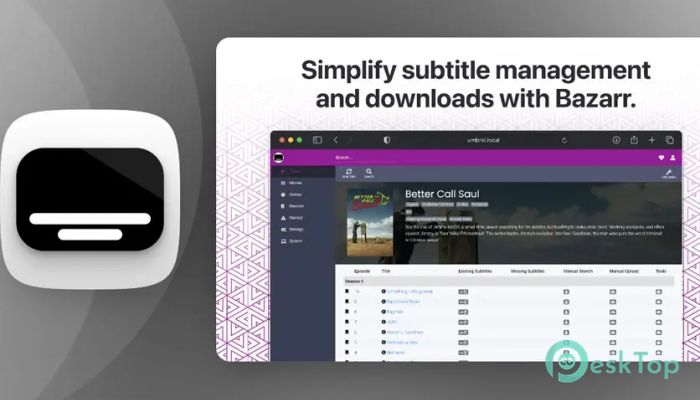
Download Bazarr 1.5.7 for Windows.
Bazarr Overview
Finding subtitles for movies and TV shows can sometimes be frustrating, especially when you have a large media collection. This software simplifies the entire process by automatically searching for, downloading, and managing subtitles based on your preferences. It works as a companion tool for Sonarr and Radarr, helping users keep their media libraries complete and organized without manual effort. The tool is designed for users who want a seamless subtitle experience. Instead of manually searching for subtitles across different websites, it automatically detects missing subtitles and downloads them in your preferred language. This makes media playback smoother and more enjoyable. Whether you are managing a small movie collection or a massive media library, it ensures that subtitles are always available when needed. It also keeps your files properly named and compatible with most media players, making everything work effortlessly.Features of Bazarr
Automatic Subtitle Search
One of the most useful features is the automatic search function. The tool constantly monitors your media library and checks for missing subtitles. When it finds missing subtitles, it immediately begins searching online sources to download them.
This automatic process saves time and effort. Instead of manually browsing websites, the software does everything in the background. As soon as subtitles become available in your preferred language, they are automatically downloaded and added to your media folder.
This feature is especially helpful for users who frequently download new movies or TV episodes. The tool acts like a personal assistant, ensuring subtitles are always ready before playback.
Manual Subtitle Search
While automatic searching is convenient, sometimes users prefer more control. The manual search feature allows users to browse available subtitles and select the one that best fits their needs. This provides flexibility and improves accuracy.
The tool lists multiple subtitle options from various sources. Users can compare them and choose the most suitable one. Once selected, it downloads the file and places it in the correct media folder with proper naming.
This option is helpful when you want specific subtitle formats, improved synchronization, or higher-quality subtitle files. It gives users full control while maintaining simplicity.
Subtitle Upgrade Feature
Another smart feature is subtitle upgrading. Sometimes, the first subtitle downloaded may not be the best available. The tool automatically checks for better versions and upgrades them when available.
This means subtitles can improve over time without any manual action. For example, if a higher-quality subtitle becomes available later, it automatically replaces the previous version.
This feature ensures users always have the best possible subtitle quality. It improves readability, synchronization, and overall viewing experience.
Seamless Integration with Media Tools
The software works perfectly alongside Sonarr and Radarr. These tools manage your media downloads, while this companion focuses on subtitles. Together, they create a fully automated media management system.
Once connected, it automatically detects new downloads and searches for subtitles instantly. This integration reduces manual work and improves workflow efficiency.
It works quietly in the background, ensuring subtitles are ready when your media is ready to watch.
User-Friendly Interface
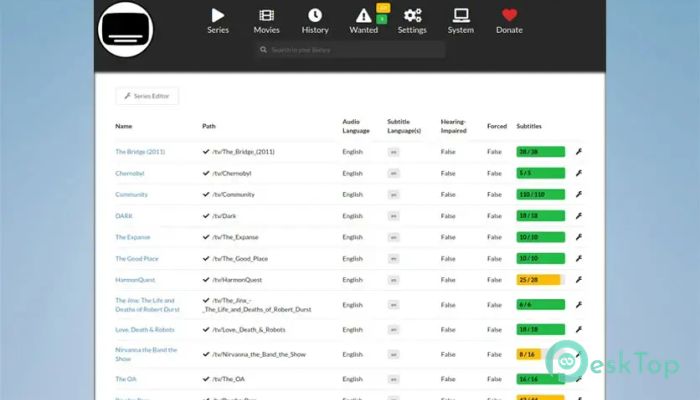
The interface is simple and clean. Even beginners can quickly understand how everything works. Settings are clearly organized, and users can easily customize subtitle preferences.
Users can choose languages, subtitle providers, and download preferences. This flexibility makes it suitable for different types of users.
The layout is designed to reduce complexity while keeping powerful features accessible.
Custom Language Support
The tool supports multiple languages. Users can select their preferred subtitle languages. This makes it useful for international users and multilingual households.
Once configured, it downloads subtitles only in selected languages. This keeps the media library clean and organized.
This feature is helpful for users who watch content from different countries and need subtitles in various languages.
Improved Media Organization
Keeping subtitle files properly named and placed is important. The software automatically organizes subtitle files in the correct folders. This ensures compatibility with most media players.
It also keeps everything tidy. Users do not need to rename files manually. The tool handles everything automatically.
This helps create a smooth viewing experience with minimal effort.
Lightweight Performance
The tool is lightweight and does not consume heavy system resources. It runs smoothly in the background while performing subtitle searches and downloads.
Even on older systems, performance remains stable. This makes it suitable for most Windows users.
Because of its efficient design, users can run it continuously without slowing down their system.
Why This Tool is Useful
Managing subtitles manually can feel like searching for a needle in a haystack. This software simplifies everything by automating the process. It saves time, improves organization, and enhances the viewing experience.
It also reduces frustration caused by missing subtitles. With automatic downloads and upgrades, users can enjoy content without interruptions.
The tool acts like a smart assistant, quietly and efficiently handling subtitle management.
System Requirements and Technical Details
Operating System: Windows 11 / 10 / 8.1 / 7
Processor: Minimum 1 GHz Processor (2.4 GHz recommended)
RAM: 2GB (4GB or more recommended)
Free Hard Disk Space: 200MB or more is recommended

-
Program size24.85 MB
-
Version1.5.7
-
Program languagemultilanguage
-
Last updatedBefore 3 Month
-
Downloads25Ralated programs
![ChrisPC VideoTube Downloader Pro]() ChrisPC VideoTube Downloader Pro
ChrisPC VideoTube Downloader Pro![TranscribeKit]() TranscribeKit
TranscribeKit![Vision Search]() Vision Search
Vision Search![DVDFab]() DVDFab
DVDFab![Crynet Showcase]() Crynet Showcase
Crynet Showcase![OVRLEY]() OVRLEY
OVRLEY
 ChrisPC VideoTube Downloader Pro
 TranscribeKit
 Vision Search
 DVDFab
 Crynet Showcase
 OVRLEY