
 Arabic
  English
  Turkish
  Chinese
  Japanese
  Russian
  Spanish
  German
  French
  Hindi
Hindi Download BonesPro for 3dsmax - Source 4.7.9 for Windows
Download BonesPro for 3dsmax - Source 4.7.9 for Windows.
BonesPro for 3dsmax - Source Overview
When working on character animation, getting natural skin deformation can feel like trying to bend metal into silk. This tool changes that experience completely. It is designed to simplify organic skinning in Autodesk 3ds Max, making complex tasks feel effortless and smooth. The software focuses on delivering high-quality results while saving time. Instead of manually adjusting every vertex, it uses smart algorithms to generate natural movement. This means you can spend more time being creative and less time fixing technical issues. Whether you are designing game characters, cinematic models, or animated objects, it offers a reliable way to achieve professional results. The real beauty lies in how it blends simplicity with advanced control.Features of BonesPro for 3dsmax - Source
Fast and Intelligent Skinning Process
One of the biggest advantages of this tool is speed. Traditional skinning can take hours, sometimes even days, especially for complex models. Here, the process becomes much faster thanks to optimized technology.
It intelligently calculates bone influence, almost like a smart assistant that understands how muscles should move. You don’t need to manually tweak every detail unless you want to. This automation reduces workload and improves efficiency.
Think of it like having a GPS for your workflow. Instead of guessing directions, it guides you straight to the best result.
Real-Time Skin Deformations
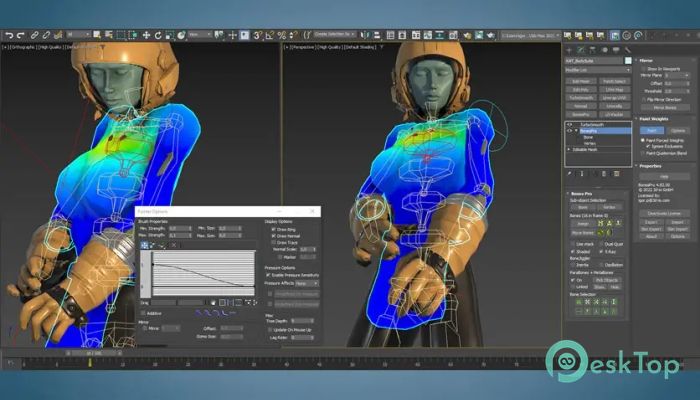
Seeing results instantly can change how you work. This tool provides real-time feedback, allowing you to view deformations as they happen. No need to wait for previews or re-renders.
This feature is especially helpful during animation. You can adjust bones and instantly see how the mesh reacts. It feels more interactive, almost like sculpting clay with your hands.
Real-time performance also helps you catch mistakes early. This saves time and prevents issues from piling up later.
Easy Bone Influence Control
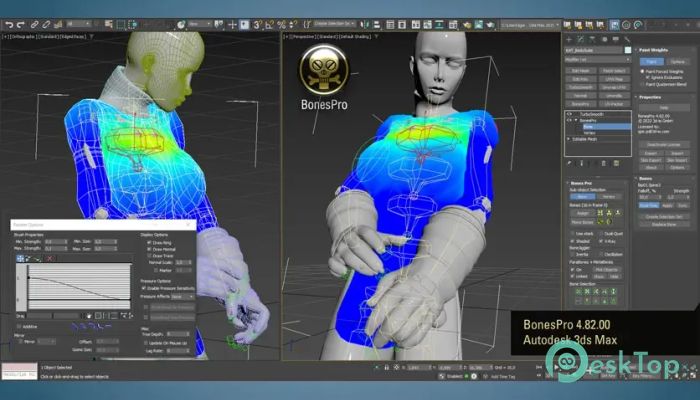
Understanding bone influence is key to creating realistic animations. The software makes this process simple and visual. You can easily assign and adjust weights without confusion.
Instead of complex menus, it offers intuitive controls that make sense even for beginners. At the same time, professionals can dive deeper for precise adjustments.
It’s like having both automatic and manual gears in a car. You can let it handle things or take full control whenever needed.
High-Quality Skin Mesh Creation
Creating smooth and clean meshes is often a challenge. This tool ensures that your skin meshes look polished and natural. It avoids sharp distortions and unnatural stretching.
The results are suitable for high-end projects like games, films, and visual effects. Even complex characters with detailed rigs can be handled with ease.
This level of quality helps bring your characters to life. Movements feel believable, which is essential for immersive storytelling.
Special Effects and Advanced Features
Beyond basic skinning, the software includes special effects that enhance your work. You can create dynamic deformations and unique animations that stand out.
These features allow for creative experimentation. You are not limited to standard results. Instead, you can push boundaries and explore new styles.
It’s like adding spices to a dish. The core recipe is strong, but these extras make it unforgettable.
Optimized Performance for Large Projects
Handling heavy scenes can slow down many tools, but this one is optimized for performance. It works smoothly even with complex models and multiple bones.
This makes it ideal for large-scale projects where efficiency matters. You won’t experience frustrating lag or crashes during important tasks.
Reliable performance builds confidence. You can focus on your creativity without worrying about technical limitations.
User-Friendly Workflow
The interface is designed to be simple and clear. Even if you are new to skinning, you can quickly understand how things work.
It reduces the learning curve while still offering powerful capabilities. This balance makes it suitable for both beginners and experienced artists.
The workflow feels natural, almost like following a conversation rather than reading a complicated manual.
Compatibility with Autodesk 3ds Max
This tool integrates seamlessly with Autodesk 3ds Max. You don’t need to worry about compatibility issues or complex setups.
It works as an extension of your existing workflow, enhancing what you already use. This smooth integration makes it easy to adopt without changing your habits.
It feels like adding a turbo engine to your car without replacing the whole system.
Why It Stands Out
There are many skinning tools available, but few offer this level of speed, quality, and simplicity together. It combines automation with control in a way that benefits all users.
The real strength lies in its ability to handle complex tasks without making them feel complicated. This balance is what sets it apart in the industry.
If you want to improve your workflow and achieve better results, this tool is worth considering.
System Requirements and Technical Details
Operating System: Windows 11 / 10 / 8.1 / 7
Processor: Minimum 1 GHz Processor (2.4 GHz recommended)
RAM: 2GB (4GB or more recommended)
Free Hard Disk Space: 200MB or more is recommended
Autodesk 3ds Max: 2021

-
Program size636.11 KB
-
Version4.7.9
-
Program languagemultilanguage
-
Last updatedBefore 4 Month
-
Downloads28
 Paragon Hard Disk Manager 18 Business
 Aescripts MaskMotion
 Aescripts AE Glass
 Aescripts PreFlight
 Aescripts Risograph
 Aescripts Folder Fanatic