
 Arabic
  English
  Turkish
  Chinese
  Japanese
  Russian
  Spanish
  German
  French
  Hindi
Hindi Download Cobalt Image - Base Pack for Adobe Panasonic Lumix G9 v3.0 for Windows
Download Cobalt Image - Base Pack for Adobe Panasonic Lumix G9 v3.0 for Windows.
Cobalt Image - Base Pack for Adobe Panasonic Lumix G9 Overview
Professional photo editing depends heavily on color accuracy, consistency, and flexibility. This powerful base pack provides calibrated colors specifically designed for Panasonic Lumix G9 users, helping photographers achieve more natural, balanced, and professional results. Whether you're editing portraits, landscapes, or street photography, the software acts as a strong foundation for your entire editing workflow. The tool works as the cornerstone of a modular editing system built for Adobe Camera RAW, Lightroom, and Lightroom CC. Instead of applying generic presets, it uses carefully designed camera profiles that deliver realistic color reproduction. This makes editing smoother, faster, and more reliable across different lighting conditions and environments. Think of it as building a house. You start with a strong foundation before adding walls and decoration. In the same way, this base pack provides a foundation, allowing users to expand their editing experience with additional emulation packs as needed.Features of Cobalt Image - Base Pack for Adobe Panasonic Lumix G9
Calibrated Color Profiles for Accurate Editing
Color accuracy is one of the biggest challenges photographers face. Lighting conditions, camera sensors, and shooting environments can dramatically affect color. The software solves this issue by providing calibrated color profiles designed specifically for Panasonic Lumix G9 cameras.
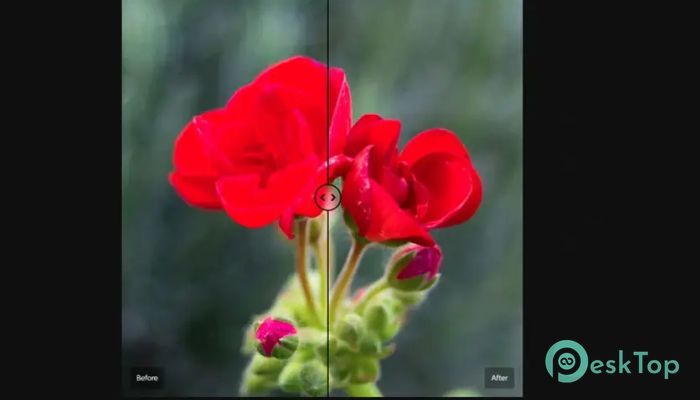
This means colors appear more natural and closer to what you actually saw when taking the photo. Skin tones become balanced, skies look realistic, and landscapes gain improved depth. Instead of spending hours manually adjusting colors, users can rely on these profiles to start with an accurate base.
It works quietly behind the scenes, improving the entire editing process. The result is consistent color performance that saves time while improving quality.
Modular System for Flexible Editing
One of the most powerful aspects is its modular design. Rather than locking users into a fixed editing style, the software allows flexible expansion using additional emulation packs. This modular approach gives photographers creative freedom without complicating the workflow.
Once installed, the system acts like a gateway. Any additional emulation pack integrates smoothly and automatically works with supported cameras. This makes it easy to build a personalized editing toolkit based on individual preferences.
The modular engine automatically activates when both the base pack and emulation packs are installed. Everything becomes available instantly in Adobe editing software, allowing users to focus on creativity rather than technical setup.
Universal Camera Compatibility Support
Compatibility is essential for photographers who use multiple cameras or upgrade equipment. The software solves this by making emulation packs compatible with supported cameras through the base pack.
This ensures that photographers do not need to rebuild their editing workflow when switching cameras. Profiles remain consistent, helping maintain a unified visual style across different projects.
It also makes collaboration easier. Editors, photographers, and creative teams can work with the same color profiles, ensuring consistent results across all devices and editing environments.
Effortless Integration with Adobe Software
The software is designed specifically for Adobe Camera RAW, Lightroom, and Lightroom CC. Installation is simple, and once installed, profiles appear directly inside the editing interface.
Users can apply calibrated profiles instantly without complicated adjustments. The tool integrates seamlessly into the editing workflow, reducing setup time and improving productivity.
It behaves like a built-in feature, making the editing process smooth and natural. Whether working with RAW or JPEG images, users benefit from improved color accuracy and enhanced control.
Creative Cloud Synchronization Support
Modern photographers often edit across multiple devices. The software supports Adobe Creative Cloud synchronization, allowing profiles to work across desktop and mobile devices.
This means users can start editing on a computer and continue on a laptop, tablet, or mobile device without losing color consistency. The workflow becomes flexible and convenient, especially for photographers working on the go.
Synchronization ensures profiles remain consistent across all devices. This eliminates the need to manually transfer files or settings between platforms.
Improved Workflow for Professional Editing
The software simplifies editing by providing reliable starting points. Instead of manually adjusting white balance, color tones, and saturation, users can start with calibrated profiles.
This approach speeds up editing while maintaining professional quality. It also reduces the learning curve for beginners while giving advanced users more control over final adjustments.
The tool works like a color compass, guiding users toward accurate results while allowing creative flexibility. This balance between precision and creativity makes it suitable for both professionals and hobbyists.
Seamless Expansion with Emulation Packs
Once installed, users can expand their editing capabilities by adding emulation packs. These packs provide different color styles inspired by film stocks, creative looks, and professional grading techniques.
The software automatically recognizes installed packs and activates them instantly. No complicated setup is required, making the process simple and efficient.
This expandability makes it a long-term investment for photographers. As new packs become available, users can continue enhancing their editing workflow.
Simple Installation and Setup
Installation is straightforward and quick. Users only need to install the base pack along with preferred emulation packs. Once installed, the modular engine activates automatically.
The profiles appear inside Adobe editing software, ready to use immediately. This removes technical barriers and allows users to focus on creativity.
Even beginners can set up the software easily without advanced technical knowledge.
Professional Results for Every Photography Style
The software supports various photography styles, including portrait, landscape, street, and studio photography. Calibrated colors ensure each style maintains visual accuracy.
Portrait photographers benefit from improved skin tones. Landscape photographers enjoy natural colors and enhanced depth. Street photographers gain consistency across lighting conditions.
This versatility makes it suitable for a wide range of creative workflows.
System Requirements and Technical Details
Operating System: Windows 11 / 10 / 8.1 / 7
Processor: Minimum 1 GHz Processor (2.4 GHz recommended)
RAM: 2GB (4GB or more recommended)
Free Hard Disk Space: 200MB or more is recommended

-
Program size2.70 MB
-
Versionv3.0
-
Program languagemultilanguage
-
Last updatedBefore 4 Month
-
Downloads12
 Paragon Hard Disk Manager 18 Business
 Aescripts MaskMotion
 Aescripts AE Glass
 Aescripts PreFlight
 Aescripts Risograph
 Aescripts Folder Fanatic