
 Arabic
  English
  Turkish
  Chinese
  Japanese
  Russian
  Spanish
  German
  French
  Hindi
Hindi Download Extreme InfiniTV 1.6.4 for Windows
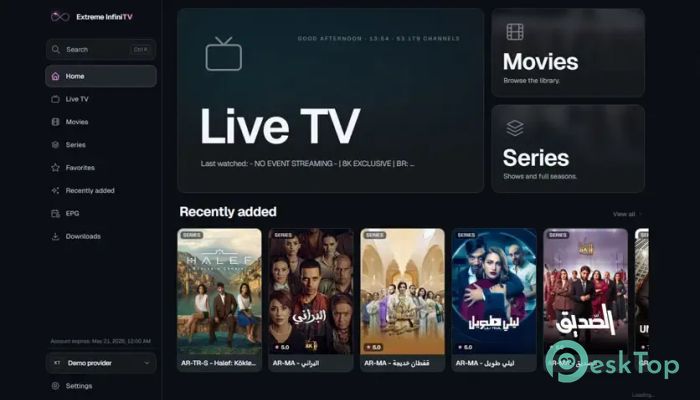
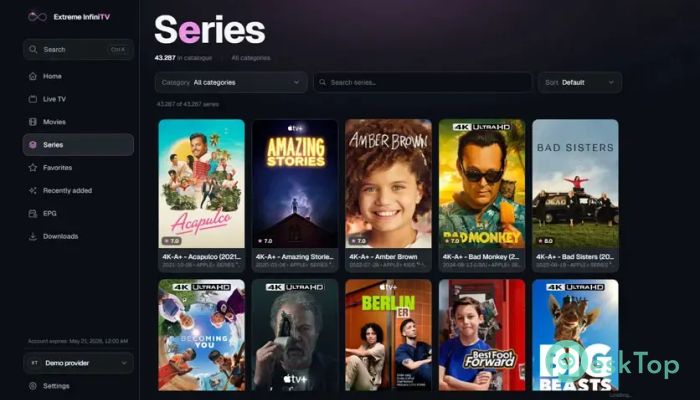
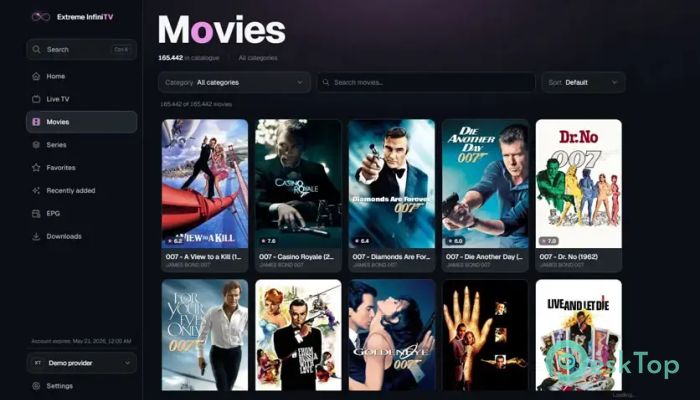
Download Extreme InfiniTV 1.6.4 for Windows.
Extreme InfiniTV Overview
It is designed for people who want a clean, fast, and reliable way to watch IPTV content on Windows. It supports Xtream Codes accounts as well as M3U and M3U8 playlist URLs, making it easy to connect to your preferred IPTV provider in just a few clicks. There are no ads, no tracking, and no complicated setup, allowing you to focus on enjoying your favorite entertainment. The software delivers a modern viewing experience with useful features for live TV, video-on-demand, and personal customization. Whether you enjoy watching sports, news, TV shows, or movies, the tool keeps everything organized and easy to access. It feels like having a smart TV experience directly on your desktop or laptop.Features of Extreme InfiniTV
Simple IPTV Setup
Getting started is quick and effortless. Simply sign in using your Xtream Codes account or add an M3U or M3U8 playlist URL. Within moments, your channels and content become available without lengthy configuration or technical knowledge.
The software remembers your settings, so you don't have to repeat the setup every time you launch it. This makes switching between different providers simple and convenient.
Smooth Live TV Experience
Watching live television feels smooth and responsive. The built-in Electronic Program Guide (EPG) displays schedules using your local time zone, helping you see what's currently playing and what's coming next.
Channels are organized into categories for faster browsing. You can mark favorites, revisit recently watched channels, and even test stream quality or copy stream URLs with a simple right-click. Picture-in-picture mode and full-screen viewing provide extra flexibility for multitasking or immersive entertainment.
Enjoy Movies and TV Series
The software also works as a complete video-on-demand player. Movies and TV series are displayed with attractive high-resolution poster artwork, making it easy to browse large collections.
It remembers where you stopped watching, allowing you to continue exactly where you left off. Episode progress is tracked automatically, and the next episode can begin playing immediately, creating a smooth binge-watching experience.
Offline Downloads
Internet connections are not always available, but that doesn't have to stop your entertainment. The tool allows you to download supported movies and TV episodes for offline viewing whenever you want.
This feature is perfect for traveling, commuting, or enjoying content in places with limited internet access. Your favorite shows remain available even when you're offline.
Powerful Playlist Management
Managing several IPTV providers is surprisingly easy. The software supports multiple playlists, allowing you to switch between different services without signing in again every time.
This flexibility saves time and keeps everything organized in one place. Whether you separate playlists for sports, movies, or international channels, switching between them takes only a few seconds.
Personalized Viewing Experience
Everyone has different viewing preferences, and the tool offers many customization options. Users can choose between light and dark themes, adjust font sizes, and change channel column widths for easier viewing on televisions or large displays.
Custom User-Agent presets are also available for popular platforms such as VLC, Kodi, Smart TV devices, and OTT Navigator. This improves compatibility with various IPTV providers.
Convenient Playback Controls
The software includes keyboard shortcuts for nearly every important function. You can pause playback, seek forward or backward, change channels, and perform many other actions without constantly reaching for the mouse.
These shortcuts create a faster and more enjoyable experience, especially for users who watch content every day.
Backup and Restore Features
Your settings, favorites, and watch history are valuable, and the software makes it simple to protect them. Everything can be backed up into a JSON file and restored later whenever needed.
This feature is especially useful when moving to a new computer or reinstalling Windows because your personalized setup can be restored within minutes.
Optional Discord Integration
For users who enjoy sharing their activity, optional Discord Rich Presence integration is available. Friends can see what you're currently watching while promotional buttons provide additional customization options.
The feature remains completely optional, allowing privacy-focused users to keep everything disabled if they prefer.
Fast, Clean, and Privacy Friendly
One of the biggest strengths of the software is its clean approach to entertainment. There are no built-in advertisements interrupting your viewing sessions, and no unnecessary tracking running in the background.
This lightweight design helps deliver quick performance while keeping your viewing experience simple, private, and distraction-free.
System Requirements and Technical Details
Operating System: Windows 11 / 10 / 8.1 / 7
Processor: Minimum 1 GHz Processor (2.4 GHz recommended)
RAM: 2GB (4GB or more recommended)
Free Hard Disk Space: 200MB or more is recommended

-
Program size6.38 MB
-
Version1.6.4
-
Program languagemultilanguage
-
Last updatedBefore 3 Month
-
Downloads38Ralated programs
![ChrisPC VideoTube Downloader Pro]() ChrisPC VideoTube Downloader Pro
ChrisPC VideoTube Downloader Pro![TranscribeKit]() TranscribeKit
TranscribeKit![Vision Search]() Vision Search
Vision Search![DVDFab]() DVDFab
DVDFab![Crynet Showcase]() Crynet Showcase
Crynet Showcase![OVRLEY]() OVRLEY
OVRLEY
 ChrisPC VideoTube Downloader Pro
 TranscribeKit
 Vision Search
 DVDFab
 Crynet Showcase
 OVRLEY