
 Arabic
  English
  Turkish
  Chinese
  Japanese
  Russian
  Spanish
  German
  French
  Hindi
Hindi Download Gradient Wheel - Plugin for Photoshop 1.0 for Windows
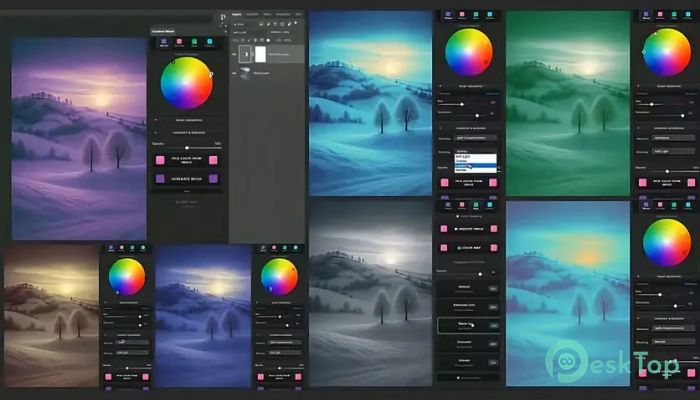
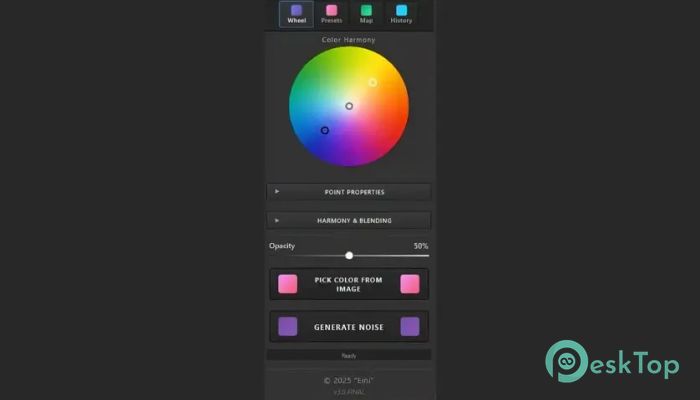
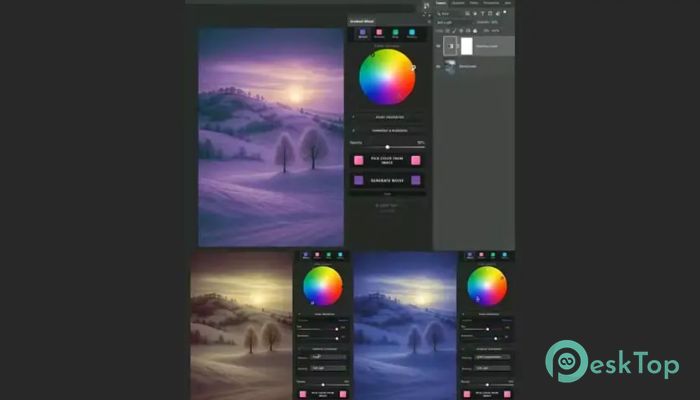
Download Gradient Wheel - Plugin for Photoshop 1.0 for Windows.
Gradient Wheel - Plugin for Photoshop Overview
Color grading plays a major role in making images look professional and visually appealing. Whether you are editing photos, designing graphics, or creating artwork, color balance can dramatically affect the final result. This tool brings professional-level color grading directly into your editing workflow, making it easier to control shadows, midtones, and highlights. The software integrates smoothly into Adobe Photoshop and provides a user-friendly color wheel interface. Instead of manually adjusting multiple settings, users can quickly fine-tune colors with precision. This approach saves time while delivering cinematic-quality results that normally require advanced editing skills. The tool is designed for photographers, designers, digital artists, and anyone who wants to enhance colors professionally. With its simple layout and powerful features, it allows beginners to improve images easily while giving professionals advanced control for detailed adjustments.Features of Gradient Wheel - Plugin for Photoshop
Professional Color Grading Made Simple
Color grading can often feel complicated, especially when working with multiple adjustments and layers. This plugin simplifies the entire process by providing a visual color wheel. Users can easily move controls and instantly see how shadows, midtones, and highlights respond.
It works like a painter's palette. Instead of manually mixing colors, the interface lets users make precise adjustments in seconds. This intuitive workflow makes editing faster and more enjoyable, especially when working on large projects.
Intuitive Color Wheel Interface
The highlight of the tool is its color wheel interface. It allows users to adjust tones visually instead of relying on sliders and numbers. This makes color correction more natural and easier to understand.
The interface divides color adjustments into three main sections: shadows, midtones, and highlights. Each section can be controlled independently. This level of control helps create balanced and professional-looking images.
Even beginners can achieve impressive results. The wheel simplifies complex adjustments and removes guesswork from color grading.
Precise Control Over Shadows, Midtones, and Highlights
Color balance plays an important role in professional editing. The software gives complete control over different tonal areas of an image. Users can enhance shadows for depth, adjust midtones for clarity, and fine-tune highlights for brightness.
This flexibility allows users to create dramatic cinematic effects or subtle natural corrections. Whether working on portraits, landscapes, or creative designs, the plugin delivers reliable, accurate results.
Seamless Integration with Photoshop
The tool integrates directly into Photoshop, making it easy to use within existing workflows. There is no need to switch between different software. Everything works inside Photoshop, which saves time and keeps the editing process smooth.
Users can apply color grading adjustments while working on layers. This makes it easier to experiment and refine results without affecting the original images. The seamless integration ensures a professional editing experience.
Fast and Efficient Workflow
Speed is important when working on multiple images. The plugin is designed to improve efficiency by reducing the time needed for color correction. Instead of adjusting multiple controls, users can apply changes quickly using the color wheel.
This faster workflow is especially helpful for photographers and designers who handle large projects. It reduces editing time while maintaining high-quality results.
Ideal for Photographers and Designers
Whether you are editing portraits, product photos, or creative artwork, the software provides tools for every scenario. Photographers can enhance lighting and tone, while designers can create visually appealing color palettes.
It also helps maintain consistency across multiple images. This is particularly useful when working on branding projects or photo collections.
Cinematic Color Correction
Cinematic color grading is widely used in films and professional photography. This plugin brings those capabilities directly into Photoshop. Users can apply dramatic tones, create mood-based colors, and achieve professional cinematic styles.
It allows creative freedom while keeping adjustments simple. The result is polished and visually stunning images.
User-Friendly Experience
The interface is designed to be simple and easy to understand. Even users with limited editing experience can quickly learn how to use it. Controls are clearly organized, making adjustments smooth and intuitive.
The straightforward design ensures that users focus on creativity rather than technical complexity.
High-Quality Editing Results
The tool delivers professional-level color correction with minimal effort. Images look balanced, vibrant, and visually appealing. This helps improve overall image quality and presentation.
From small adjustments to dramatic transformations, users can achieve impressive results easily.
Reliable Performance
The plugin runs smoothly inside Photoshop and works efficiently on most systems. It is optimized for performance, ensuring stable editing sessions without lag.
This reliability makes it suitable for both personal and professional use.
System Requirements and Technical Details
Operating System: Windows 11 / 10 / 8.1 / 7
Processor: Minimum 1 GHz Processor (2.4 GHz recommended)
RAM: 2GB (4GB or more recommended)
Free Hard Disk Space: 200MB or more is recommended

-
Program size1.02 MB
-
Version1.0
-
Program languagemultilanguage
-
Last updatedBefore 4 Month
-
Downloads34
 Paragon Hard Disk Manager 18 Business
 Aescripts MaskMotion
 Aescripts AE Glass
 Aescripts PreFlight
 Aescripts Risograph
 Aescripts Folder Fanatic