
 Arabic
  English
  Turkish
  Chinese
  Japanese
  Russian
  Spanish
  German
  French
  Hindi
Hindi Download Hybrid Constructs HeadsUp 1.1.1 for Windows
Download Hybrid Constructs HeadsUp 1.1.1 for Windows.
Hybrid Constructs HeadsUp Overview
Running a live event is like conducting an orchestra—every second matters. The software is built to help show directors, lighting operators, audio engineers, video teams, and stage managers stay perfectly synchronized throughout a production. Instead of guessing when the next cue will arrive, everyone can see accurate countdowns in real time. Designed for concerts, theater productions, television broadcasts, corporate events, and live performances, the tool connects cue information with Linear Timecode (LTC). This creates a reliable workflow where every department knows exactly what happens next, making live productions smoother and more organized.Features of Hybrid Constructs HeadsUp
Easy CSV Import for Show Cues
Preparing a live show becomes much easier with built-in CSV importing. The software supports CSV files exported from Reaper or Cuepoints, allowing users to load scripted tracks and complete show timelines in just a few clicks.
Instead of entering cue information manually, production teams can import existing show data directly into the application. This not only saves valuable setup time but also reduces typing mistakes that could affect a live performance.
Reliable Timecode Synchronization
The heart of the tool is its powerful synchronization system. Using Linear Timecode (LTC) keeps every countdown aligned with the running production. Users can apply custom offsets to match rehearsals or live timing adjustments without rebuilding the entire cue list.
This flexibility is especially useful during fast-paced productions where timing changes at the last minute. Even small adjustments are accurately reflected, helping operators stay focused rather than constantly recalculating cue times.
Real-Time Countdown Displays
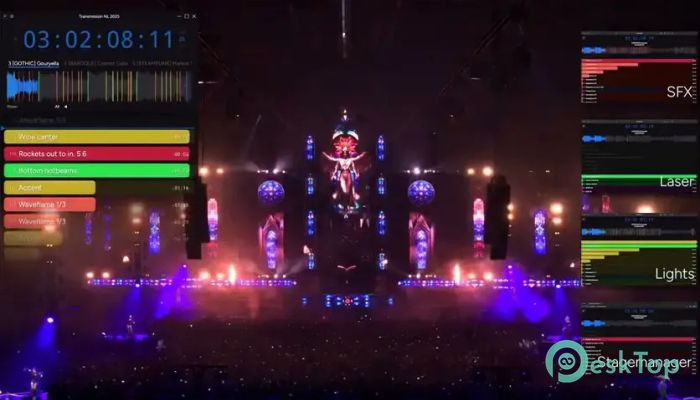
Watching a countdown instead of checking a printed script makes every department more confident. The software displays upcoming cues with clear countdown timers, allowing everyone to prepare before the next event happens.
Whether the next action is triggering lights, starting a video, opening curtains, or launching sound effects, the visual countdown keeps every operator informed. This simple approach helps reduce missed cues and unnecessary communication during a live show.
Share Custom Views Across Departments
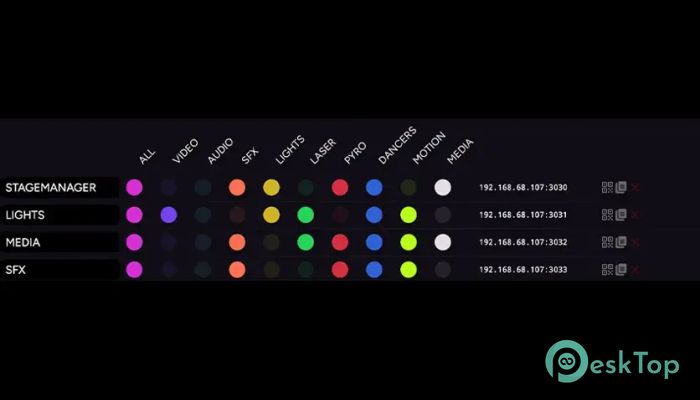
Not every team member needs to see the same information. The software solves this by offering web clients that display customized views for different departments.
For example, the lighting crew can monitor lighting cues, while the audio department focuses on sound events. Video operators, stage managers, and production assistants can each receive their own dedicated interface. This keeps screens clean, avoids distractions, and improves overall efficiency.
Designed for Live Productions
The tool fits naturally into professional production environments. It supports rehearsals just as well as live broadcasts, making it suitable for both small and large events.
Production teams can prepare their timelines in advance, verify every cue during rehearsals, and confidently execute the final performance knowing that timing information is always available. It becomes a trusted companion throughout the entire production process.
Simple Interface for Fast Operation
A complicated interface has no place during a live event. The software keeps everything clean and easy to understand, so operators can concentrate on performance rather than searching through menus.
Important controls are presented clearly, allowing users to import cues, configure synchronization, adjust offsets, and monitor countdowns without unnecessary complexity. Even first-time users can become comfortable after a short learning session.
Flexible Workflow for Every Show
No two productions are exactly alike. Some shows involve hundreds of cues, while others require only a handful of critical events. The software adapts easily to different production sizes and working styles.
Users can prepare unique timelines for concerts, conferences, worship events, theatrical productions, award ceremonies, and television recordings. Because it accepts imported cue lists, switching between different projects is quick and convenient.
Improved Team Coordination
Communication is one of the biggest challenges during live events. Instead of relying entirely on radio calls or verbal instructions, the software gives every department a visual reference for upcoming actions.
This shared awareness helps reduce stress, prevents timing errors, and allows teams to react quickly when schedules change. Everyone works from the same synchronized timeline, making collaboration much smoother from start to finish.
Perfect for Professional Event Management
The software is suitable for production companies, event organizers, touring crews, television studios, educational institutions, houses of worship, and theater groups. Its dependable timing system supports productions where precision cannot be compromised.
Whether managing a single presentation or a complex multi-hour performance, it helps ensure every cue happens exactly when it should. That reliability gives production teams greater confidence before and during every show.
System Requirements and Technical Details
Operating System: Windows 11 / 10 / 8.1 / 7
Processor: Minimum 1 GHz Processor (2.4 GHz recommended)
RAM: 2GB (4GB or more recommended)
Free Hard Disk Space: 200MB or more is recommended

-
Program size28.60 MB
-
Version1.1.1
-
Program languagemultilanguage
-
Last updatedBefore 3 Month
-
Downloads5Ralated programs
![ChrisPC VideoTube Downloader Pro]() ChrisPC VideoTube Downloader Pro
ChrisPC VideoTube Downloader Pro![TranscribeKit]() TranscribeKit
TranscribeKit![Vision Search]() Vision Search
Vision Search![DVDFab]() DVDFab
DVDFab![Crynet Showcase]() Crynet Showcase
Crynet Showcase![OVRLEY]() OVRLEY
OVRLEY
 ChrisPC VideoTube Downloader Pro
 TranscribeKit
 Vision Search
 DVDFab
 Crynet Showcase
 OVRLEY