
 Arabic
  English
  Turkish
  Chinese
  Japanese
  Russian
  Spanish
  German
  French
  Hindi
Hindi Download IPTV Player Zero 1.7.65 for Windows
Download IPTV Player Zero 1.7.65 for Windows.
IPTV Player Zero Overview
Watching IPTV content should feel simple and natural, just like turning on a television. This software removes the complexity often associated with playlist-based streaming and replaces it with a clean, organized, and easy-to-use interface. Instead of juggling links and formats, users can quickly move from playlist setup to live viewing, recordings, downloads, and video-on-demand playback without friction. The tool acts purely as a player. This means users provide their own playlists and provider data. Some streams may not work due to provider restrictions, unsupported formats, or DRM limitations. However, when streams are supported, the experience feels smooth, modern, and reliable. Once configured, everything becomes accessible from a centralized dashboard. Channels, movies, and series are organized into categories, making browsing simple. With a modern guide, smooth playback, and recording capabilities, it delivers a viewing experience that feels like using a premium television service.Features of IPTV Player Zero
Easy Setup and Quick Start
Getting started is refreshingly simple. Users can set up the player in under 1 minute using Xtream Codes, M3U playlists, or Stalker portal connections. Instead of dealing with complicated technical steps, the software walks users through a straightforward setup process.
Once playlists are added, channels automatically organize into categories. Movies and series are presented with structured layouts, making it easy for users to navigate content. The process feels similar to installing a streaming app and immediately browsing available content.
This quick setup saves time and reduces frustration. Even beginners can configure playlists and start watching live TV within minutes.
Modern Electronic Program Guide (EPG)
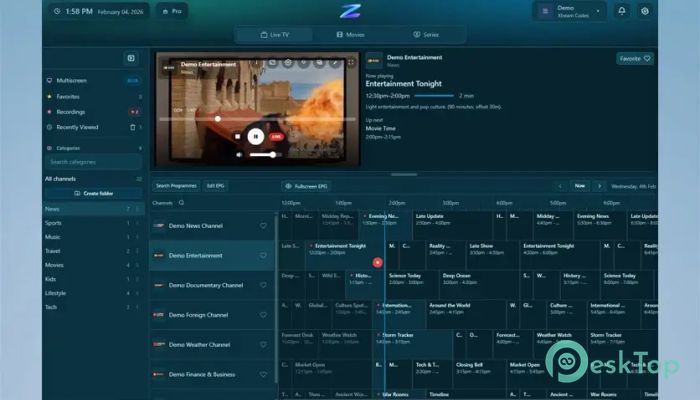
A modern Electronic Program Guide brings structure to IPTV viewing. Instead of guessing what is playing, users can view schedules, upcoming shows, and channel listings in one place. The guide functions like traditional TV listings, making navigation intuitive.
The clean design makes browsing comfortable. Users can scroll through channels, view program details, and switch instantly. This feature enhances the viewing experience by making content discovery easy and efficient.
It also helps users plan their viewing time. With upcoming programs visible, users never miss their favorite shows or live events.
Smooth Playback Experience
Playback quality plays a major role in streaming satisfaction. The player focuses on smooth performance, minimizing buffering, and improving responsiveness. Channels load quickly, and switching between streams feels seamless.
Adaptive playback ensures stable viewing, even with varying internet speeds. The interface remains responsive while streams load, creating a fluid experience. This makes watching live content feel natural and uninterrupted.
The software supports various formats, allowing users to play different types of IPTV streams. This flexibility increases compatibility and usability.
Recording and Download Features
Recording capabilities enhance IPTV viewing. Users can record live channels and watch them later, just like traditional DVR functionality. This feature ensures that important content is never missed.
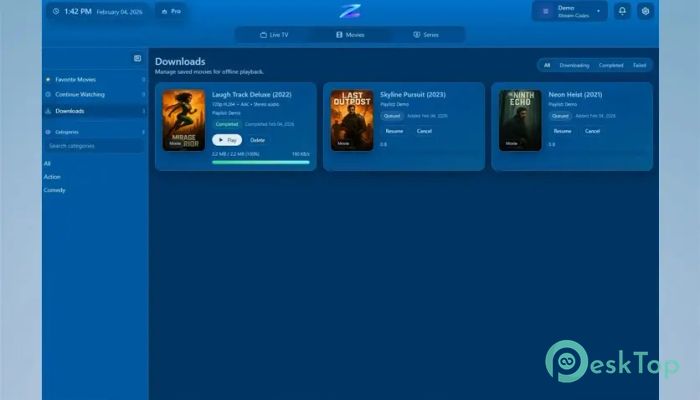
Downloads provide additional flexibility. Users can save videos and watch them offline when needed. This is useful for travelers, limited internet users, or those who prefer offline viewing.
The recording and download features work smoothly within the interface. Everything remains accessible from the same dashboard, keeping the experience organized and efficient.
Live TV, Movies, and Series in One Place
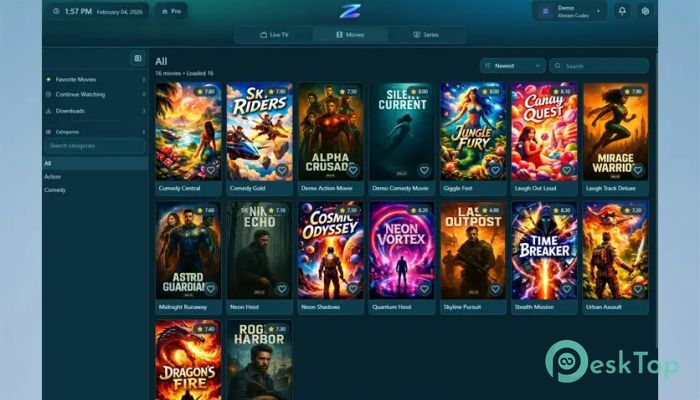
One of the biggest advantages is the unified content library. Live TV, movies, and series appear together in a structured layout. Users can switch between categories effortlessly.
The organized layout improves content discovery. Instead of searching through separate applications, everything appears in one location. This simplifies navigation and improves usability.
Browsing feels similar to using a premium streaming platform. Content categories, thumbnails, and listings help users quickly find what they want.
User-Friendly Interface
The clean interface improves usability and comfort. The layout focuses on clarity, making navigation intuitive. Buttons are easy to understand, and menus remain accessible.
Users can quickly browse channels, view guides, and manage recordings without confusion. The software avoids clutter, focusing instead on essential controls.
This simplicity benefits both beginners and advanced users. Everyone can enjoy a smooth and comfortable viewing experience.
Flexible Playlist Support
The player supports multiple playlist formats, including Xtream Codes, M3U, and Stalker. This flexibility allows users to connect to various providers easily.
Adding playlists is straightforward. Once added, content automatically appears within categories. This automation reduces manual effort and improves convenience.
Support for multiple formats increases compatibility with different providers. Users can switch or add playlists at any time.
Reliable Viewing Experience
Stability remains an important aspect of IPTV playback. The software focuses on consistent performance and responsiveness. Channels load quickly, and navigation remains smooth.
Even when switching between live TV and video-on-demand, performance remains steady. This consistency improves overall satisfaction.
With reliable playback, users can enjoy uninterrupted viewing sessions.
System Requirements and Technical Details
Operating System: Windows 11 / 10 / 8.1 / 7
Processor: Minimum 1 GHz Processor (2.4 GHz recommended)
RAM: 2GB (4GB or more recommended)
Free Hard Disk Space: 200MB or more is recommended

-
Program size151.37 MB
-
Version1.7.65
-
Program languagemultilanguage
-
Last updatedBefore 3 Month
-
Downloads306Ralated programs
![ChrisPC VideoTube Downloader Pro]() ChrisPC VideoTube Downloader Pro
ChrisPC VideoTube Downloader Pro![TranscribeKit]() TranscribeKit
TranscribeKit![Vision Search]() Vision Search
Vision Search![DVDFab]() DVDFab
DVDFab![Crynet Showcase]() Crynet Showcase
Crynet Showcase![OVRLEY]() OVRLEY
OVRLEY
 ChrisPC VideoTube Downloader Pro
 TranscribeKit
 Vision Search
 DVDFab
 Crynet Showcase
 OVRLEY