
 Arabic
  English
  Turkish
  Chinese
  Japanese
  Russian
  Spanish
  German
  French
  Hindi
Hindi Download Kingshiper Screen Recorder 4.0.1 for Windows
Download Kingshiper Screen Recorder 4.0.1 for Windows.
Kingshiper Screen Recorder Overview
The software is designed for anyone who wants to record their screen without having to deal with complicated settings. Whether you're creating tutorials, recording online meetings, capturing gameplay, or saving live streams, it makes the whole process smooth and hassle-free. With a clean interface and simple controls, even beginners can start recording within seconds. Think of it as a digital camera for your computer screen. Instead of taking pictures, it records everything happening on your desktop with clear video and crisp audio. The tool also supports multiple recording modes and popular output formats, making it suitable for work, education, content creation, and personal use.Features of Kingshiper Screen Recorder
Multiple Recording Modes
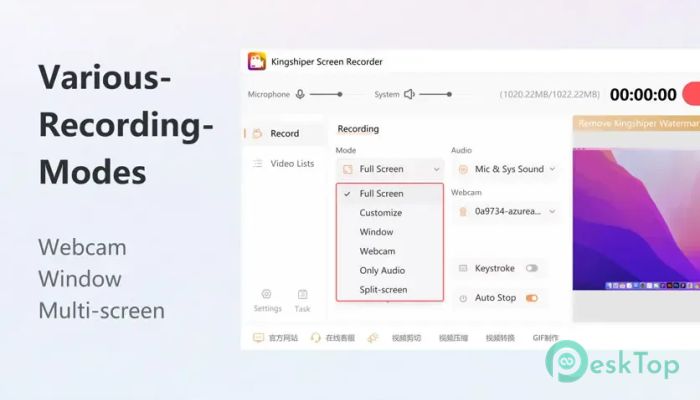
One of the biggest strengths of the software is its flexibility. It comes with six different recording modes, allowing you to capture exactly what you need. Whether you want to record the entire desktop, a selected area, a single application window, or your webcam, everything is just a click away.
This flexibility means you don't have to adjust complicated settings every time. Simply choose the recording mode that fits your task and start capturing your content immediately.
Full Screen Recording
If you need to capture everything displayed on your monitor, the full-screen mode is the perfect choice. It records your complete desktop while maintaining smooth performance and excellent image quality.
You can also customize the video quality before recording begins. During recording, helpful tools like the paintbrush and selection box allow you to highlight important areas, making tutorials and presentations easier to understand.
Custom Area Recording
Sometimes you only need a specific section of the screen, not the entire desktop. The custom recording mode gives you complete control by letting you select any recording area.
This feature is ideal for software demonstrations, online lessons, browser recordings, or showing only the information that matters while keeping the rest of the desktop private.
Window Recording Mode
The software can lock the recording to a selected application window. This means other windows or desktop notifications won't interrupt the recording, even if they appear on your screen.
It creates cleaner videos and helps maintain focus on the chosen application. This is especially useful for business presentations, software tutorials, and professional training videos.
Webcam Recording
The built-in webcam recording feature lets you capture yourself as you record. You can even adjust the recording area to focus on a particular section of the camera view.
This makes the tool a great choice for online teachers, YouTubers, streamers, and anyone who wants to add a personal touch to their videos.
Split Screen Recording
Creating professional-looking videos becomes much easier with split-screen recording. The software can capture both your desktop and your webcam simultaneously, producing multi-angle recordings in a single session.
This feature is perfect for online classes, product demonstrations, reaction videos, presentations, and training content where viewers need to see both the speaker and the screen together.
High-Quality Audio Recording
Great video deserves equally good sound, and the tool delivers exactly that. It can record system audio, microphone audio, or both simultaneously while maintaining excellent sound quality.
If you only need audio, it also supports audio-only recording. This is useful for recording podcasts, voice notes, music, online meetings, or lectures without capturing video.
High-Definition Video Quality
Video quality plays a huge role in creating professional content. The software offers multiple quality settings and supports high-definition recording to ensure your videos remain clear and detailed.
Whether you're recording a simple tutorial or a full HD presentation, the output stays smooth with impressive visual clarity.
Support for Multiple File Formats
Compatibility is another area where the tool performs well. It supports a wide range of popular output formats, allowing you to save recordings as needed.
Supported video and audio formats include MP4, WAV, WEBM, MKV, MPEG, M4V, and several others. This makes it easy to edit, upload, or share recordings across different devices and platforms.
Simple Interface for Everyone
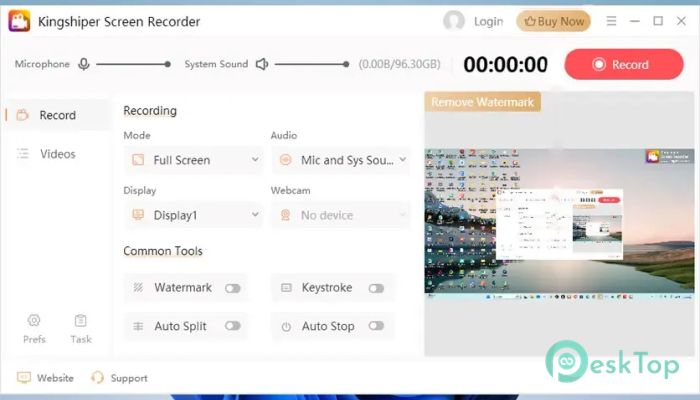
The software focuses on simplicity without sacrificing powerful features. Everything is organized in a clean layout, making navigation easy for beginners while still offering enough options for experienced users.
You don't have to spend hours learning complicated menus. Most recording tasks can be completed in just a few clicks, allowing you to focus on creating content rather than configuring software.
Perfect for Different Recording Needs
Whether you're a student recording online classes, a professional creating training materials, a gamer capturing gameplay, or a content creator producing videos for social media, the tool adapts to your workflow.
Its combination of flexible recording modes, high-quality output, and reliable performance makes it suitable for almost every screen recording situation.
System Requirements and Technical Details
Operating System: Windows 11 / 10 / 8.1 / 7
Processor: Minimum 1 GHz Processor (2.4 GHz recommended)
RAM: 2GB (4GB or more recommended)
Free Hard Disk Space: 200MB or more is recommended

-
Program size44.13 MB
-
Version4.0.1
-
Program languagemultilanguage
-
Last updatedBefore 3 Month
-
Downloads14Ralated programs
![ChrisPC VideoTube Downloader Pro]() ChrisPC VideoTube Downloader Pro
ChrisPC VideoTube Downloader Pro![TranscribeKit]() TranscribeKit
TranscribeKit![Vision Search]() Vision Search
Vision Search![DVDFab]() DVDFab
DVDFab![Crynet Showcase]() Crynet Showcase
Crynet Showcase![OVRLEY]() OVRLEY
OVRLEY
 ChrisPC VideoTube Downloader Pro
 TranscribeKit
 Vision Search
 DVDFab
 Crynet Showcase
 OVRLEY