
 Arabic
  English
  Turkish
  Chinese
  Japanese
  Russian
  Spanish
  German
  French
  Hindi
Hindi Download Kingshiper TopBurn AI 2.0.9 for Windows
Download Kingshiper TopBurn AI 2.0.9 for Windows.
Kingshiper TopBurn AI Overview
It is a complete disc management application that helps you burn, copy, erase, rip, and create image files with ease. Whether you need to back up important files, create music CDs, burn movies to DVDs, or convert disc content to digital formats, the software brings everything together in one clean, easy-to-use interface. The software is built for users of all experience levels. Beginners can complete burning tasks with just a few clicks, while advanced users can customize settings like burning speed and erase methods. Its smooth workflow helps save time while ensuring reliable results every time.Features of Kingshiper TopBurn AI
Powerful Disc Burning Features
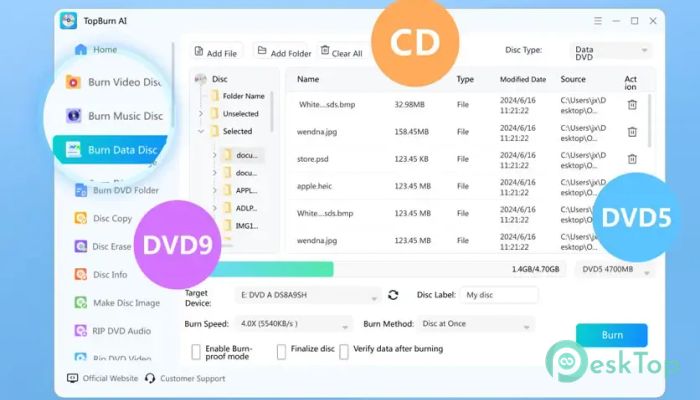
The software makes disc burning feel as simple as dragging files into a folder. It supports creating music, video, and data discs without complicated settings. Whether you are storing family photos, office documents, or HD videos, it keeps the process quick and hassle-free.
It works with multiple recordable disc types, including CD, DVD5, and DVD9. Thanks to Burn-Proof technology, the burning process remains stable, reducing the risk of failed discs due to interruptions or buffer errors.
Burn ISO and Image Files Easily
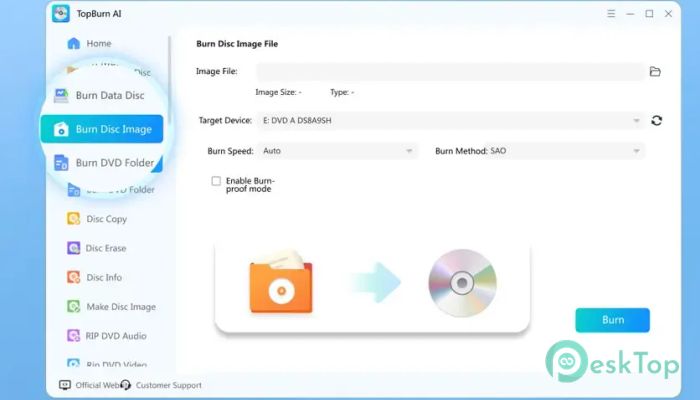
Creating physical discs from image files is just a few clicks away. The tool quickly transfers ISO images stored on your computer directly onto CDs or DVDs while maintaining the original structure and data.
You can also adjust the burning speed according to your preference. Lower speeds can improve compatibility with older drives, while higher speeds help finish large projects much faster. It even supports burning DVD folders directly to blank discs.
Reliable Disc Copy Function
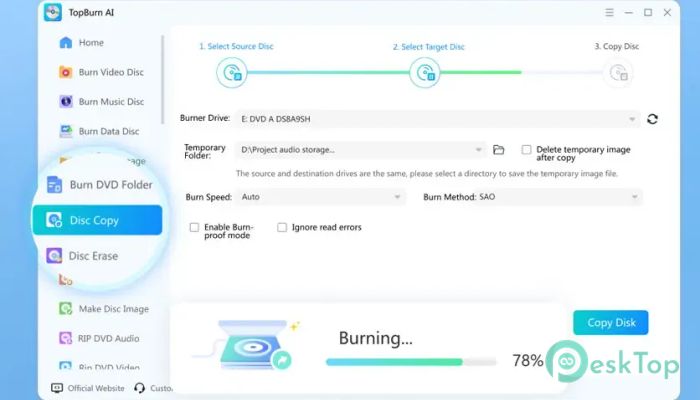
Making a duplicate of an important disc has never been easier. The software supports copying discs with either a single optical drive or two separate drives, giving you flexibility based on your hardware.
Its accurate copying engine preserves the original content while delivering fast duplication speeds. Whether you are creating backups or sharing data with colleagues, the copied disc remains dependable and consistent.
Quick Disc Erasing Options
When you need to reuse a rewritable disc, the tool provides both quick erase and full erase modes. A quick erase removes file references within seconds, while a full erase completely wipes the disc for maximum privacy.
You can also select different erase speeds depending on your requirements. This flexibility helps balance speed and reliability, making the process convenient for both home and professional users.
Create Disc Images in Minutes
Disc images are perfect for creating backups or preserving the exact structure of a CD or DVD. The software allows you to generate image files directly from physical discs without unnecessary complexity.
It supports many common image formats, making the files compatible with a wide range of virtual drives and burning applications. The image creation process is fast, straightforward, and highly accurate.
Rip DVDs and Audio CDs
The software is not limited to burning alone. It also lets you extract content from DVDs and music CDs into popular digital formats that you can store on your computer or portable devices.
Video discs can be converted to common video formats, while audio CDs can be converted to high-quality music files. The ripping engine works quickly without sacrificing the original sound or video quality.
Supports Multiple Disc Types
Compatibility is one of its biggest strengths. The tool works with a wide range of recordable media, making it suitable for everyday backup tasks, multimedia storage, and long-term archiving.
Whether you are using CDs for music, DVDs for movies, or data discs for business files, it provides a reliable environment for handling different storage needs without switching between multiple applications.
Simple Interface for Everyone
The clean interface makes every feature easy to find. Large buttons, organized menus, and step-by-step workflows allow users to complete complex operations without feeling overwhelmed.
Even if you have never burned a disc before, you can quickly learn the process. Experienced users will also appreciate the customization options available for more advanced burning and copying tasks.
Fast Performance with Stable Results
Speed is important, but stability matters just as much. The software combines both by optimizing burning, copying, ripping, and image creation processes for dependable performance.
Its intelligent technology minimizes interruptions and improves success rates, allowing you to complete large projects with confidence. Whether working with personal memories or important business files, it keeps your data safe throughout the process.
System Requirements and Technical Details
Operating System: Windows 11 / 10 / 8.1 / 7
Processor: Minimum 1 GHz Processor (2.4 GHz recommended)
RAM: 2GB (4GB or more recommended)
Free Hard Disk Space: 200MB or more is recommended

-
Program size124.46 MB
-
Version2.0.9
-
Program languagemultilanguage
-
Last updatedBefore 3 Month
-
Downloads15Ralated programs
![ChrisPC VideoTube Downloader Pro]() ChrisPC VideoTube Downloader Pro
ChrisPC VideoTube Downloader Pro![TranscribeKit]() TranscribeKit
TranscribeKit![Vision Search]() Vision Search
Vision Search![DVDFab]() DVDFab
DVDFab![Crynet Showcase]() Crynet Showcase
Crynet Showcase![OVRLEY]() OVRLEY
OVRLEY
 ChrisPC VideoTube Downloader Pro
 TranscribeKit
 Vision Search
 DVDFab
 Crynet Showcase
 OVRLEY