
 Arabic
  English
  Turkish
  Chinese
  Japanese
  Russian
  Spanish
  German
  French
  Hindi
Hindi Download Kumoo AI 7.9.3 for Windows

Download Kumoo AI 7.9.3 for Windows.
Kumoo AI Overview
This powerful editing platform delivers fast, high-quality results for portraits, products, and commercial images. The software combines AI automation with professional-grade precision, making it ideal for anyone handling large batches of photos. Whether you work in e-commerce, advertising, design, or photography, this tool ensures quick, consistent, and polished output. Its strength lies in simplifying tasks that usually take hours. With just a few clicks, you can retouch portraits, adjust details, remove backgrounds, and generate clean cutouts suitable for marketing materials and branded content. Because it supports both web and desktop versions, you can enjoy flexible editing at home, in the studio, or on the go.Features of Kumoo AI
AI-Powered Photo Enhancement
The tool uses advanced AI technology to automatically detect faces, objects, backgrounds, and fine edges. This helps create smooth retouching results without manual effort. Think of it as having a digital assistant that never gets tired – one that processes dozens or even hundreds of images with the same accuracy.
It improves overall brightness, texture, and clarity while preserving the natural look. This makes it especially useful for photographers who want fast but reliable results.
Batch Processing for Maximum Efficiency
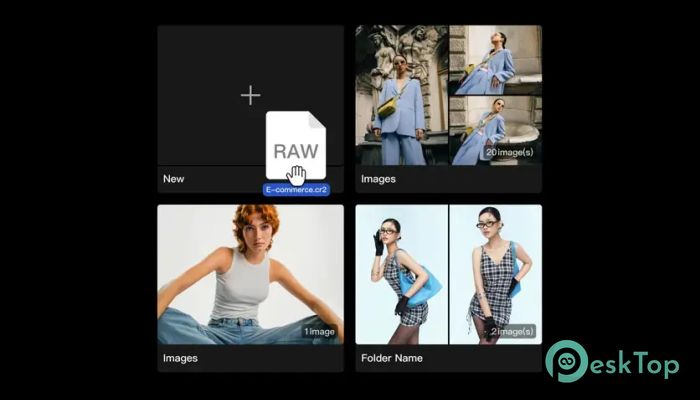
One of its most significant advantages is batch processing. Instead of editing each file individually, you can upload an entire folder and let the software handle everything. It’s a massive time-saver for store owners, agencies, and photographers who must deliver large sets of clean visuals.
This feature keeps the look consistent across all images, helping your brand maintain a professional appearance.
Hair-Level Background Removal
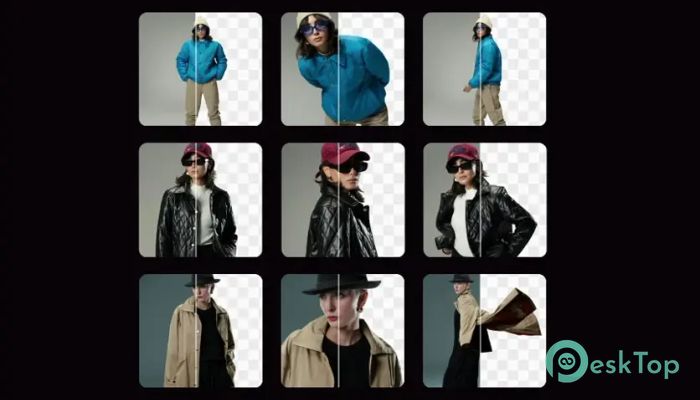
Background removal is one of the most challenging tasks in photo editing, especially when dealing with messy hair, fine edges, or complex shapes. The tool addresses this problem with intelligent edge detection that captures even the most minor details.
You get clean, transparent cutouts suitable for ads, catalogs, thumbnails, and social media content. No manual tracing, no complicated tools – just fast and accurate results.
Professional RAW File Support
Photographers who work with RAW files will appreciate its ability to import high-quality, uncompressed images. RAW support ensures:
Better color accuracy
Greater editing flexibility
Finest detail preservation
Background Replacement Tools
Creating a studio-quality background is easy with its replacement options. You can:
Switch to clean solid colors
Build promotional-ready product displays
Replace distracting scenes with simple, elegant backdrops
It is ideal for online stores, catalogs, and ad creatives that demand a clean visual presentation.
Batch Background Removal
If you often handle product collections or model shoots, batch background removal will save hours of work. Upload multiple photos and simultaneously remove or replace their backgrounds. The tool ensures every image matches in style, brightness, and clarity – keeping customer attention exactly where it should be.
Why This Tool Stands Out
High accuracy even with complex subjects
Professional outputs suitable for marketing
Easy interface for both beginners and experts
Fast processing speeds for large image volumes
High-resolution exports without visible loss
System Requirements and Technical Details
Operating System: Windows 11 / 10 / 8.1 / 7
Processor: Minimum 1 GHz Processor (2.4 GHz recommended)
RAM: 2GB (4GB or more recommended)
Free Hard Disk Space: 1GB or more is recommended

-
Program size835.75 MB
-
Version7.9.3
-
Program languagemultilanguage
-
Last updatedBefore 2 Month
-
Downloads412
 Paragon Hard Disk Manager 18 Business
 Aescripts MaskMotion
 Aescripts AE Glass
 Aescripts PreFlight
 Aescripts Risograph
 Aescripts Folder Fanatic