
 Arabic
  English
  Turkish
  Chinese
  Japanese
  Russian
  Spanish
  German
  French
  Hindi
Hindi Download MadPeel - AI Background Remover 1.0.1 for Windows
Download MadPeel - AI Background Remover 1.0.1 for Windows.
MadPeel - AI Background Remover Overview
Removing backgrounds from images used to be slow and frustrating. Many tools require uploading files to the internet, waiting for results, and sometimes sacrificing privacy. This software changes that experience completely. It works entirely offline, meaning every image stays safely on your PC without being sent to the cloud. The software uses advanced artificial intelligence to detect subjects and separate them from the background with impressive accuracy. Whether you are editing product photos, portraits, or graphics, it can cleanly and quickly cut out the subject. It feels like having a professional photo editor sitting next to you, helping refine every edge. What makes the tool stand out is the level of control it gives users. Instead of a simple one-click background remover, it offers several AI engines, detailed editing tools, and creative background options. This means you can achieve polished results without needing complex design software.Features of MadPeel - AI Background Remover
Smart AI Modes for Different Images
Not every image is the same. Some contain products, others contain people, and some include complex elements like hair or fur. The software solves this by providing three intelligent AI modes designed for different situations.
The first option focuses on high-quality object detection. It carefully separates products, objects, and general subjects from their surroundings. This mode is perfect for e-commerce photography where clean cutouts are important.
The portrait mode is specially optimized for images that include people. It focuses on natural skin edges, smooth contours, and accurate subject detection. This helps create professional headshots and profile pictures without rough borders.
The hair detail mode is particularly impressive. Hair strands and soft edges are often difficult for many editing tools. This AI engine preserves those fine details so portraits, pets, and animals look natural rather than artificially cut.
Professional Precision Editing Tools
Even the smartest AI sometimes needs small adjustments. That is why the software provides professional editing tools to refine every cutout. Think of it like using a fine paintbrush after the main work is done.
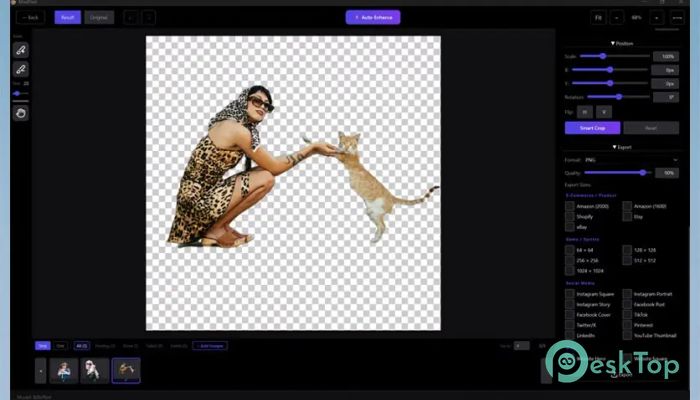
The add and remove brushes let you manually adjust areas that the AI might miss. Brush size and hardness can be customized, giving you control over delicate adjustments.
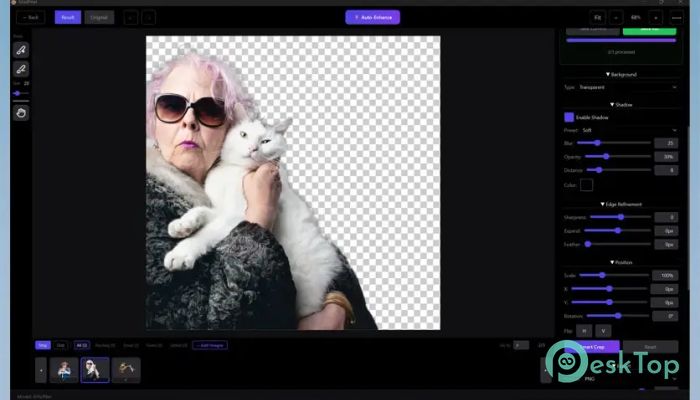
Edge refinement tools help polish the final result. You can sharpen edges, expand or contract selections, feather borders, or remove color fringes. These adjustments transform a basic cutout into a clean, professional result.
An automatic enhancement feature also analyzes the image and suggests improvements. Instead of guessing which settings to use, the software recommends the best adjustments for your cutout.
Undo and redo history ensure you never lose progress. If you experiment with changes, you can always step back and try again without damaging your work.
Creative Background and Shadow Options
Once the background is removed, the next step is choosing what replaces it. The tool offers a wide range of creative background options that make images look polished and ready for use.
You can keep the image transparent, add a solid color background, use gradients, or place a completely new image behind the subject. This flexibility is extremely useful for designers, marketers, and online sellers.
The gradient library includes several preset styles such as sunset, ocean, midnight, and golden hour. These options allow quick visual upgrades without complex editing.
Drop shadow tools add depth and realism. Several presets, such as soft, dramatic, floating, and grounded shadows, are included. Each shadow can also be customized by adjusting blur, opacity, distance, angle, and color.
These features help images feel more natural rather than flat or artificial.
Batch Processing for Faster Workflows
Editing images one by one can take a lot of time. That is why batch processing is one of the most useful features included in the software.
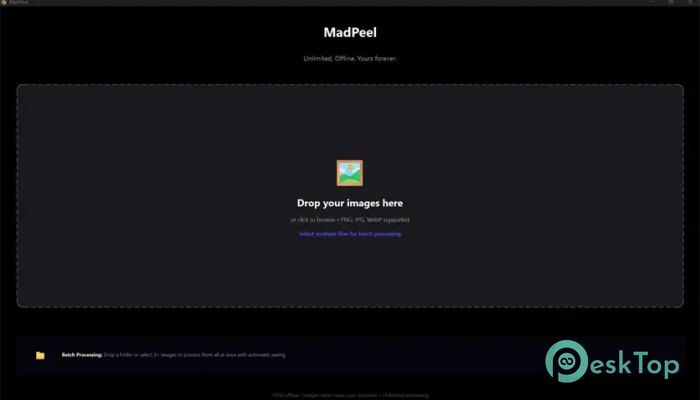
The tool allows users to process entire folders of images automatically. This is especially helpful for online stores, product catalogs, or photographers who handle large sets of images.
A queue management system lets you pause, resume, or skip tasks while they are being processed. Completed images are automatically saved into organized output folders. This keeps everything tidy and easy to locate later.
Instead of spending hours editing individual photos, you can prepare hundreds of images in a fraction of the time.
Export Images for Any Platform
After editing, images often need to be resized or optimized for different platforms. The software simplifies this process by offering more than twenty export presets designed for popular websites.
Presets are available for platforms like Amazon, Shopify, Etsy, eBay, Instagram, TikTok, Facebook, Pinterest, LinkedIn, and YouTube. Each preset automatically adjusts the image size and format to match platform requirements.
Users can export images as transparent PNG files, JPEG images, or WebP format. Quality settings are also adjustable, so you can balance image clarity with file size.
This feature saves time and eliminates the need for additional editing tools.
GPU Acceleration for Faster Processing
Image processing can sometimes take time, especially when working with high-resolution files. The software solves this by supporting GPU acceleration.
When available, the tool automatically uses the computer's graphics card to speed up processing. Both NVIDIA and AMD GPUs are supported. If a compatible graphics card is not detected, the system safely falls back to CPU processing.
This smart optimization helps maintain fast performance on both powerful machines and standard computers.
Designed for Creative Professionals
The software is built with professional workflows in mind while still remaining easy for beginners. It supports a wide range of image formats, including PNG, JPG, WebP, BMP, TIFF, and GIF.
A drag-and-drop interface makes opening images simple. Instead of navigating complicated menus, you can drop a file directly into the workspace and begin editing immediately.
The comparison slider lets you view before-and-after versions of the image. This makes it easy to evaluate the quality of the cutout.
You can zoom up to ten times to inspect tiny details at the pixel level. Keyboard shortcuts are also included to speed up everyday actions and keep your editing workflow smooth.
Another advantage is the simple licensing model. There are no subscriptions, no watermarks, and no cloud uploads. Everything runs locally on your computer, giving you full control and privacy.
System Requirements and Technical Details
Operating System: Windows 11 / 10 / 8.1 / 7
Processor: Minimum 1 GHz Processor (2.4 GHz recommended)
RAM: 2GB (4GB or more recommended)
Free Hard Disk Space: 4GB or more is recommended

-
Program size1.66 GB
-
Version1.0.1
-
Program languagemultilanguage
-
Last updatedBefore 4 Month
-
Downloads79
 Paragon Hard Disk Manager 18 Business
 Aescripts MaskMotion
 Aescripts AE Glass
 Aescripts PreFlight
 Aescripts Risograph
 Aescripts Folder Fanatic