
 Arabic
  English
  Turkish
  Chinese
  Japanese
  Russian
  Spanish
  German
  French
  Hindi
Hindi Download Offline Subtitle Studio AI 1.0.3 for Windows
Download Offline Subtitle Studio AI 1.0.3 for Windows.
Offline Subtitle Studio AI Overview
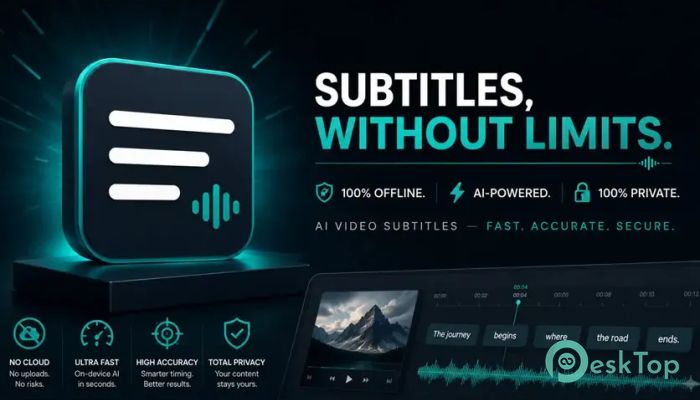
Creating subtitles can often feel like a slow, repetitive task, but this software makes the process much easier. It uses advanced on-device AI speech recognition powered by faster-whisper to convert spoken words into editable subtitles without sending your media to the cloud. Everything happens directly on your Windows PC, giving you complete privacy and control. Whether you are working with videos, podcasts, interviews, online courses, or social media content, the tool provides everything needed to generate, edit, style, and export subtitles. Since all processing is done locally, your files never leave your computer, making it an excellent choice for users who care about security and confidentiality.Features of Offline Subtitle Studio AI
Fully Offline AI Subtitle Generation
The biggest advantage of the software is its completely offline workflow. Once installed, it can generate subtitles without requiring an internet connection for everyday use. A bundled AI model is included, allowing you to start creating subtitles immediately after installation.
If you need even greater accuracy, optional AI models can be downloaded once and used indefinitely without an internet connection. This means you enjoy the speed and intelligence of modern AI while maintaining total privacy.
Private Local Processing
Your files deserve protection, and this software treats them that way. Videos, audio recordings, subtitle files, and transcripts remain safely stored on your own computer throughout the entire workflow.
Since nothing is uploaded to external servers, professionals working with confidential recordings can process projects with confidence. It's like having a personal subtitle studio sitting right on your desktop.
Fast and Accurate Speech Recognition
The software uses faster-whisper technology to recognize spoken language with impressive accuracy. It automatically converts speech into readable subtitles while maintaining natural sentence flow and timing.
For users who need even tighter synchronization, the Precise timing option provides word-level timestamps, creating smoother subtitle breaks. The result is cleaner captions that feel more natural when viewed.
Easy Subtitle Editing
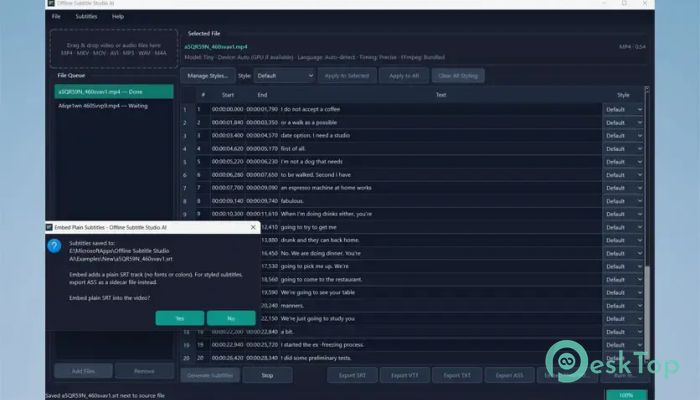
Automatic subtitles are only the starting point. The built-in editable cue table allows you to review every subtitle, correct spelling, improve wording, and adjust timing with ease.
You can change the start and end times, split or merge subtitle entries, and fine-tune each caption until it perfectly matches your content. This makes editing quick instead of frustrating.
Create Beautiful Styled Subtitles
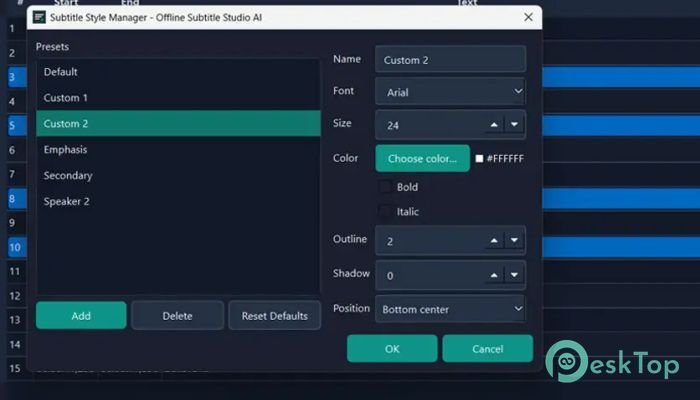
Good subtitles are not just about words—they also need to look professional. The software includes ASS styling support that lets you customize fonts, colors, outlines, sizes, positions, and other formatting options.
Using the Style Manager, you can create reusable presets that instantly give your projects a consistent appearance. This is especially useful for creators who produce videos regularly.
Flexible Export Options
After editing is complete, the tool offers multiple export formats to fit different workflows. You can save subtitles as SRT, VTT, TXT, or ASS files depending on your project requirements.
These subtitle files work perfectly with popular media players, editing software, streaming platforms, and archive systems. Having several export choices means you can easily share content with different audiences.
Burn or Embed Subtitles
The software gives you complete control over how subtitles are delivered. You can create sidecar subtitle files that load automatically in compatible players, embed selectable subtitle tracks into supported video files, or permanently burn styled subtitles into a brand-new video.
Even when creating a new rendered video, the original media file remains untouched. This allows you to experiment freely without risking your source material.
Batch Processing for Multiple Files
Handling one file at a time can waste valuable time, especially when managing large projects. The built-in batch queue lets you add multiple videos or audio recordings and process them automatically, one after another.
This feature is perfect for content creators, businesses, educators, and agencies that regularly work with large collections of media files.
Broad Media Format Support
Compatibility is another strong point of the software. It supports many common video and audio formats, allowing you to subtitle content without converting files first.
Supported media formats include MP4, MKV, MOV, AVI, MP3, WAV, M4A, and many others. This flexibility makes it suitable for almost any production workflow.
Optimized Performance
The software runs efficiently on standard processors using CPU mode by default, making it accessible to most Windows users. Those with compatible NVIDIA graphics cards can also enable CUDA acceleration to significantly speed up subtitle generation.
Because the AI runs locally, you receive reliable performance without depending on internet speed or cloud services.
Ideal for Many Types of Users
This software is designed for a wide range of creators and professionals. YouTubers can quickly caption videos before publishing, while podcasters can generate readable transcripts for their audiences. Course creators can improve accessibility, and freelancers can deliver subtitle projects faster.
It is also an excellent solution for accessibility captioning, marketing agencies, social media creators, privacy-focused organizations, and anyone who needs reliable offline subtitle creation on Windows.
One-Time Purchase with No Hidden Costs
Unlike many online subtitle services, the software follows a simple pricing model. You pay once and own the software without monthly subscriptions or recurring fees.
There are no advertisements, no account registration, and no telemetry tracking your work. You simply install it, generate subtitles, and stay productive.
System Requirements and Technical Details
Operating System: Windows 11 / 10
Processor: Minimum 1 GHz Processor (2.4 GHz recommended)
RAM: 2GB (4GB or more recommended)
Free Hard Disk Space: 2GB or more is recommended

-
Program size1.27 GB
-
Version1.0.3
-
Program languagemultilanguage
-
Last updatedBefore 3 Month
-
Downloads56Ralated programs
![ChrisPC VideoTube Downloader Pro]() ChrisPC VideoTube Downloader Pro
ChrisPC VideoTube Downloader Pro![TranscribeKit]() TranscribeKit
TranscribeKit![Vision Search]() Vision Search
Vision Search![DVDFab]() DVDFab
DVDFab![Crynet Showcase]() Crynet Showcase
Crynet Showcase![OVRLEY]() OVRLEY
OVRLEY
 ChrisPC VideoTube Downloader Pro
 TranscribeKit
 Vision Search
 DVDFab
 Crynet Showcase
 OVRLEY