
 Arabic
  English
  Turkish
  Chinese
  Japanese
  Russian
  Spanish
  German
  French
  Hindi
Hindi Download REVisionFX DEFlicker 2.4.1A for Windows
Download REVisionFX DEFlicker 2.4.1A for Windows.
REVisionFX DEFlicker Overview
Flickering footage can quickly ruin an otherwise perfect video. Whether you are working on time-lapse photography, slow-motion clips, or high-speed recordings, inconsistent brightness can distract viewers and reduce overall quality. This is where this professional flicker-removal solution becomes extremely useful. It helps video editors and content creators fix brightness fluctuations and stabilize lighting across frames. The software intelligently analyzes brightness variations between frames and smooths them. Instead of manually adjusting each frame, users can rely on automated processing to save time and deliver professional results. It works well for filmmakers, photographers, YouTubers, and editors who regularly work in challenging lighting conditions. Another advantage is its ability to handle multiple types of flicker. Whether caused by artificial lighting, changes in camera exposure, or time-lapse shooting conditions, the tool helps smooth out inconsistencies. This makes footage look natural, stable, and visually pleasing.Features of REVisionFX DEFlicker
Smart Flicker Removal Technology
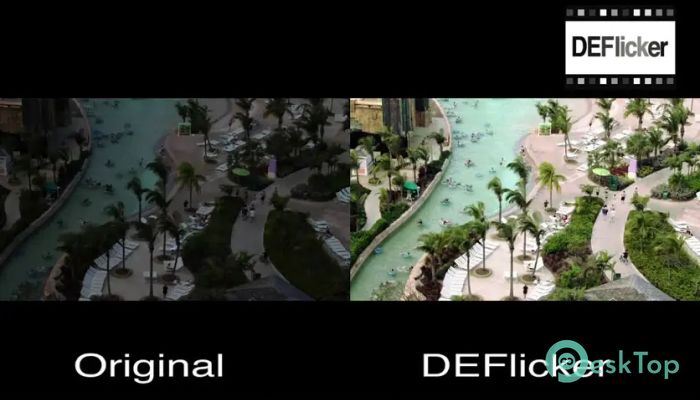
Flicker often appears when lighting changes between frames. Sometimes it is subtle, and other times it becomes extremely noticeable. The software detects these variations automatically and balances brightness levels. Think of it like smoothing waves on water until the surface becomes calm and steady.
The advanced algorithm analyzes neighboring frames and adjusts exposure smoothly. This prevents sudden brightness jumps and keeps transitions natural. Editors do not need advanced technical skills to achieve professional results. A few adjustments and the footage becomes stable and clean.
Perfect for Time-lapse Footage
Time-lapse videos often suffer from lighting inconsistencies caused by weather changes, shifting sunlight, or camera settings. These changes create flickering effects that distract viewers. The tool solves this problem by equalizing brightness across frames.
It works especially well for sunrise, sunset, city timelapse, and construction sequences. The result is smooth, cinematic footage that looks professionally produced. Instead of spending hours manually correcting exposure, editors can process entire sequences quickly.
High Frame Rate Video Support
High frame rate recordings sometimes produce flicker due to the frequency of artificial lighting. When shooting slow motion under fluorescent or LED lighting, flickering can appear in the footage. This solution identifies these patterns and removes them effectively.
The software analyzes frame patterns and corrects brightness fluctuations. It ensures that slow-motion clips remain smooth and visually consistent. This makes it ideal for sports videos, action sequences, and cinematic slow-motion footage.
Easy to Use Interface
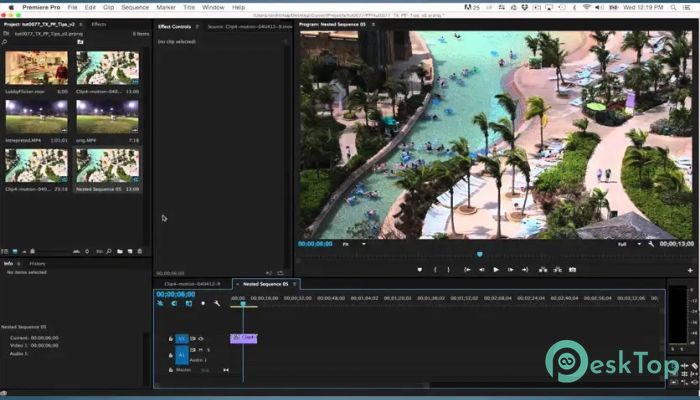
Even though it offers professional features, the interface remains simple and user-friendly. Users can import clips, apply settings, and preview results quickly. The layout is designed to help beginners and professionals work efficiently.
Controls are clearly organized and easy to understand. Sliders allow quick adjustments, while preview windows show results instantly. This makes editing smoother and reduces the learning curve.
Professional Quality Results
Consistency is the key to high-quality video production. Flicker removal enhances visual quality and improves viewer experience. It transforms unstable footage into smooth cinematic visuals.
The software maintains original colors and details while correcting brightness issues. This ensures that the final output looks natural. Editors can rely on it for professional filmmaking, YouTube content, and commercial projects.
Flexible Workflow Integration
The tool integrates smoothly into existing editing workflows. It works alongside popular video editing platforms, allowing users to enhance footage without switching tools. This flexibility helps editors maintain productivity.
Batch processing also allows multiple clips to be corrected simultaneously. This saves time, especially when working on large projects. Instead of fixing clips one by one, users can process entire sequences.
Key Features
Advanced flicker removal technology
Time-lapse flicker correction
High frame rate video support
Automatic brightness smoothing
Professional quality output
User-friendly interface
Batch processing support
Flexible workflow integration
Fast rendering performance
Accurate frame analysis
Improves Video Production Quality
Stable footage improves storytelling and visual impact. When brightness shifts disappear, viewers focus on the content instead of distractions. This helps create professional-looking videos.
The tool acts like a stabilizer for lighting. Just as image stabilization smooths camera movement, flicker removal smooths brightness. The result is cleaner and more polished footage.
Fast Processing Performance
Time is important in video production. The software processes footage quickly without compromising quality. Editors can preview adjustments and export results efficiently.
Optimized performance ensures that even large time-lapse sequences are handled smoothly. This makes it suitable for both short clips and long projects.
Reliable for Various Projects
The software works well for different video types. From documentaries to cinematic films, it provides consistent results. Editors working on professional projects benefit from its accuracy.
It is also useful for content creators and social media editors. Clean visuals help videos stand out and attract viewers.
System Requirements and Technical Details
Operating System: Windows 11 / 10 / 8.1 / 7
Processor: Minimum 1 GHz Processor (2.4 GHz recommended)
RAM: 2GB (4GB or more recommended)
Free Hard Disk Space: 200MB or more is recommended
After Effects: CS6 and up
Premiere Pro: CS6 and up

-
Program size17.05 MB
-
Version2.4.1A
-
Program languagemultilanguage
-
Last updatedBefore 4 Month
-
Downloads20
 Paragon Hard Disk Manager 18 Business
 Aescripts MaskMotion
 Aescripts AE Glass
 Aescripts PreFlight
 Aescripts Risograph
 Aescripts Folder Fanatic