
 Arabic
  English
  Turkish
  Chinese
  Japanese
  Russian
  Spanish
  German
  French
  Hindi
Hindi Download Scalable Vector Graphics (SVG) Plugin for Paint.NET 1.0.7.2 for Windows
Download Scalable Vector Graphics (SVG) Plugin for Paint.NET 1.0.7.2 for Windows.
Scalable Vector Graphics (SVG) Plugin for Paint.NET Overview
This useful add-on expands the capabilities of Paint.NET by adding support for SVG and SVGZ image formats. Vector graphics are different from regular images because they can scale to any size without losing quality. That means icons, logos, diagrams, and illustrations stay sharp and clean even when enlarged. The software lets users import these graphics as either a flat image or multiple editable layers. It feels like opening a neatly organized toolbox where every piece is separated and easy to manage. This makes editing faster and more comfortable, especially for designers and digital artists. Many users struggle to open vector files in simple image editors. This plugin solves that problem in a lightweight and efficient way. It integrates directly into Paint.NET and works smoothly without adding unnecessary complexity.Features of Scalable Vector Graphics (SVG) Plugin for Paint.NET
Supports both SVG and compressed SVGZ files
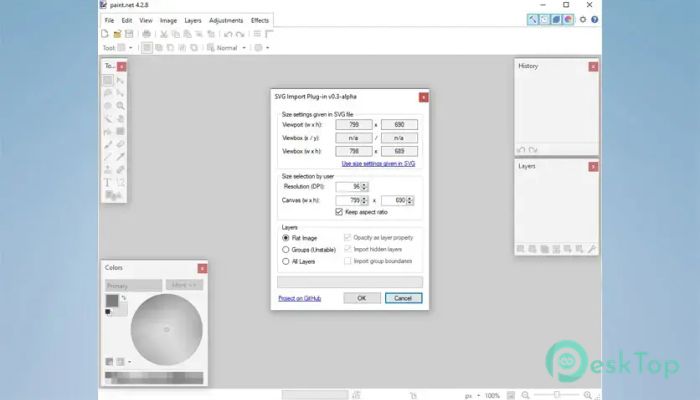
Imports graphics as flat images or separate layers
Maintains sharp image quality during scaling
Works directly inside Paint.NET
Lightweight and easy to install
Helps edit vector-based graphics quickly
Improves workflow for logos and icons
Supports grouped vector elements
Simple interface with smooth integration
Useful for beginners and professionals alike
Easy Vector File Support
One of the biggest strengths of this tool is its ability to handle vector graphics effortlessly. SVG files are commonly used for web graphics, UI designs, and digital illustrations because they remain crisp at any size. Instead of struggling with unsupported formats, users can simply open these files like any other image.
The software acts like a bridge between vector design and raster editing. It allows users to enjoy the flexibility of vector graphics while still using the familiar Paint.NET environment. This saves time and removes the need to switch between multiple programs.
Flexible Layer Importing
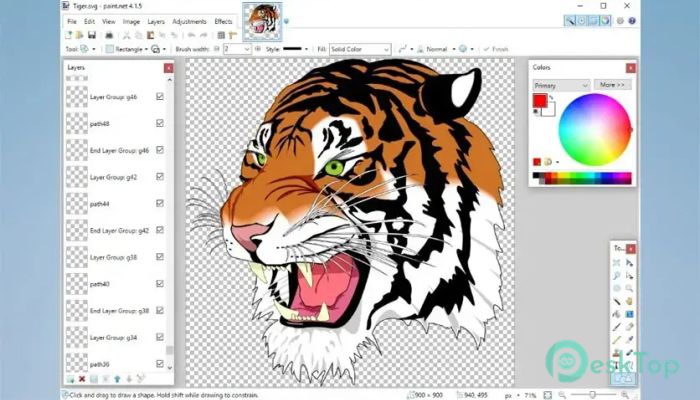
The layer-importing feature makes editing much more convenient. Instead of flattening everything into a single image, the plugin can separate groups and elements into individual layers. This gives users greater control over modifications.
For example, if a logo contains text, shapes, and icons, each part can appear on its own layer. That means users can adjust colors, remove objects, or apply effects without affecting the whole design. It feels similar to organizing papers into folders instead of throwing everything into one drawer.
Perfect for Designers and Creators
The plugin is especially helpful for graphic designers, content creators, students, and hobbyists. Many online resources offer graphics in SVG format because of their high quality and small file size. Having direct access to these files inside Paint.NET creates a smoother creative process.
The tool also helps users prepare images for websites, social media posts, presentations, and printing projects. Since vector graphics remain sharp, the final output looks clean and professional.
Lightweight and Smooth Performance
Unlike heavy design applications that consume large amounts of system resources, this add-on stays lightweight and responsive. Installation is quick, and the plugin works quietly in the background without slowing down the editing process.
Even older computers can handle the software comfortably. This makes it a practical solution for users who want advanced format support without upgrading their hardware.
Simple Installation Process
Setting up the plugin is easy and beginner-friendly. Users only need to place the plugin files into the Paint.NET FileTypes folder. After restarting the editor, SVG support becomes available automatically.
The straightforward setup process eliminates confusion and lets users start editing almost immediately. There are no complicated settings or technical steps involved.
Better Workflow for Everyday Editing
The software improves productivity by reducing extra steps in the editing workflow. Instead of converting vector graphics into another format using external tools, users can work directly with the original files.
This saves both time and effort. It also helps preserve image quality because there is less need for repeated conversions. The editing experience becomes smoother, cleaner, and more organized.
Useful for Web and Digital Projects
SVG graphics are widely used in modern web design because they load quickly and scale perfectly across different screen sizes. This plugin allows users to prepare and customize these graphics before adding them to websites or digital projects.
From app icons to banners and diagrams, the software makes handling vector images feel natural and simple. It provides a practical solution for modern design needs without overwhelming the user.
How to install
Note: Before installing, make sure you don't have any other file type plugin installed handling the same file extensions: .svg, .svgz
To automatically install the plugin, perform the following steps:
Make sure Paint.NET is not running.
Download and run SvgFileTypePlugin_setup.exe
Follow the steps of the setup wizard.
To manually install the plugin, perform the following steps:
Make sure Paint.NET is not running.
Download and extract SvgFileTypePlugin.zip
If you're using the Classic version of Paint.NET, copy the SvgFileTypePlugin folder into the \FileTypes directory (Default location is C:\Program Files\Paint.net\FileTypes).
If you're using the Microsoft Store version of Paint.NET, copy the SvgFileTypePlugin folder into the \paint.net App Files\FileTypes directory.
Done. You may start Paint.NET.
System Requirements and Technical Details
Operating System: Windows 11 / 10
Processor: Minimum 1 GHz Processor (2.4 GHz recommended)
RAM: 2GB (4GB or more recommended)
Free Hard Disk Space: 200MB or more is recommended
Paint.NET: 5.1 or later

-
Program size2.91 MB
-
Version1.0.7.2
-
Program languagemultilanguage
-
Last updatedBefore 5 Month
-
Downloads41
 Paragon Hard Disk Manager 18 Business
 Aescripts MaskMotion
 Aescripts AE Glass
 Aescripts PreFlight
 Aescripts Risograph
 Aescripts Folder Fanatic