
 Arabic
  English
  Turkish
  Chinese
  Japanese
  Russian
  Spanish
  German
  French
  Hindi
Hindi Download Screenbox Media Player 0.20.1 for Windows
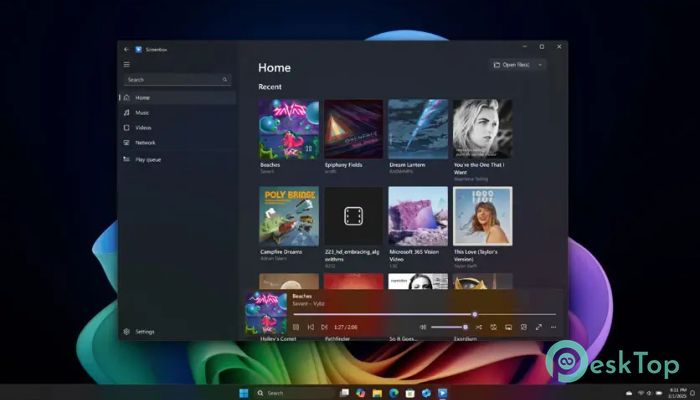
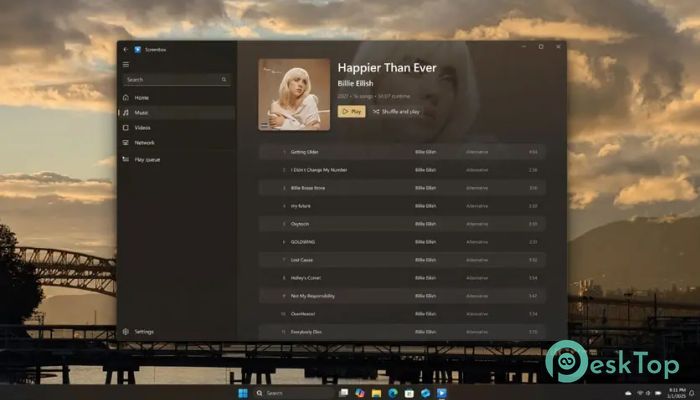
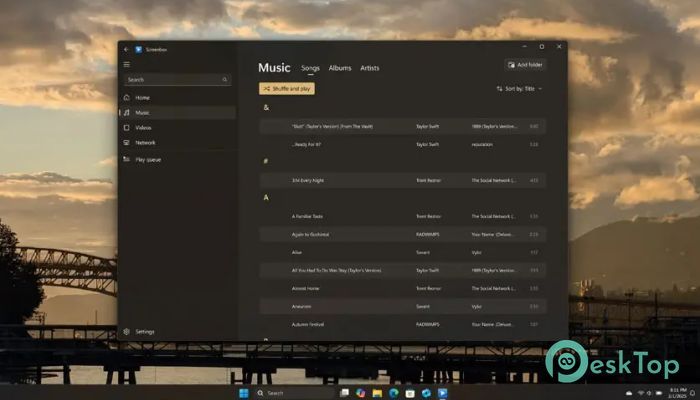
Download Screenbox Media Player 0.20.1 for Windows.
Screenbox Media Player Overview
It is a brings a fresh approach to watching videos on your Windows PC. Instead of feeling heavy or complicated, it feels light, quick, and smart. The software is built for people who want a simple media experience without sacrificing performance. Whether you are watching movies, TV shows, or personal videos, it keeps everything running smoothly. What makes it special is how well it adapts to your system. It does not demand powerful hardware to work properly. Even on older devices, it stays responsive and fluid. On modern systems, it shines even more, taking advantage of better performance to deliver high-quality playback.Features of Screenbox Media Player
Clean and Friendly User Interface
The first thing you notice is the beautiful interface. It feels modern and uncluttered. Everything is placed where you expect it to be. You do not have to search through complicated menus just to adjust volume or change subtitles.
The design feels like walking into a well-organized room. Nothing is messy. The controls are simple, yet powerful. It gives you what you need without overwhelming you. This balance makes it perfect for beginners and experienced users alike.
Fast and Lightweight Performance
Speed is one of this tool's strongest points. It launches quickly and loads media files almost instantly. You click a video, and it starts playing without long waits. That kind of responsiveness makes a huge difference in daily use.
Unlike bulky players that consume too many system resources, the software stays light. It does not slow down your PC while running in the background. You can multitask, browse the web, or work on documents while your video plays smoothly.
Wide Format and Codec Support
One of the most frustrating aspects of media players is the lack of support for certain formats. With this player, that problem is almost gone. It supports a wide range of file formats and codecs right out of the box.
You can play MP4, MKV, AVI, and many other common video formats without installing extra add-ons. It feels like having a universal remote for your media files. No extra downloads. No complicated setups. Just open and play.
Seamless Experience Across Devices
The software is designed to work smoothly on different Windows devices and even Xbox consoles. That flexibility makes it more than just a standard desktop player. Whether you are on a laptop, desktop, or console, the experience stays consistent.
It adapts to your system’s capabilities. On high-end machines, it takes advantage of better graphics and processing power. On modest devices, it adjusts performance to keep playback stable. It is like water filling the shape of its container, always adjusting to fit perfectly.
Smooth Playback and Stability
No one likes stuttering videos or random crashes. Stability is a big priority here. The tool focuses on delivering smooth playback even with high-resolution files. You can enjoy HD and even larger video files without worrying about freezing or lag.
The playback controls are also responsive. You can pause, rewind, fast forward, or skip scenes without delay. Everything reacts instantly. That smooth control makes watching content more enjoyable and stress-free.
Simple Controls with Powerful Options
Even though it looks simple, it still offers useful customization options. You can adjust playback speed, manage subtitles, change audio tracks, and tweak video settings. All of these features are available without complicating the interface.
Think of it like a sports car with automatic steering. It feels easy to drive, but there is real power under the hood. You can keep things simple or dive deeper into settings for more control.
Optimized for Everyday Use
This player is built for daily life. You do not need technical knowledge to use it. Installation is quick, and the setup process is straightforward. Once installed, you can start enjoying your favorite content right away.
It also handles large media libraries smoothly. If you have many videos stored on your PC, it loads them efficiently. Browsing through files feels natural and organized.
Modern Design with Classic Functionality
While it brings a fresh look, it still respects the classic features people expect from a media player. Basic controls are familiar and easy to access. That combination of new design and traditional functionality makes it comfortable to use.
You get the reliability of old-school media players with the polished appearance of modern software. It is like updating your favorite chair with new cushions. Same comfort, better style.
System Requirements and Technical Details
Operating System: Windows 11 / 10 / 8.1 / 7
Processor: Minimum 1 GHz Processor (2.4 GHz recommended)
RAM: 2GB (4GB or more recommended)
Free Hard Disk Space: 200MB or more is recommended

-
Program size154.06 MB
-
Version0.20.1
-
Program languagemultilanguage
-
Last updatedBefore 2 Month
-
Downloads88Ralated programs
![ChrisPC VideoTube Downloader Pro]() ChrisPC VideoTube Downloader Pro
ChrisPC VideoTube Downloader Pro![TranscribeKit]() TranscribeKit
TranscribeKit![Vision Search]() Vision Search
Vision Search![DVDFab]() DVDFab
DVDFab![Crynet Showcase]() Crynet Showcase
Crynet Showcase![OVRLEY]() OVRLEY
OVRLEY
 ChrisPC VideoTube Downloader Pro
 TranscribeKit
 Vision Search
 DVDFab
 Crynet Showcase
 OVRLEY