
 Arabic
  English
  Turkish
  Chinese
  Japanese
  Russian
  Spanish
  German
  French
  Hindi
Hindi Download Shiru 6.6.0 for Windows
Download Shiru 6.6.0 for Windows.
Shiru Overview
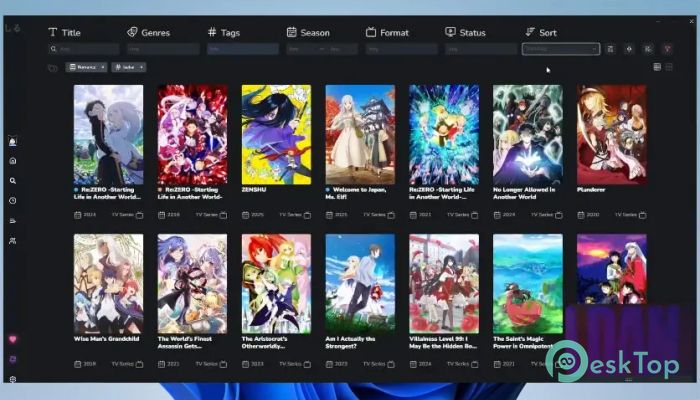
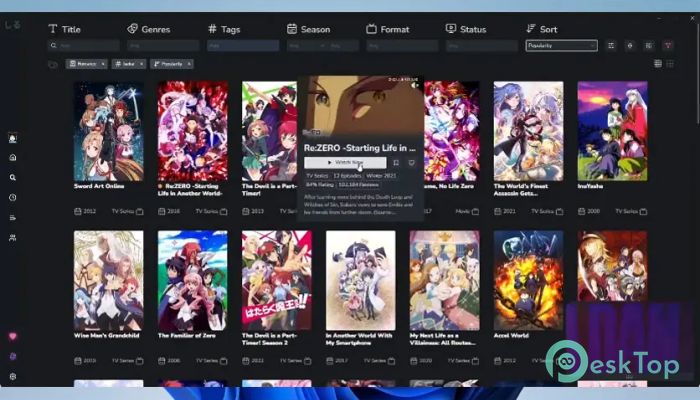
It is a modern anime library manager built around speed, flexibility, and a seamless watching experience. It allows users to organize their anime collections, track progress, and enjoy near-instant playback without transcoding or compression. Unlike traditional media managers, this software focuses on performance and convenience, enabling users to play native videos directly from their files. It combines smart automation with user control. Whether you're managing a massive anime collection or just starting your library, the software keeps everything organized and accessible. With features like AniList integration, subtitle support, offline viewing, and customizable controls, it creates a comfortable environment for both casual viewers and dedicated anime fans. The tool also supports mobile devices, making it easy to continue watching on the go. With its lightweight design and fast load times, users can jump into their favorite episodes without delay. Everything feels smooth, responsive, and built for convenience.Features of Shiru
Lightning Fast Native Playback
Speed is one of this software's strongest features. Instead of transcoding video files, it plays media directly from your local storage. This approach reduces buffering and maintains video quality. It feels like opening a local file instantly, without waiting for conversions.
This native playback also helps maintain original resolution and sound quality. Users can enjoy high-definition anime episodes without worrying about compression artifacts. Whether watching 720p or 4K content, playback remains smooth and consistent.
The experience is simple but powerful. Click an episode, and it starts almost immediately. This quick responsiveness makes the software feel lightweight while still offering advanced functionality.
AniList and MyAnimeList Integration
Managing anime collections becomes effortless with built-in AniList and MyAnimeList integration. Users can sync their watchlists, track progress, and rate episodes without leaving the interface. It acts like a bridge between personal collections and online tracking platforms.
This integration also helps discover new anime. Related shows, recommendations, and ongoing releases appear automatically. Users no longer need to switch between apps or websites to manage their watch history.
Everything updates automatically. When an episode is completed, progress tracking updates instantly. It saves time and keeps libraries organized without manual input.
Smart Dub-First Support
Many anime viewers prefer dubbed versions, and the software recognizes this preference. Dub-first support tracks both subbed and dubbed release schedules independently. This ensures users see episodes based on their preferred language format.
With the "Prefer Dubs" option, shows remain hidden until dubbed episodes become available. This feature helps avoid spoilers and maintain consistent viewing. It feels like having a personalized release calendar tailored to your preferences.
This smart scheduling makes watching more enjoyable. Users can follow anime at their own pace without constantly checking release dates.
Real-Time Release Notifications
Keeping up with new anime episodes becomes easier with instant release notifications. The software alerts users when new sub, dub, or batch episodes are available. This ensures you never miss a release.
Notifications also include delayed releases and special announcements. This feature works like a personal anime assistant, automatically keeping viewers updated.
The alerts are fast and accurate. Users can jump straight into newly released episodes without having to search manually.
Full Subtitle Support
Subtitle flexibility is another major advantage. The software supports soft-coded and external subtitle formats, including VTT, SSA, ASS, SUB, and TXT. This allows users to choose subtitles that suit their viewing preferences.
Per-series subtitle memory automatically remembers your settings. Once configured, subtitles load exactly the way you prefer. This eliminates repetitive adjustments.
It also includes CJK glyph fallback support and in-player track cycling. These features enhance compatibility and make subtitle handling smooth and reliable.
Extension Support for Custom Content
The extension system allows users to connect personal media servers or custom content sources. This flexibility transforms the software into a centralized anime hub.
Users can bring their own content sources and manage everything in one place. It feels like building your own streaming platform tailored to your preferences.
This customization gives users complete control. Whether using local files or remote servers, everything integrates seamlessly.
Full Mobile Support
Watching anime on mobile devices becomes effortless with full Android support. The mobile experience includes landscape and portrait viewing, immersive full-screen mode, and external player integration.
Progress tracking stays synchronized across devices. Start watching on PC and continue on mobile without losing progress. This seamless transition improves flexibility.
The mobile interface remains responsive and easy to use. Everything feels optimized for both small and large screens.
Customizable Keybindings
The drag-and-drop keybind editor allows complete control over shortcuts. Users can customize playback controls, subtitle options, and navigation keys.
Default shortcuts are already included, but customization adds flexibility. This feature is especially useful for power users who prefer keyboard-based navigation.
It feels like tailoring the software to your workflow. Every command becomes faster and more convenient.
Offline Support for Anywhere Viewing
Offline functionality ensures access to your library without an internet connection. Previously loaded media and watch history remain available at any time.
This feature is perfect for travel or for situations with limited connectivity. Users can watch anime without worrying about network availability.
Local file playback continues to work smoothly. Everything remains accessible and responsive offline.
Multiple Profiles for Personalized Experience
Multiple profile support allows separate libraries and settings. Each profile maintains its own watch history and preferences.
This feature is useful for shared devices. Family members or friends can maintain independent anime libraries.
Optional cross-profile sync keeps progress up to date when needed. It offers flexibility for different viewing styles.
Discord Rich Presence Integration
Discord Rich Presence shows what you're watching in real time. It displays episode progress, paused states, and browsing activity.
This integration helps friends see your current viewing status. It adds a social element to the watching experience.
Everything updates automatically. Users can share their anime journey effortlessly.
System Requirements and Technical Details
Operating System: Windows 11 / 10 / 8.1 / 7
Processor: Minimum 1 GHz Processor (2.4 GHz recommended)
RAM: 2GB (4GB or more recommended)
Free Hard Disk Space: 200MB or more is recommended

-
Program size116.99 MB
-
Version6.6.0
-
Program languagemultilanguage
-
Last updatedBefore 3 Month
-
Downloads14Ralated programs
![ChrisPC VideoTube Downloader Pro]() ChrisPC VideoTube Downloader Pro
ChrisPC VideoTube Downloader Pro![TranscribeKit]() TranscribeKit
TranscribeKit![Vision Search]() Vision Search
Vision Search![DVDFab]() DVDFab
DVDFab![Crynet Showcase]() Crynet Showcase
Crynet Showcase![OVRLEY]() OVRLEY
OVRLEY
 ChrisPC VideoTube Downloader Pro
 TranscribeKit
 Vision Search
 DVDFab
 Crynet Showcase
 OVRLEY