
 Arabic
  English
  Turkish
  Chinese
  Japanese
  Russian
  Spanish
  German
  French
  Hindi
Hindi Download SizeKit Plugin 1.0 for Windows
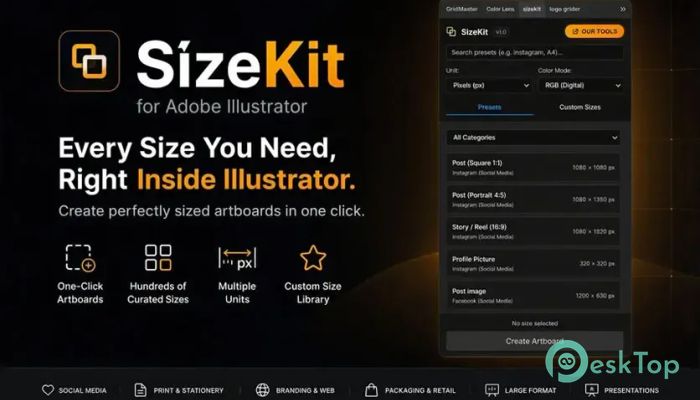
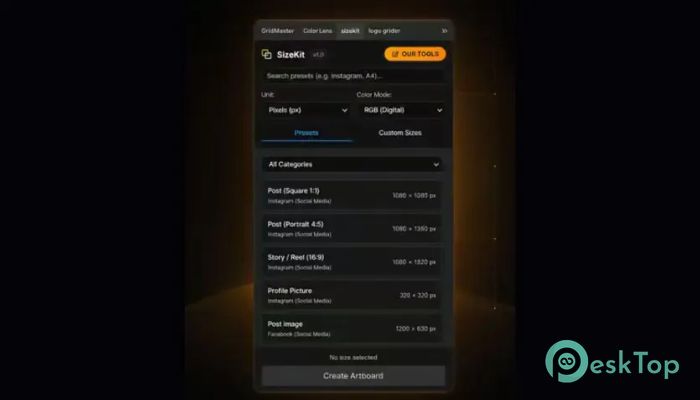
Download SizeKit Plugin 1.0 for Windows.
SizeKit Plugin Overview
Creating design files in the correct dimensions can take more time than most people realize. The software removes that hassle by providing hundreds of professionally selected size presets inside Adobe Illustrator. Instead of searching online for measurements, you can choose the size you need instantly and start designing right away. The tool is built for designers, marketers, branding experts, social media creators, and print professionals. It covers almost every common design format and lets you save your own custom sizes for future projects. This makes daily work smoother, faster, and much more organized.Features of SizeKit Plugin
One-Click Artboard Creation
The biggest advantage of the software is its one-click artboard creation feature. Simply choose the category, select the required size, and create a perfectly measured artboard instantly. There is no need to enter width, height, or measurement units manually every time.
This feature saves valuable time, especially when working on multiple client projects with different design requirements.
Huge Collection of Ready-to-Use Presets
The extension includes hundreds of carefully organized presets for both digital and print work. Everything is arranged into categories, making it easy to find the right dimensions within seconds.
Instead of keeping separate notes or searching the internet, you have every important size available directly inside Illustrator.
Perfect for Social Media Projects
The software comes with ready-made dimensions for today's most popular social media platforms. Whether you are designing a post, story, banner, or profile picture, the correct size is always available.
Supported platforms include Instagram, Facebook, X (Twitter), LinkedIn, TikTok, Pinterest, YouTube, and Behance. It also includes sizes for reels, covers, thumbnails, stories, and many other digital assets.
Useful for Branding and Web Design
Building a strong brand requires graphics in many different formats. The tool includes common branding assets such as Open Graph images, email signatures, logo grids, app icons, and hero banners.
This helps designers maintain consistency across websites, applications, and marketing campaigns without worrying about incorrect dimensions.
Professional Print Templates
Print design becomes much easier with professionally prepared measurements for business stationery. Users can quickly create business cards, letterheads, envelopes, compliment slips, and presentation folders.
Multiple business card standards are included, such as US, European, Japanese, and square formats, making international projects much easier to manage.
Marketing Materials Made Simple
The software also includes standard dimensions for promotional materials that businesses use every day. Flyers, brochures, menus, and marketing handouts are available as ready-to-use presets.
This reduces preparation time and helps designers focus on creativity rather than technical measurements.
Packaging and Retail Design Support
Packaging projects often require accurate dimensions. The tool provides popular sizes for shopping bags, hangtags, swing tags, product labels, and wine labels.
These presets make retail branding projects much more efficient while helping maintain professional printing standards.
Large Format Design Options
Designing large promotional graphics becomes easier with industry-standard dimensions for posters, roll-up banners, and billboards. The software even includes properly scaled billboard sizes for easier editing.
This makes it suitable for advertising agencies, print shops, and designers working on outdoor marketing campaigns.
Brandbooks and Presentation Sizes
Creating professional company documents is much faster thanks to dedicated presets for brand guidelines, presentation decks, corporate reports, and PDF documents.
Instead of manually setting document sizes, users can start working immediately with proven layouts.
Create Your Own Custom Presets
Every designer has unique workflows. That's why the software allows users to save custom dimensions for future use. Once saved, favorite sizes are always available with a single click.
This feature is especially useful for agencies and freelancers who repeatedly create designs with identical specifications.
Supports Multiple Measurement Units
Different projects often require different units, such as pixels, inches, millimeters, centimeters, or points. The tool supports multiple measurement units, making it flexible for both digital and print production.
This flexibility eliminates unnecessary conversions and reduces the chance of sizing mistakes.
Built Directly Inside Adobe Illustrator
The extension works directly within Adobe Illustrator, so there is no need to switch between different applications. Everything stays inside the same workspace, allowing designers to remain focused on their creative work.
The clean interface feels natural and blends smoothly with Illustrator, making it easy for beginners and experienced users alike.
Save Time Every Day
Searching online for dimensions may only take a few minutes, but those minutes quickly add up over weeks and months. The software eliminates that repetitive task by placing all common sizes in one convenient location.
It works like having a personal design assistant that always remembers the exact measurements you need.
System Requirements and Technical Details
Operating System: Windows 11 / 10 / 8.1 / 7
Processor: Minimum 1 GHz Processor (2.4 GHz recommended)
RAM: 2GB (4GB or more recommended)
Free Hard Disk Space: 200MB or more is recommended

-
Program size31.85 KB
-
Version1.0
-
Program languagemultilanguage
-
Last updatedBefore 2 Month
-
Downloads10
 Paragon Hard Disk Manager 18 Business
 Aescripts MaskMotion
 Aescripts AE Glass
 Aescripts PreFlight
 Aescripts Risograph
 Aescripts Folder Fanatic