
 Arabic
  English
  Turkish
  Chinese
  Japanese
  Russian
  Spanish
  German
  French
  Hindi
Hindi Download SmartAnim 1.00.03 for Windows
Download SmartAnim 1.00.03 for Windows.
SmartAnim Overview
The software brings a new level of functionality to Autodesk 3ds Max by expanding the range of available controllers, solvers, and helpers. It helps artists streamline their workflow with automatic rig systems, pose management, and new inverse kinematic solutions. With this tool, animators can easily handle both simple and advanced animation setups without heavy scripting or complicated manual adjustments. It simplifies the animation process through automation and intelligent rig systems. Whether working on a film, a game, or a simulation project, users can achieve smoother motion, better control, and more expressive results within a familiar environment.Features of SmartAnim
Rig System Capabilities
The rigging system provides a framework that supports multiple types of rigs, including bipeds, quadrupeds, and other complex creatures. With a few parameters and predefined templates, users can build fully functional rigs that include independent bones, controllers, and helpers. These elements can be modified, replaced, or removed to suit specific project needs.
The rig system supports features such as IKFK solvers, reverse-foot mechanics, and twist bones, enabling more natural motion. Additionally, it allows the creation of facial rigs using bones or morph targets, enabling expressive character performances.
User Interface Enhancements
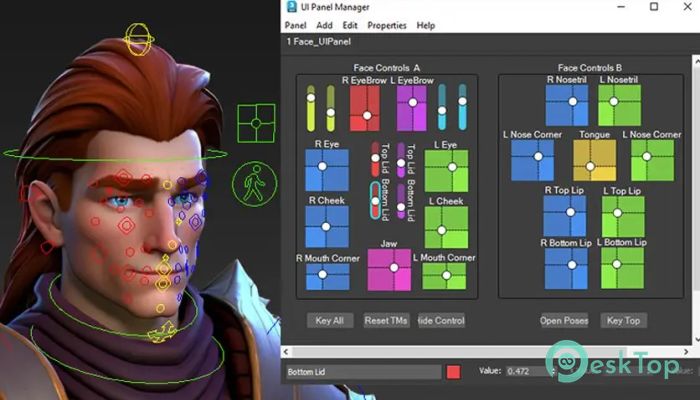
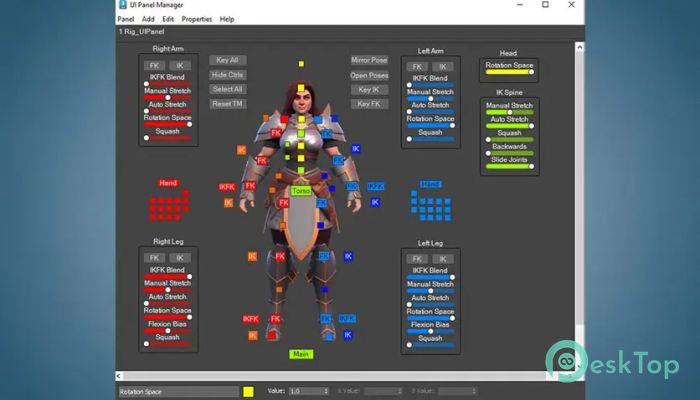
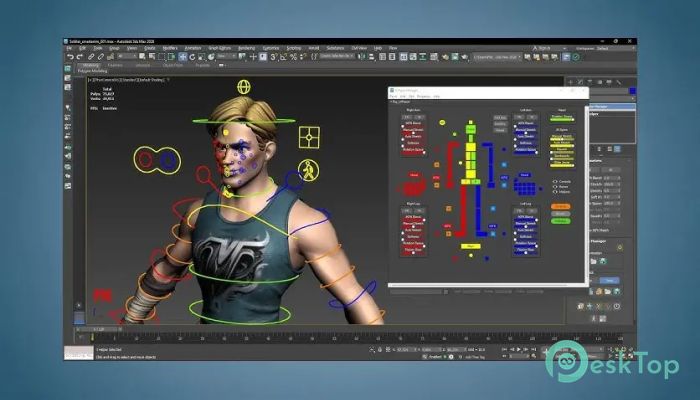
The integrated UI panel brings simplicity and clarity to animation management. It provides pickers, sliders, and control buttons to manipulate different rig components easily. The tool’s clean interface helps users focus more on creativity rather than technical setup.
The panel dynamically updates depending on the selected elements, giving quick access to parameters and animations. This feature makes controlling complex characters much faster and more intuitive for both beginners and professionals.
Pose and Animation Management
The included Pose Kit lets animators save and reuse poses for characters and rigs. This system makes it easy to switch between emotional states or body positions within seconds. By saving poses, users can also maintain consistency across animation shots.
The Animation Manager handles all movement data, including poses, keyframes, and entire animation sequences. It supports copying, pasting, mirroring, and resetting animations. It also integrates seamlessly with custom rigs, ensuring compatibility across different projects.
Control Helpers
Control helpers offer a wide range of customization options. They can take various display forms, such as boxes, circles, or arrows, allowing animators to visually organize their rig. The selector feature lets you quickly select parts of the rig during animation.
With over 40 different helper types, users can build rigs that are both functional and visually clean. Each helper can be customized in color, shape, or size to match the artist's specific workflow.
New Inverse Kinematic Solvers
The plugin introduces two new solvers: IKFK Solver and CurveIK Solver. The IKFK Solver allows a smooth transition between forward and inverse kinematics, giving animators flexibility in controlling limbs and objects. It supports stretching and soft IK, which help create fluid, realistic movements.
The CurveIK Solver is particularly useful for animating flexible structures such as tails, tentacles, and bendy limbs. Using fewer objects and connections simplifies the rigging process while maintaining control and precision. These solvers significantly improve the rig’s responsiveness and natural motion flow.
New Controllers
It comes equipped with several new controllers that enhance animation workflows. These include:
Aim Constraint: works as an improved alternative to the LookAt Constraint for precise direction control.
Parent Constraint: enables flexible parenting setups between objects.
Rig Control: offers offset transformations and mirroring functionality.
Stretch Constraint: provides easy control over stretching parts of the rig.
Rotation Space: ensures accurate rotation control with fewer limitations.
Float Expose TM: lets animators access non-keyed object values directly for better control.
Connection Controllers: allow easy linking between controllers and tracks.
All of these tools enhance the animator’s ability to handle dynamic and precise movements, reducing the need for additional plugins or manual setup.
Benefits for Artists and Studios
Using this plugin saves hours of manual rigging and testing. It standardizes the process while allowing for complete customization when required. Artists can focus on performance and creativity rather than spend time on repetitive setup work. For studios, it creates a consistent workflow across multiple projects and team members.
Its automation features ensure reduced errors, while its intuitive interface supports faster learning. The combination of advanced rigging, pose management, and control customization provides professionals with a robust, reliable solution for all animation requirements.
System Requirements and Technical Details
Operating System: Windows 11 / 10 / 8.1 / 7
Processor: Minimum 1 GHz Processor (2.4 GHz recommended)
RAM: 2GB (4GB or more recommended)
Free Hard Disk Space: 200MB or more is recommended
3ds Max: 2020 - 2026

-
Program size3.84 MB
-
Version1.00.03
-
Program languagemultilanguage
-
Last updatedBefore 11 Month
-
Downloads16
 Paragon Hard Disk Manager 18 Business
 Aescripts MaskMotion
 Aescripts AE Glass
 Aescripts PreFlight
 Aescripts Risograph
 Aescripts Folder Fanatic