
 Arabic
  English
  Turkish
  Chinese
  Japanese
  Russian
  Spanish
  German
  French
  Hindi
Hindi Download Superhive Market - Alt Tab Studio Pro 1.0.4 for Windows
Download Superhive Market - Alt Tab Studio Pro 1.0.4 for Windows.
Superhive Market - Alt Tab Studio Pro Overview
Creating complex scenes in Blender often becomes time-consuming when managing lights, materials, cameras, and assets. This tool is designed to eliminate those repetitive tasks and help creators work faster without sacrificing quality. It acts like a productivity assistant that sits inside Blender and streamlines almost every part of your workflow. Instead of manually adjusting dozens of settings, users can quickly apply presets, organize assets, and manage scenes with just a few clicks. Whether you're working on animation, 3D modeling, motion graphics, or cinematic scenes, this software helps reduce clutter and improve performance. From lighting presets to time tracking, every feature is designed to improve efficiency. It transforms Blender into a more organized and professional environment, making it easier to focus on creativity rather than technical hurdles. 200+ Lighting Presets for Instant Results Lighting plays a major role in creating realistic and cinematic scenes. The software offers more than 200 lighting presets that instantly improve visuals. Instead of manually placing lights and adjusting intensity, you can apply professional lighting setups in seconds. These presets are designed for different situations, such as studio lighting, cinematic shots, product rendering, and environment scenes. It works like switching camera filters, but for professional lighting. This saves time and helps beginners achieve expert-level results quickly. Lighting Manager for Full Control Managing multiple lights in a complex project can quickly become messy. The built-in lighting manager simplifies this process by allowing users to control all lights from one panel. You can enable, disable, adjust intensity, and organize lights without having to search through multiple menus. This speeds up scene management and reduces confusion. It is especially helpful when working with large animation projects or cinematic sequences. Material Manager for Clean Projects Unused materials often clutter Blender files and increase file size. The material manager removes excess materials, keeping projects clean and lightweight. This improves performance and makes navigation easier. Think of it like cleaning your workspace. When everything is organized, productivity increases, and you can focus on creative tasks rather than managing clutter. Master Key for Faster Workflow The master key feature allows users to control multiple functions using a single keybind. This reduces the need to memorize multiple shortcuts and significantly speeds up the workflow. With one key, you can quickly access important tools, switch modes, or activate features instantly. This makes navigation smoother and improves efficiency during creative work. Camera Recording and Motion Tools Camera movement is important for animation and cinematic scenes. The camera recording feature allows users to capture movement smoothly. It also includes noise and smoothing effects for a professional-looking motion. Instead of manually adjusting keyframes, users can record movement naturally and refine it later. This saves time and produces more organic camera motion. Camera Settings Panel All camera controls are organized into one panel, making it easier to adjust settings. Users can quickly change focal length, depth of field, and other camera properties. This centralized control panel reduces confusion and allows faster adjustments during production. Quick Render Preview Waiting for full renders slows down creativity. The quick render preview feature allows users to instantly preview animations and scenes. This helps creators test ideas quickly and make changes faster. It works like a real-time preview tool, improving workflow and reducing rendering time during development. Asset Master for Custom Libraries Managing assets becomes easier with the asset master feature. Users can create custom asset libraries from their own projects. This allows quick reuse of models, materials, and objects. It works like building your personal toolbox. Once assets are saved, they can be used in future projects instantly. Blend File Diagnostics This feature analyzes blend files and identifies potential issues. It helps detect unused objects, heavy files, and performance bottlenecks. With detailed diagnostics, users can easily optimize projects and improve performance. Shader Editor Tools Working in the shader editor becomes more organized with additional tools. Users can color nodes, group them, and frame sections for better readability. This makes complex node setups easier to understand and edit. Outliner Tools for Organization The outliner tools automatically organize objects into collections. This keeps projects structured and easy to navigate. Large scenes become manageable, and users can quickly locate objects. Time Tracking Feature Time tracking helps monitor hours spent on projects. This is useful for freelancers and professionals who want to track productivity. It also helps improve workflow efficiency by analyzing time usage.Features of Superhive Market - Alt Tab Studio Pro
200+ Lighting Presets for instant results
Lighting Manager for easy control
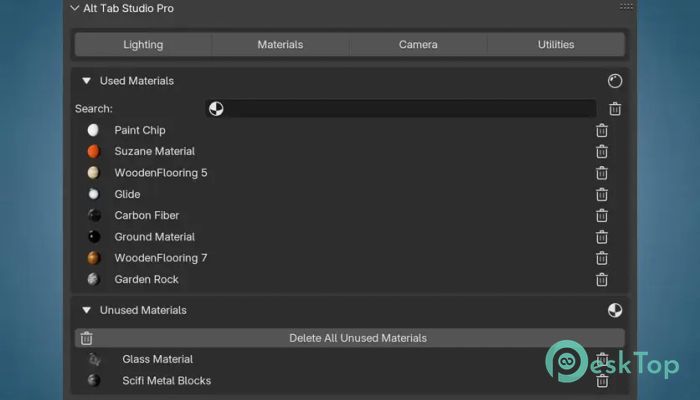
Material Manager for clean files
Master Key shortcut system
Camera Recording tools
Camera Settings Panel
Quick Render Preview
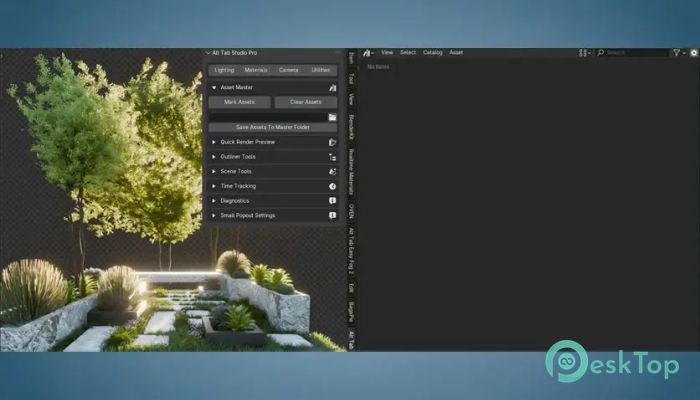
Asset Master for libraries
Blend File Diagnostics
Shader Editor tools
Outliner organization tools
Time tracking feature
System Requirements and Technical Details
Operating System: Windows 11 / 10 / 8.1 / 7
Processor: Minimum 1 GHz Processor (2.4 GHz recommended)
RAM: 2GB (4GB or more recommended)
Free Hard Disk Space: 200MB or more is recommended
Blender: 4.0 - 5.0
Comments

11.22 MB
Program details
-
Program size11.22 MB
-
Version1.0.4
-
Program languagemultilanguage
-
Last updatedBefore 6 Month
-
Downloads13
 Paragon Hard Disk Manager 18 Business
 Aescripts MaskMotion
 Aescripts AE Glass
 Aescripts PreFlight
 Aescripts Risograph
 Aescripts Folder Fanatic