
 Arabic
  English
  Turkish
  Chinese
  Japanese
  Russian
  Spanish
  German
  French
  Hindi
Hindi Download Superhive Market - Lazy Shapekeys 1.0.72 for Windows
Download Superhive Market - Lazy Shapekeys 1.0.72 for Windows.
Superhive Market - Lazy Shapekeys Overview
It is built for creators who work heavily with shape keys and want cleaner control without wasting time on repetitive tasks. It focuses on organizing, transferring, and managing shape keys more innovatively. Instead of juggling manual steps, the add-on introduces utilities that function as shortcuts for everyday modeling and animation tasks. What Makes This Tool Stand Out Working with shape keys can feel like organizing a messy toolbox. This add-on functions as a labeled drawer system, ensuring everything has a place. It reduces clutter, prevents errors, and helps artists focus on creativity rather than technical friction. The workflow feels lighter, smoother, and more predictable.Features of Superhive Market - Lazy Shapekeys
Shape Key Folder Division
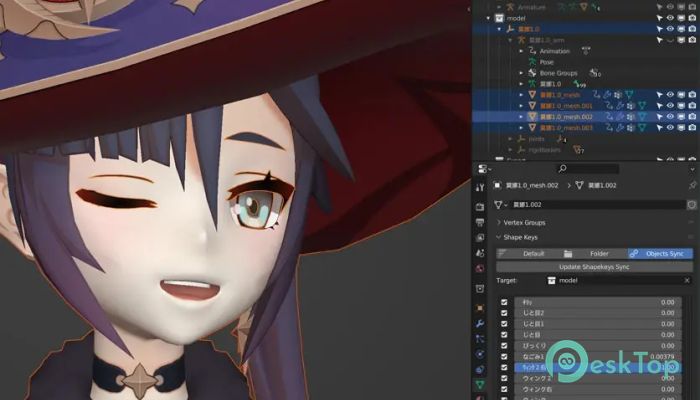
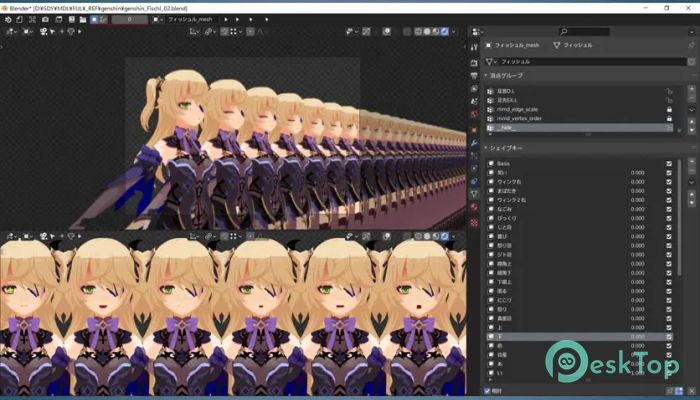
One of the most helpful features is the shape key folder menu. It allows users to group related shape keys into folders, making navigation easier. Instead of scrolling through long lists, everything stays organized. This is especially useful in facial rigs where dozens of shape keys are standard.
Create Separate Objects for Each Shape Key
The tool automatically generates a new object for each shape key. This is perfect for editing, exporting, or testing shapes individually. Think of it like splitting a playlist into single tracks so each one can be fine-tuned without interference.
Forced Shape Transfer
Transferring shape keys between objects often fails due to mismatched topology. This add-on includes a forced transfer option that forces the shape data to be transferred regardless. It saves time when working with similar meshes and reduces the need to rebuild shapes from scratch.
Apply Modifiers While Holding Shape Keys
Usually, applying modifiers can destroy or reset shape keys. This feature safely applies modifiers while preserving all existing shape keys. It feels like freezing a moment in time while improving the underlying mesh, making it highly valuable for non-destructive workflows.
Left and Right Shape Key Separation
Facial animation often needs symmetrical control. The add-on automatically splits shape keys into left and right versions. This allows for more natural expressions and detailed animation without manual duplication or adjustment.
Shape Key Synchronization by Object Name
When multiple objects share the same name, the software can synchronize their shape keys. This keeps characters consistent across variations, outfits, or linked assets. It works like syncing settings across devices, so everything behaves the same.
Improved Workflow for Character Artists
Character artists benefit the most from this tool. Facial rigs, body deformations, and expression libraries become easier to manage. Instead of wrestling with technical steps, artists can focus on performance and emotion.
Useful for Animation and Game Assets
The add-on is also helpful for animation pipelines and game-ready assets. Clean shape key management ensures better exports and fewer surprises later. It helps keep projects stable even as complexity grows.
Simple Interface and Practical Design
The interface stays clean and logical. Buttons are placed where users expect them, and functions are named clearly. Even beginners can quickly understand the workflow, while advanced users benefit from time savings.
Why This Tool Saves Time
Every feature is designed to eliminate extra steps. Tasks that usually take minutes are reduced to a single click. Over the course of a project, this adds up to hours saved and less frustration.
Reliable for Large Projects
When working on large scenes with many shape keys, mistakes can be costly. This add-on helps maintain structure and consistency, reducing errors and making revisions easier.
System Requirements and Technical Details
Operating System: Windows 11 / 10 / 8.1 / 7
Processor: Minimum 1 GHz Processor (2.4 GHz recommended)
RAM: 2GB (4GB or more recommended)
Free Hard Disk Space: 200MB or more is recommended
Blender: 2.92 - 5.0

-
Program size191.36 KB
-
Version1.0.72
-
Program languagemultilanguage
-
Last updatedBefore 10 Month
-
Downloads5
 Paragon Hard Disk Manager 18 Business
 Aescripts MaskMotion
 Aescripts AE Glass
 Aescripts PreFlight
 Aescripts Risograph
 Aescripts Folder Fanatic