
 Arabic
  English
  Turkish
  Chinese
  Japanese
  Russian
  Spanish
  German
  French
  Hindi
Hindi Download Superhive Market - Meshmachine 0.20.1 for Windows
Download Superhive Market - Meshmachine 0.20.1 for Windows.
Superhive Market - Meshmachine Overview
It is a Blender mesh modeling addon designed specifically for artists working on hard-surface designs. Instead of relying heavily on subdivision surfaces, it allows users to build clean, professional models using direct mesh editing techniques. This makes the workflow faster, more flexible, and easier to control. The addon focuses on improving bevel workflows, creating smooth transitions, and quickly fixing topology issues. Whether you're building mechanical objects, sci-fi assets, product designs, or game-ready models, the tool delivers a reliable, efficient modeling experience. What makes it stand out is how it simplifies complicated modeling tasks. Instead of spending time manually adjusting vertices and edges, users can apply smart tools that automatically handle the heavy lifting. This saves time and improves overall modeling quality.Features of Superhive Market - Meshmachine
The addon offers several powerful features to make hard-surface modeling easier and faster. These tools focus on improving mesh quality and speeding up workflows.
Advanced bevel system for clean edge transitions
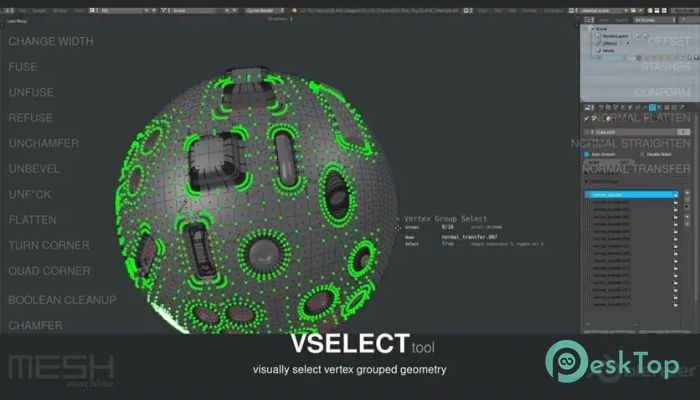
Quick boolean cleanup tools
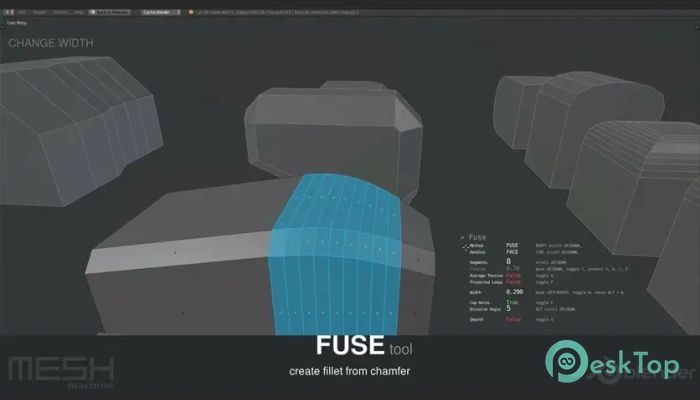
Smart chamfer and fillet creation
Easy edge loop adjustments
Topology fixing and cleanup tools
Surface blending and smoothing options
Non-destructive workflow support
Fast mesh manipulation tools
Customizable user interface
Seamless Blender integration
Fast Hard Surface Modeling
Hard surface modeling often requires precision and patience. Creating mechanical shapes, panels, and smooth transitions can be time-consuming. This addon changes that by providing specialized tools designed specifically for these tasks.
Instead of manually tweaking every vertex, users can apply smart commands that automatically create clean transitions. It's like switching from hand-drawing to using professional design tools. The process becomes faster and more accurate.
This makes it ideal for artists working on sci-fi designs, vehicles, weapons, architecture, and industrial assets. The workflow becomes smoother, and the final results look more polished.
Improved Bevel Workflow
Beveling is one of the most important aspects of hard surface modeling. However, Blender's default bevel tools can sometimes be difficult to manage in complex situations. The addon improves this process significantly.
It allows users to create smooth bevels with better control. You can easily adjust edges, fix shading issues, and maintain clean geometry. This makes the modeling process feel more natural and predictable.
Whether you're adding small details or shaping large surfaces, the bevel workflow becomes easier and more flexible.
Boolean Cleanup and Mesh Fixing
Boolean operations are useful but often leave messy geometry. Fixing these problems manually can be frustrating. This addon solves that problem with smart cleanup tools.
After performing Boolean operations, users can quickly clean up topology and fix shading issues. The tool automatically adjusts geometry to maintain clean mesh structures.
This feature is especially helpful when working with complex models. It saves time and ensures better results without extra effort.
Surface Blending Tools
Creating smooth transitions between surfaces is another challenge in modeling. The addon provides blending tools that help create smooth connections between edges and faces.
This makes models look more professional and polished. Instead of sharp or uneven transitions, users get smooth and natural surface flow.
This is particularly useful for product design, mechanical modeling, and game asset creation.
Non-Destructive Workflow
One of the biggest advantages is the non-destructive workflow. Users can make changes without permanently affecting the model. This allows for more flexibility and experimentation.
You can adjust shapes, modify edges, and test new ideas without worrying about breaking the mesh. It's like having an undo button for your entire modeling process.
This makes the tool suitable for both beginners and professionals.
Easy Integration with Blender
The addon integrates smoothly into Blender's interface. Once installed, the tools become available within the modeling workflow. There is no complicated setup required.
The interface is clean and easy to understand. Even new users can start using the tools quickly. This reduces the learning curve and improves productivity.
Because it works directly inside Blender, users don't need additional software. Everything happens within the same environment.
Performance and Efficiency
Modeling efficiency improves significantly with this addon. Tasks that normally take minutes can be completed in seconds. This makes it ideal for professional workflows.
The lightweight design ensures smooth performance even on mid-range systems. Users can work on complex models without experiencing slowdowns.
This makes it suitable for freelancers, designers, and game developers alike.
Who Should Use It
This addon is perfect for users of all types. Beginners can use it to simplify modeling tasks, while professionals can speed up their workflow.
3D Artists
Game Developers
Product Designers
Industrial Designers
Architectural Modelers
Blender Enthusiasts
Anyone working with hard surface modeling will find it useful.
Why It Improves Your Workflow
Think of modeling like building with blocks. Without proper tools, you have to shape every piece by hand. With this addon, it's like having smart tools that automatically shape blocks for you.
This improves speed, accuracy, and creativity. Instead of struggling with technical details, users can focus on designing and creating.
This results in better models and faster project completion.
System Requirements and Technical Details
Operating System: Windows 11 / 10 / 8.1 / 7
Processor: Minimum 1 GHz Processor (2.4 GHz recommended)
RAM: 2GB (4GB or more recommended)
Free Hard Disk Space: 200MB or more is recommended
Blender: 4.2 - 5.1

-
Program size72.92 MB
-
Version0.20.1
-
Program languagemultilanguage
-
Last updatedBefore 4 Month
-
Downloads11
 Paragon Hard Disk Manager 18 Business
 Aescripts MaskMotion
 Aescripts AE Glass
 Aescripts PreFlight
 Aescripts Risograph
 Aescripts Folder Fanatic