
 Arabic
  English
  Turkish
  Chinese
  Japanese
  Russian
  Spanish
  German
  French
  Hindi
Hindi Download Superhive Market - Node Minimap 1.0.4 for Windows
Download Superhive Market - Node Minimap 1.0.4 for Windows.
Superhive Market - Node Minimap Overview
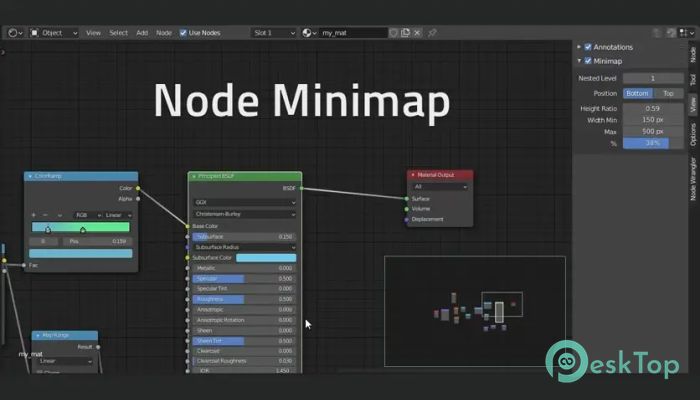
This add-on is built for creators who work with complex node setups and want a faster way to move around. Instead of endlessly zooming and panning, it provides a clear bird’s-eye view of the entire node tree. You can instantly understand how everything connects, even in very large projects. It fits naturally into Blender and feels like a native feature rather than an extra tool. What the Add-on Does It places a small interactive map inside the node editor that mirrors the full node layout. Think of it like a GPS for nodes. You always know where you are and where you want to go. By clicking or dragging inside the minimap, you can jump to any section of the node tree in seconds, saving time and reducing frustration.Features of Superhive Market - Node Minimap
Middle Mouse Button Navigation
Navigation feels smooth and natural thanks to support for the middle mouse button. You can pan around the node tree directly from the minimap, just like moving a camera over a large map. This simple control makes movement intuitive and keeps your workflow fast, especially when working on detailed materials or compositing setups.
Works with All Node Trees
The tool is compatible with every node editor in Blender. Whether you are working on shaders, geometry nodes, compositing, or textures, it behaves consistently. This means you do not need to learn different controls for different editors. Once you get used to it, the experience stays the same everywhere.
Clear Visuals with Node Colors
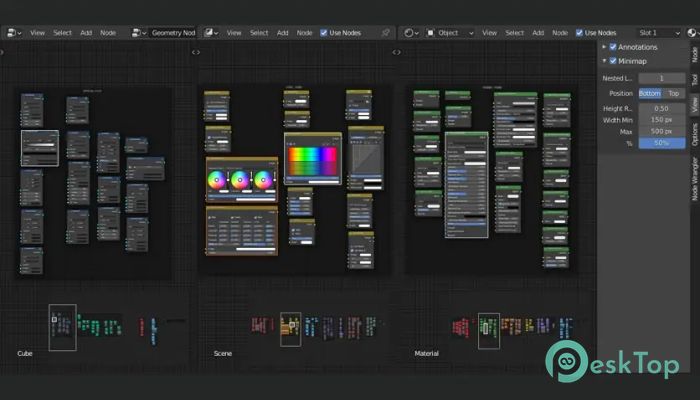
Nodes are displayed in colors by type, making the structure easier to read at a glance. Custom node colors are also supported, so any color coding you already use remains visible in the minimap. This visual clarity helps you recognize patterns and problem areas without zooming into each section.
Active and Selected Node Highlighting
To avoid losing track of what you are editing, the minimap highlights active and selected nodes. Even when you are zoomed out, you can instantly see where your current focus is. This is especially helpful in dense graphs where many nodes look similar at first glance.
Simplifying Complex Node Trees
Large projects often use nested frames, which can make the overview difficult to navigate. The add-on lets you limit how deeply nested frames are displayed. By reducing visual clutter, it keeps the minimap clean and readable, so you can focus on the overall structure rather than getting overwhelmed by details.
Customizable Minimap Appearance
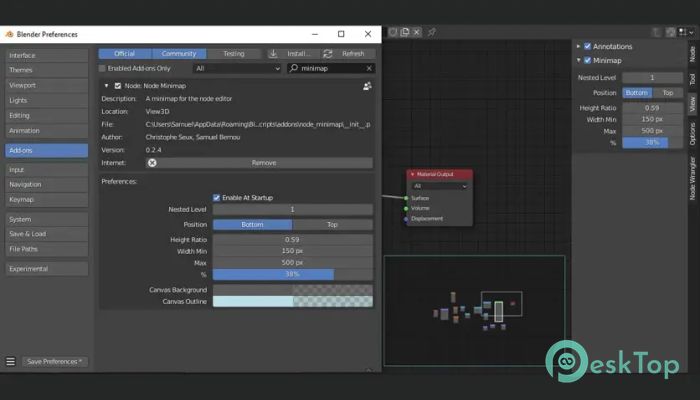
Everyone works differently, so flexibility matters. You can adjust the minimap’s position, size, and canvas color to match your layout and personal preference. Whether you want it small and subtle or large and always visible, the settings let you shape it to fit your workflow.
Why It Improves Productivity
Time spent navigating is time not spent creating. By giving you instant orientation and quick movement, the add-on reduces unnecessary actions. It feels like having a zoomed-out blueprint of your node setup at all times. This makes experimentation easier and encourages cleaner, more organized node graphs.
System Requirements and Technical Details
Operating System: Windows 11 / 10 / 8.1 / 7
Processor: Minimum 1 GHz Processor (2.4 GHz recommended)
RAM: 2GB (4GB or more recommended)
Free Hard Disk Space: 200MB or more is recommended
Blender: 4.4, 4.3, 4.2, 4.1, 4.0, 3.6, 3.5, 3.4, 3.3, 3.2, 3.1, 3.0, 2.93, 2.92, 2.91, 2.9

-
Program size11.96 KB
-
Version1.0.4
-
Program languagemultilanguage
-
Last updatedBefore 8 Month
-
Downloads8
 Paragon Hard Disk Manager 18 Business
 Aescripts MaskMotion
 Aescripts AE Glass
 Aescripts PreFlight
 Aescripts Risograph
 Aescripts Folder Fanatic