
 Arabic
  English
  Turkish
  Chinese
  Japanese
  Russian
  Spanish
  German
  French
  Hindi
Hindi Download Superhive Market - Pivot Transform 5.0.3 for Windows
Download Superhive Market - Pivot Transform 5.0.3 for Windows.
Superhive Market - Pivot Transform Overview
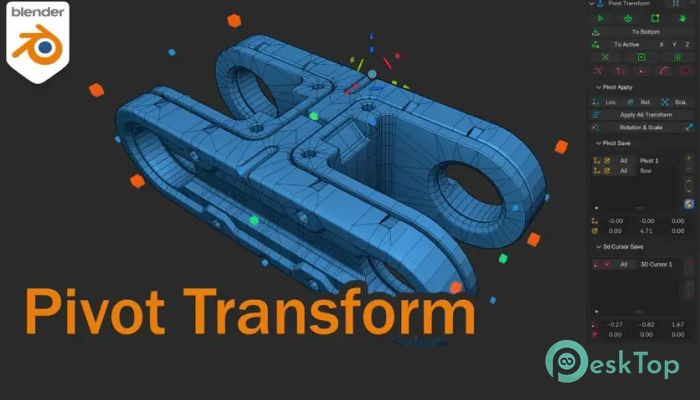
Working with 3D models often requires precise control over pivot points, and this addon makes that process incredibly simple. Instead of struggling with complex adjustments, this tool brings all essential pivot controls into a single convenient panel. It allows you to change pivot position, align to polygon normals, move and rotate pivots, and place them exactly where needed. Whether you're designing complex models or making quick edits, this solution provides flexibility and speed. It improves productivity by reducing repetitive steps and giving you greater control over object transformations. With easy-to-use features and a clean interface, it becomes an essential addition for anyone working in 3D environments.Features of Superhive Market - Pivot Transform
Simple and Flexible Pivot Control
Controlling pivot points can sometimes feel like balancing a pencil on your fingertip. One small movement can throw everything off. This addon makes the process smooth and predictable. You can easily reposition the pivot point without affecting the object itself.
It provides quick options to move the pivot point exactly where needed. Whether you're aligning objects for animation or preparing models for export, the process becomes much faster. The intuitive interface ensures that even beginners can use it without confusion.
Align Pivot to Polygon Normals
One of the most useful features is the ability to align the pivot to polygon normals. This is especially helpful when working with angled surfaces or irregular shapes. Instead of manually adjusting orientation, the tool does it automatically.
This feature saves time and improves accuracy. You can quickly align pivots to match the direction of any surface. It makes tasks like rotation, scaling, and transformation easier and more precise.
Rotate and Move Pivot Easily
Moving and rotating pivot points manually can take time. This addon simplifies the process with dedicated controls. You can rotate the pivot independently from the object, giving you full control over transformations.
It works like adjusting a camera tripod. Once the pivot is placed correctly, everything becomes easier to control. This makes animation and modeling workflows more efficient.
Place Pivot in Object Center
Sometimes, you just want the pivot centered. This feature allows you to quickly place it in the middle of an object. No calculations or manual positioning required.
It ensures accurate scaling and rotation. This is especially useful when working with symmetrical objects or preparing models for animation.
Align Pivot to 3D Cursor
The ability to align pivot points to the 3D cursor gives users more flexibility. You can place the cursor anywhere and instantly move the pivot to that location.
This feature works perfectly when you need precise placement. It reduces guesswork and speeds up modeling workflows. It also improves overall control when working with multiple objects.
Use Bounding Box for Extreme Positions
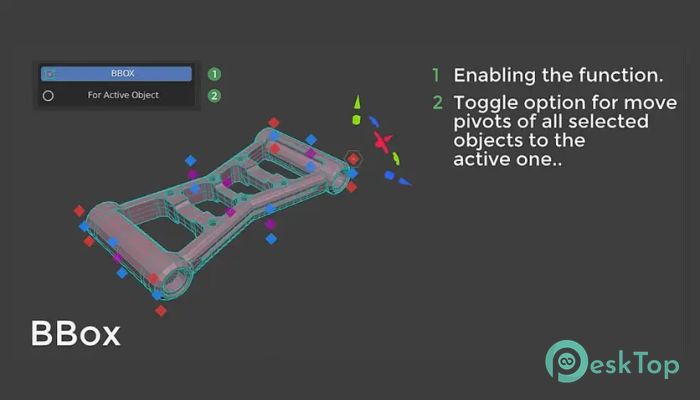
Bounding box alignment is another powerful feature. You can quickly place the pivot at extreme positions such as top, bottom, left, or right.
This works like snapping objects to edges. It ensures consistent placement and speeds up modeling. It also improves alignment when working with multiple assets.
Save Pivot Position and Rotation
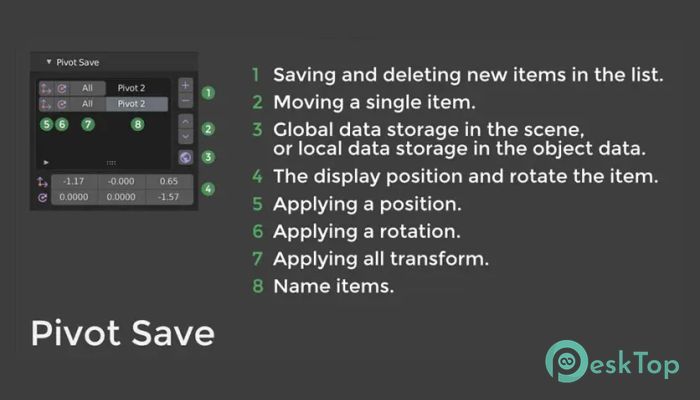
Saving pivot position and rotation is a huge time saver. You can store your preferred settings and reuse them later. This helps maintain consistency across projects.
This feature works like bookmarking your favorite settings. Instead of repeating the same steps, you can quickly apply saved configurations.
Convenient User Interface
The addon consolidates all features into a single, organized panel. Everything is easy to access and simple to use. You don't need to navigate through multiple menus.
The clean layout ensures a smooth workflow. Even complex tasks become simple with the available controls. This makes it suitable for beginners and professionals alike.
Boost Productivity and Workflow
Speed matters when working on 3D projects. This tool reduces manual adjustments and improves efficiency. Tasks that normally take minutes can be completed in seconds.
It helps you focus on creativity rather than technical adjustments. This leads to better results and faster project completion.
Perfect for Beginners and Professionals
Whether you're new to 3D modeling or an experienced designer, this addon fits your workflow. Beginners benefit from its simplicity, while professionals appreciate its precision.
It acts like a helpful assistant, quickly handling pivot adjustments. This makes it a valuable addition to any 3D workflow.
System Requirements and Technical Details
Operating System: Windows 11 / 10 / 8.1 / 7
Processor: Minimum 1 GHz Processor (2.4 GHz recommended)
RAM: 2GB (4GB or more recommended)
Free Hard Disk Space: 200MB or more is recommended
Blender: 3.0 - 5.0

-
Program size270.39 KB
-
Version5.0.3
-
Program languagemultilanguage
-
Last updatedBefore 4 Month
-
Downloads28
 Paragon Hard Disk Manager 18 Business
 Aescripts MaskMotion
 Aescripts AE Glass
 Aescripts PreFlight
 Aescripts Risograph
 Aescripts Folder Fanatic