
 Arabic
  English
  Turkish
  Chinese
  Japanese
  Russian
  Spanish
  German
  French
  Hindi
Hindi Download Superhive Market - Quick Finger Collision 0.6.0 for Windows
Download Superhive Market - Quick Finger Collision 0.6.0 for Windows.
Superhive Market - Quick Finger Collision Overview
Creating realistic hand poses in Blender can be surprisingly difficult. Fingers often clip through objects, and adjusting each joint manually takes time and patience. This addon simplifies that entire process by adding smart collision-aware behavior to finger bones, making hand posing faster, smoother, and more natural. The tool focuses on solving one of the most common problems in 3D animation and character posing: realistic hand-object interaction. Instead of constantly adjusting finger bones to avoid clipping, the addon helps fingers automatically respect object surfaces. This makes the posing workflow more intuitive and less frustrating. Designed to be lightweight and efficient, it integrates seamlessly into Blender without slowing down performance. Whether you're working on character animation, product visualization, or still renders, it helps create believable hand poses with minimal effort.Features of Superhive Market - Quick Finger Collision
Smart Finger Collision System
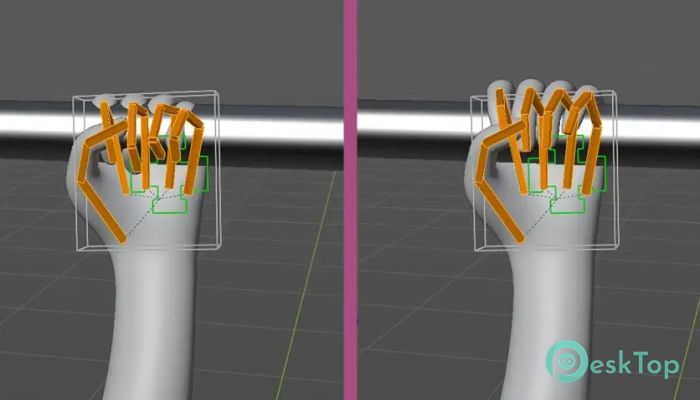
The biggest highlight is the smart collision behavior applied to finger bones. When you move a hand toward an object, the fingers respond intelligently rather than passing through surfaces. This creates a natural interaction between the hand and the object.
It works like placing your real hand on a table. Your fingers automatically stop when they touch the surface. In the same way, this addon makes finger positioning feel intuitive and realistic, reducing the need for constant manual corrections.
This feature is particularly useful for animation, where realistic contact matters. From grabbing objects to resting hands on surfaces, everything becomes easier and more believable.
Clean Object Contact for Realistic Posing
Achieving clean object contact is essential when working with close-up shots or professional renders. The addon ensures fingers properly wrap around objects, creating natural gripping poses.
Instead of adjusting each finger individually, you can focus on the overall hand motion. The software automatically handles fine adjustments, saving time and improving results. This makes it ideal for artists working under tight deadlines.
The result is cleaner animations, more realistic still images, and improved workflow efficiency. It helps eliminate awkward finger positions that can break immersion.
Lightweight and Performance Friendly
One of the best aspects of this addon is its lightweight design. It doesn't overload Blender or slow down your scene. You can use it even in complex projects without worrying about performance issues.
The tool runs smoothly in the background, allowing you to keep working without interruptions. This makes it suitable for both beginners and professionals who want a simple yet powerful solution.
Because of its minimal footprint, it fits perfectly into existing workflows. You don't need powerful hardware to benefit from its features.
Easy Integration with Blender Workflow
The addon integrates directly into Blender's posing system. There's no complicated setup or learning curve. Once installed, it becomes part of your regular rigging and posing workflow.
Controls are intuitive and straightforward. You simply move the hand as usual, and the collision behavior handles the rest. This makes it feel like a natural extension of Blender rather than a separate tool.
This simplicity is especially helpful for beginners. Even users with limited rigging experience can quickly create professional-looking hand poses.
Ideal for Animation and Still Renders
The tool works equally well for both animation and static scenes. Animators benefit from smooth transitions and consistent finger contact across frames. This reduces the need for frame-by-frame adjustments.
For still renders, it helps create polished and realistic hand positions instantly. Whether you're posing a character holding a cup, phone, or tool, it delivers clean and believable results.
This flexibility makes it useful for multiple industries, including game development, product visualization, and cinematic animation.
Improved Workflow Efficiency
Manual finger posing can significantly slow down production. The addon speeds up this process by automating collision handling. This allows artists to focus more on creativity rather than on technical adjustments.
It acts like a helpful assistant that prevents common mistakes. Instead of constantly checking finger placement, you can trust the system to maintain realistic contact.
This improves productivity while maintaining high-quality results. It also reduces frustration during complex posing tasks.
Perfect for Character Artists and Animators
Character artists often spend a lot of time refining hand poses. The addon simplifies this process by providing accurate contact and natural finger behavior.
Animators benefit from smoother motion and reduced manual corrections. This makes animation workflows more efficient and enjoyable.
Even hobbyists can take advantage of its features. It helps create professional-looking poses without requiring advanced rigging knowledge.
Simple Installation and Usage
Installing the addon is quick and straightforward. After adding it to Blender, you can start using it immediately. No complicated configuration is required.
Once activated, it works automatically when posing hands. This simplicity makes it accessible for all skill levels.
The tool is designed to enhance your workflow, not complicate it. Everything is optimized for ease of use.
System Requirements and Technical Details
Operating System: Windows 11 / 10 / 8.1 / 7
Processor: Minimum 1 GHz Processor (2.4 GHz recommended)
RAM: 2GB (4GB or more recommended)
Free Hard Disk Space: 200MB or more is recommended
Blender: 4.0 - 5.1

-
Program size8.78 KB
-
Version0.6.0
-
Program languagemultilanguage
-
Last updatedBefore 5 Month
-
Downloads21
 Paragon Hard Disk Manager 18 Business
 Aescripts MaskMotion
 Aescripts AE Glass
 Aescripts PreFlight
 Aescripts Risograph
 Aescripts Folder Fanatic