
 Arabic
  English
  Turkish
  Chinese
  Japanese
  Russian
  Spanish
  German
  French
  Hindi
Hindi Download Superhive Market - Render Profiler 0.9.4 for Windows
Download Superhive Market - Render Profiler 0.9.4 for Windows.
Superhive Market - Render Profiler Overview
Working with complex Blender scenes can sometimes feel like driving through heavy traffic without knowing where the congestion is. This tool solves that problem by acting like a performance dashboard for your renders. It profiles rendering and viewport performance and provides a live HTML report directly in your browser. The add-on tracks modifier timings, mesh statistics, texture usage, memory estimates, and overall scene performance. Instead of guessing which object is slowing down your workflow, it shows you exactly where the bottleneck is. The report updates automatically and stays in sync with Blender, so you can make adjustments and see the results immediately. Whether you're working on animation, product visualization, or complex environments, the software provides the clarity needed to optimize your workflow. It helps reduce render times, improve viewport responsiveness, and make smarter decisions when building scenes.Features of Superhive Market - Render Profiler
Live Performance Analysis
One of the most impressive features is live performance monitoring. As soon as you start working in Blender, the tool begins collecting data and presenting it in an easy-to-understand HTML report. This report opens in your browser and updates in real time.
This means you do not have to constantly restart renders or run manual tests. You can instantly see which objects, modifiers, or textures are affecting performance. It feels like having a live performance meter for your entire project.
Live monitoring helps artists quickly identify and resolve issues before they become major problems. This saves time and significantly improves productivity.
Detailed Modifier Timing Insights
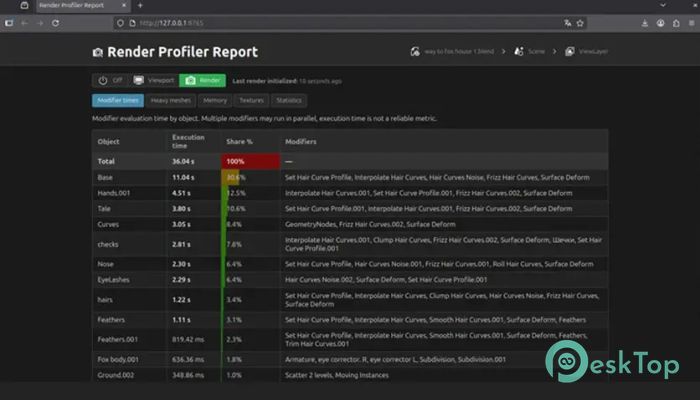
Modifiers are essential in Blender, but they can also slow down scenes if not optimized. The tool analyzes modifier timings and shows how much processing time each modifier uses.
This information makes it easier to understand which modifiers are heavy and which ones are efficient. For example, subdivision surfaces, booleans, or geometry nodes may consume more resources. With clear data, users can simplify modifiers or reorganize workflows for better performance.
Instead of blindly disabling modifiers one by one, the software gives precise insights. This helps maintain quality while improving speed.
Mesh and Geometry Statistics
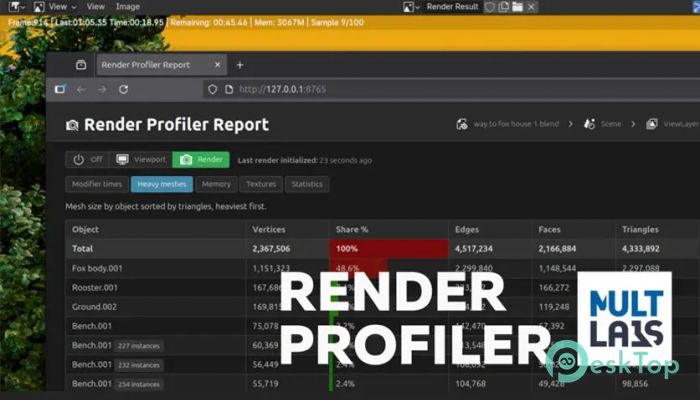
Large meshes often cause slow rendering and viewport lag. The add-on provides detailed mesh statistics, including polygon count, vertex count, and object complexity.
These statistics help users identify heavy objects that may need optimization. Reducing polygon count or simplifying geometry can significantly improve performance.
The tool presents this data in a structured format, making it easy to scan and analyze. Even beginners can quickly understand which objects need attention.
Texture and Memory Usage Analysis
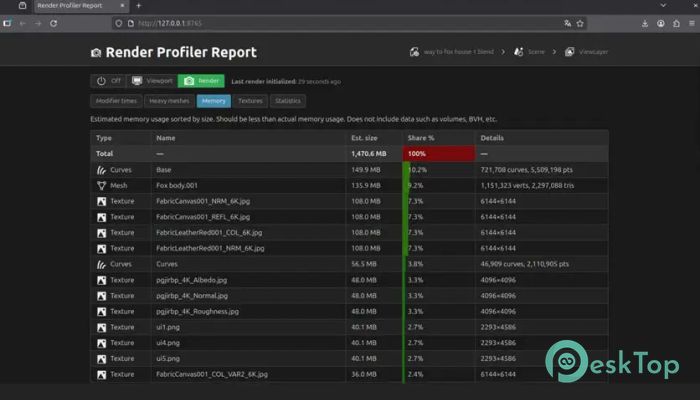
Textures play a major role in rendering performance. High-resolution textures can quickly consume memory and slow down the system. The software tracks texture usage and estimates memory consumption.
This feature helps users manage texture sizes effectively. For example, switching from 8K textures to 4K can dramatically improve performance without noticeable loss of quality.
Memory estimates also prevent crashes caused by heavy scenes. By monitoring usage, users can keep their projects stable and efficient.
Real-Time Sync with Blender
The software remains synced with Blender at all times. As soon as changes are made, the report updates automatically. This eliminates the need to refresh or rerun performance tests.
Real-time syncing creates a smooth workflow. Users can optimize scenes step by step and immediately see the results. It feels similar to tuning a car engine while watching performance improvements live.
This feature makes optimization faster, easier, and more intuitive.
Clean and Easy HTML Reports
The add-on generates clean HTML reports that open in any browser. These reports are organized into sections such as modifiers, meshes, textures, and memory usage.
Each section provides clear statistics and insights. The layout is simple and easy to read, even for beginners. Users can quickly identify performance issues and take action.
Because the reports run in a browser, they are lightweight and flexible. This ensures smooth performance even with complex scenes.
Improved Workflow Efficiency
Optimizing Blender scenes manually can be time-consuming. This tool simplifies the process by providing actionable insights. Instead of guessing, users rely on real data.
This leads to faster rendering, smoother viewport navigation, and improved productivity. Artists can focus more on creativity rather than troubleshooting performance problems.
The result is a smoother workflow and better final output.
Helpful for Beginners and Professionals
Beginners benefit from understanding how scene complexity affects performance. The tool teaches optimization techniques through real data.
Professionals benefit from saving time and improving workflow efficiency. Large projects with heavy assets become easier to manage.
Whether working on animations, games, or visual effects, the software provides valuable insights for all skill levels.
Lightweight and Easy to Use
The add-on is lightweight and does not slow down Blender. Installation is simple, and the interface is user-friendly. Once installed, it begins analyzing scenes automatically.
Users do not need advanced technical knowledge to use it. The straightforward design makes performance analysis accessible to everyone.
Key Features
Live HTML performance reports
Modifier timing analysis
Mesh and geometry statistics
Texture usage tracking
Memory estimation
Real-time syncing with Blender
Clean and easy interface
Lightweight and efficient
Improves render speed
Viewport performance optimization
System Requirements and Technical Details
Operating System: Windows 11 / 10 / 8.1 / 7
Processor: Minimum 1 GHz Processor (2.4 GHz recommended)
RAM: 2GB (4GB or more recommended)
Free Hard Disk Space: 200MB or more is recommended
Blender: 4.2 - 5.0

-
Program size41.02 KB
-
Version0.9.4
-
Program languagemultilanguage
-
Last updatedBefore 4 Month
-
Downloads8
 Paragon Hard Disk Manager 18 Business
 Aescripts MaskMotion
 Aescripts AE Glass
 Aescripts PreFlight
 Aescripts Risograph
 Aescripts Folder Fanatic