
 Arabic
  English
  Turkish
  Chinese
  Japanese
  Russian
  Spanish
  German
  French
  Hindi
Hindi Download Superhive Market - Render Toolbox 1.2 for Windows
Download Superhive Market - Render Toolbox 1.2 for Windows.
Superhive Market - Render Toolbox Overview
This toolkit is designed to streamline your rendering workflow by giving you direct control over lighting, cameras, and visual effects through a clean interface. It removes repetitive steps and replaces them with fast, artist-friendly shortcuts so that you can focus more on creativity rather than technical setup.Features of Superhive Market - Render Toolbox
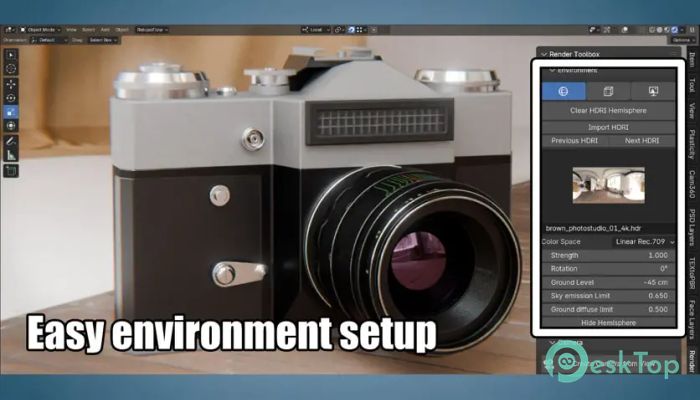
Easy HDRI Management
This toolkit is designed to streamline your rendering workflow by giving you direct control over lighting, cameras, and visual effects through a clean interface. It removes repetitive steps and replaces them with fast, artist-friendly shortcuts so that you can focus more on creativity rather than technical setup.
One of the tool's strongest features is its handling of HDRIs. You can load and control them in just a few clicks without digging through menus. The interface lets you rotate the environment, change its intensity, adjust the ground level, and balance the lighting until everything feels right. For artists who want quick scene mood adjustments, this feature feels like working with a lighting dial.
Camera Bookmarks for Quick Navigation
Switching camera angles can be frustrating during projects, especially when you need to return to a previous view. This toolkit solves that by allowing you to create camera bookmarks instantly. Each bookmark stores complete transform data and settings—no keyframes, no complex setups—just simple, reliable view switching. It keeps your workflow organized, especially when working on animation, product shots, or detailed models.
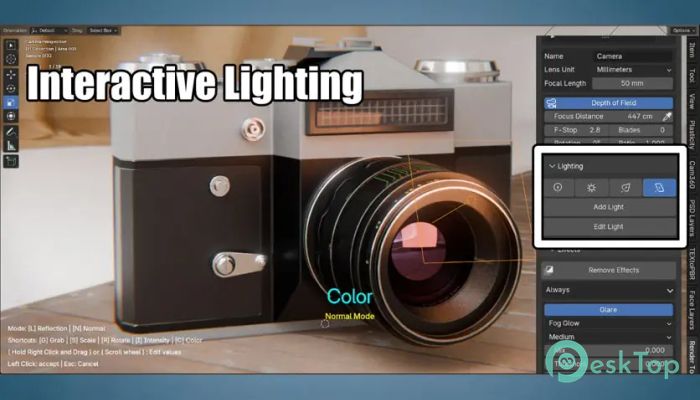
Interactive Lighting Paint
This feature lets you paint light directly onto your model. Instead of adjusting lamps manually, you paint the highlights and shape the look exactly where you want attention. It feels almost like sculpting with light, guiding the viewer’s eye naturally. The tool interprets your strokes and adjusts the lighting in real time, making the creative process more intuitive and expressive.
Realistic Camera Effects
You can apply several polished camera effects without needing external plugins. It includes glare on bright highlights, lens distortion, chromatic aberration for a cinematic feel, film grain for texture, and a vignette to direct the focus inward. All effects are applied cleanly and respond correctly even on transparent backgrounds, which saves time when exporting renders for compositing.
Improved Viewport Behavior
One key improvement is how well the effects behave inside the viewport. Whenever you add an impact, the tool automatically activates it for immediate preview. Switching cameras or toggling effects also updates correctly across multiple viewports, keeping your visual workspace consistent. This avoids confusion and enables a smoother creative workflow.
Enhanced Sunlight Tools
The tool now supports adding sunlight through Hemisphere and Cube setups without issues. This ensures natural lighting and faster scene setup, especially for outdoor environments. It fixes older issues where sunlight setups would fail, making the tool more reliable in daily use.
System Requirements and Technical Details
Operating System: Windows 11 / 10 / 8.1 / 7
Processor: Minimum 1 GHz Processor (2.4 GHz recommended)
RAM: 2GB (4GB or more recommended)
Free Hard Disk Space: 200MB or more is recommended
Blender: 4.2 - 4.5

-
Program size31.04 KB
-
Version1.2
-
Program languagemultilanguage
-
Last updatedBefore 10 Month
-
Downloads6
 Paragon Hard Disk Manager 18 Business
 Aescripts MaskMotion
 Aescripts AE Glass
 Aescripts PreFlight
 Aescripts Risograph
 Aescripts Folder Fanatic