
 Arabic
  English
  Turkish
  Chinese
  Japanese
  Russian
  Spanish
  German
  French
  Hindi
Hindi Download Superhive Market - VoxelVision III v2.0.1 for Windows
Download Superhive Market - VoxelVision III v2.0.1 for Windows.
Superhive Market - VoxelVision III Overview
Creating Minecraft-style structures from complex 3D models usually takes hours of manual work. This addon simplifies everything by automatically transforming images and models into voxel-based Minecraft blocks. Designed specifically for Blender, it uses powerful geometry nodes to convert objects into block-style visuals in real time. The addon is built for creators, designers, Minecraft builders, and content creators who want fast results without complicated workflows. Whether someone wants to generate landscapes, buildings, characters, or gradients, the software makes the process smooth and enjoyable. It works like a bridge between professional 3D modeling and Minecraft-style building. Even beginners can start quickly. While a basic understanding of Blender helps, the intuitive settings make the tool easy to explore. Users can experiment with different block sizes, gradients, and styles, allowing endless creative possibilities.Features of Superhive Market - VoxelVision III
Real-Time Minecraft Block Conversion
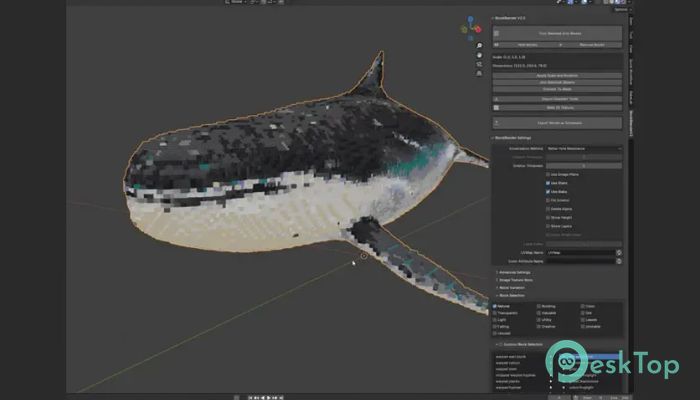
The biggest strength of this addon is real-time conversion. Instead of repeatedly exporting models, users can instantly preview block transformations in Blender. This saves time and allows quick adjustments.
The software uses geometry nodes, which means everything updates dynamically. Change the model, and the blocks update instantly. Modify colors, and the voxel structure refreshes immediately. It feels like painting with blocks rather than building them one by one.
This real-time capability makes it perfect for experimentation. Creators can test different shapes, gradients, and block densities without restarting the process.
Perfect for Minecraft Building Inspiration
Sometimes, Minecraft builders struggle with large structures or complex gradients. This addon acts like a creative assistant. It converts images and 3D objects into build-ready block layouts.
For example, users can import a character model and convert it into block form. The result becomes a blueprint for building inside Minecraft. It works like a smart guide, translating complex shapes into simple blocks.
This feature is especially useful for:
Large Minecraft builds
Pixel art structures
Gradient-based buildings
Landscape generation
Character builds
Easy to Use for Beginners
Despite being powerful, the addon remains beginner-friendly. The interface is clean, and most settings are easy to understand. Users can quickly import models, apply voxel conversion, and adjust parameters.
The software behaves like a creative playground. Adjust the block size to make the builds more detailed. Increase spacing for stylized looks. Change gradients for smoother transitions. These options make learning enjoyable and rewarding.
Even users new to Blender can follow simple steps:
Import 3D model or image
Apply voxel conversion
Adjust block size
Customize gradients
Export or build in Minecraft
Powerful Geometry Nodes Integration
Geometry nodes bring flexibility and speed. Instead of static conversions, everything remains editable. This allows creators to tweak builds at any time.
The addon integrates seamlessly into Blender’s workflow. No complicated setup is required. Users can simply apply the node system and start experimenting.
This dynamic workflow makes it useful for:
Game designers
Minecraft builders
3D artists
Content creators
Architecture designers
Customizable Block Settings
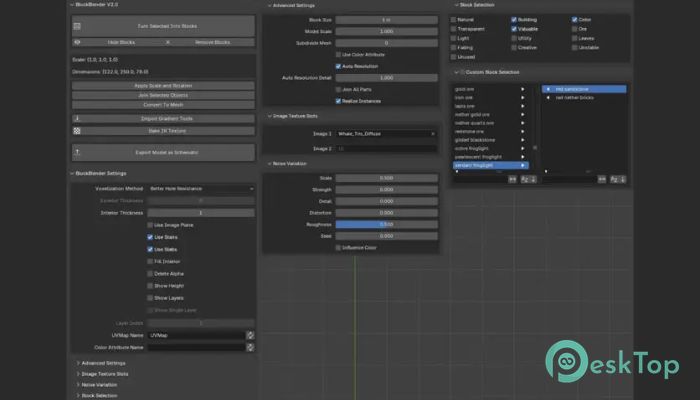
Customization plays a huge role in creativity. The tool offers multiple settings to control voxel conversion. Users can change block size, density, spacing, and gradient strength.
This flexibility helps create both simple and highly detailed builds. Smaller blocks produce more detailed structures. Larger blocks create stylized designs.
Creators can also experiment with color gradients. This feature is useful for generating smooth transitions between colors. It works great for landscapes, buildings, and artistic structures.
Fast Performance and Smooth Workflow
Performance matters when working with complex models. The addon is optimized to handle heavy scenes without slowing down the workflow. Real-time updates remain smooth even with detailed structures.
The software feels lightweight and responsive. Users can experiment freely without worrying about lag or crashes. This makes it suitable for both simple and advanced projects.
Fast performance also improves productivity. Creators spend more time designing and less time waiting.
Creative Use Cases
The addon supports a wide range of creative projects. Builders can convert landscapes, generate city layouts, or design characters. Designers can create voxel-style assets for games.
Some popular use cases include:
Minecraft structure planning
Voxel art creation
Game asset generation
Pixel-style animations
Creative building inspiration
The flexibility makes it useful for beginners and professionals alike.
Simple Installation and Setup
Installation is straightforward. Users only need to install the addon into Blender and activate it. Once enabled, the conversion tools become available immediately.
The setup process is smooth and beginner-friendly. No complicated configuration is required. Users can start converting models within minutes.
Why Creators Love This Tool
Creators appreciate simplicity combined with power. The software delivers both. It removes manual building work and replaces it with smart automation.
The addon feels like a translator. It takes complex 3D designs and converts them into Minecraft blocks effortlessly. This makes building faster and more enjoyable.
Many creators use it for inspiration, planning, and content creation. The workflow remains smooth, creative, and fun.
System Requirements and Technical Details
Operating System: Windows 11 / 10 / 8.1 / 7
Processor: Minimum 1 GHz Processor (2.4 GHz recommended)
RAM: 2GB (4GB or more recommended)
Free Hard Disk Space: 200MB or more is recommended
Blender: 5.0

-
Program size94.27 MB
-
Versionv2.0.1
-
Program languagemultilanguage
-
Last updatedBefore 4 Month
-
Downloads21
 Paragon Hard Disk Manager 18 Business
 Aescripts MaskMotion
 Aescripts AE Glass
 Aescripts PreFlight
 Aescripts Risograph
 Aescripts Folder Fanatic