
 Arabic
  English
  Turkish
  Chinese
  Japanese
  Russian
  Spanish
  German
  French
  Hindi
Hindi Download Zakaria Benkabouche Shift 1.0 for Windows
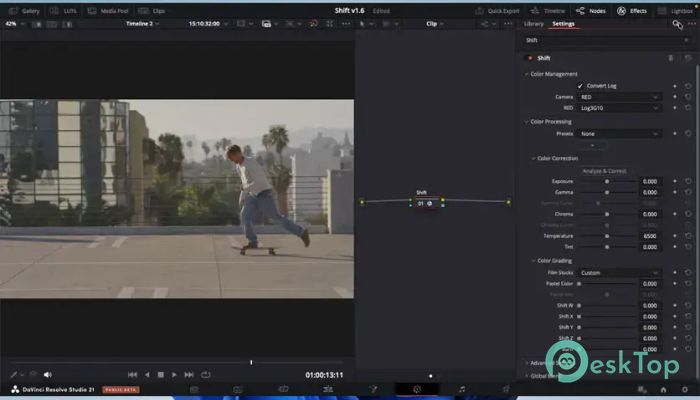
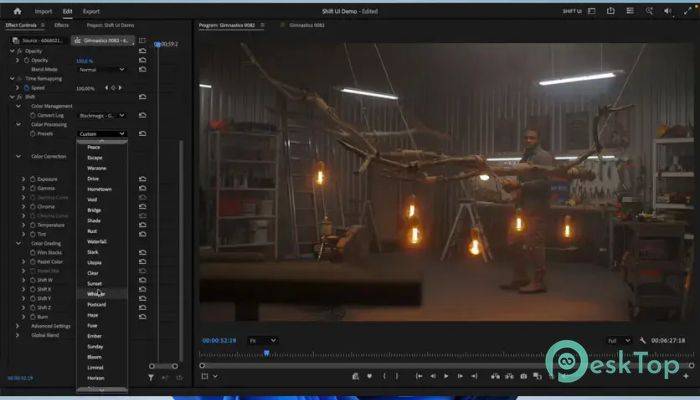
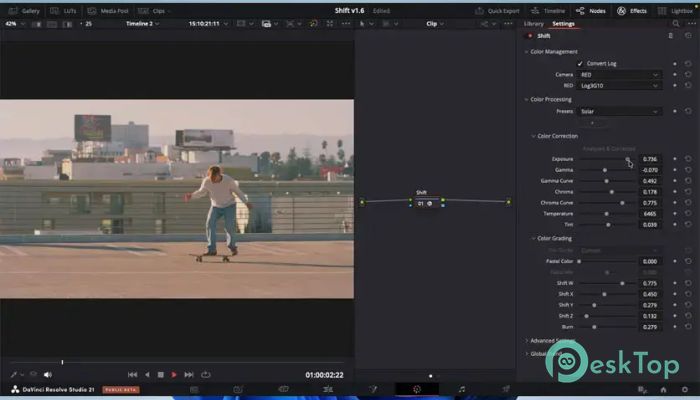
Download Zakaria Benkabouche Shift 1.0 for Windows.
Zakaria Benkabouche Shift Overview
This advanced plugin is designed for editors and filmmakers who want cinematic color correction without spending hours manually tweaking every setting. The software intelligently analyzes footage pixel by pixel and applies balanced corrections while preserving the scene's original mood. It works like an experienced colorist sitting beside you, helping improve visuals while preserving natural tones. The tool is especially useful for content creators, YouTubers, filmmakers, and video editors who need professional-looking results quickly. Instead of over-processing clips, it focuses on subtle and realistic corrections that enhance the image naturally.Features of Zakaria Benkabouche Shift
Smart Automatic Color Correction
One of the software's biggest strengths is its intelligent analysis system. It carefully scans every frame and automatically adjusts luminance, chrominance, exposure, and white balance. The process feels smooth and reliable because the adjustments remain conservative rather than aggressive.
This means your videos retain their original atmosphere rather than looking artificial. Many color-grading tools push colors too hard, making footage appear fake. Here, the balance feels more realistic, similar to how movies maintain detail while still looking cinematic.
The automatic correction system also saves a huge amount of time. Instead of manually changing multiple controls one by one, editors can start with the automatic result and fine-tune from there.
Smart Sliders for Faster Workflow
The connected slider system is another feature that makes editing easier. Traditional grading software often requires constant adjustments across multiple controls. This tool intelligently links important sliders, creating a smoother workflow.
When changing one value, related settings respond naturally to maintain balance. It feels similar to driving a modern car with power steering rather than an older, heavier vehicle. Everything becomes more fluid and precise.
This approach is very useful for beginners because it reduces confusion during grading. Professionals also benefit because they can work faster while maintaining consistency across projects.
Advanced Exposure and Contrast Controls
The exposure engine is built around realistic camera sensor behavior. Instead of simply brightening the image, it adjusts light levels in a more natural way. Highlights remain controlled while shadows keep important details.
The gamma and gamma curve controls add cinematic contrast without damaging colors. Some editing tools create harsh contrast that destroys skin tones or color depth. Here, the algorithm maintains color integrity while adding dramatic depth to the footage.
This produces a more film-like appearance that works perfectly for documentaries, travel videos, music videos, and short films. Dark scenes become richer, while bright scenes keep their realistic glow.
Rich Chroma and Color Enhancement
The chroma system gives footage stronger and more emotional colors without making them look oversaturated. Instead of pushing every color equally, the software carefully manages saturation to maintain balance.
The chroma curve also allows users to create warm or cool tonal styles. Warm tones can make scenes feel nostalgic and emotional, while cooler tones create a modern cinematic atmosphere. The transition between shades remains smooth and natural.
Editors who work with portraits and skin tones will appreciate how well the tool protects facial colors. Human skin often becomes difficult to manage during heavy grading, but this system handles it with impressive accuracy.
Realistic Temperature and Tint Adjustment
Color temperature and tint settings are based on the real characteristics of camera sensors. This allows footage to look more authentic compared to standard digital corrections.
If a clip looks too cold, the software can warm it naturally without turning everything orange. If lighting creates unwanted green or magenta tones, the tint controls help gently restore balance.
This feature becomes extremely useful when working with mixed lighting conditions. Indoor scenes, sunset footage, or fluorescent environments can all be corrected smoothly without losing image quality.
Subtractive Color and Filmic Mixing
The subtractive color system introduces advanced mixing capabilities inspired by cinematic workflows. Instead of relying solely on basic RGB controls, it blends colors in a more artistic, filmic way.
The result feels deeper and more emotional. Colors interact naturally, similar to traditional film processing. This makes scenes appear more organic and visually pleasing.
The advanced mixing controls also help protect important areas, such as skin tones. Even after strong stylistic grading, faces remain believable and pleasant to watch.
Shift WXYZ Technology
This feature creates intelligent filmic contrast and emotional depth inside the footage. It calibrates color relationships carefully to add character while maintaining image balance.
The effect can transform flat-looking footage into something more cinematic and engaging. Scenes gain atmosphere and personality without appearing over-edited.
For creators who want a signature visual style, this system provides an excellent starting point. It adds subtle emotional energy, helping videos stand out.
Burn Effect for Warm Cinematic Looks
The burn algorithm creates warm highlights and intense colors with smooth hue transitions. It gives footage a rich cinematic glow that feels stylish without becoming distracting.
This effect works especially well for sunsets, travel clips, lifestyle content, and dramatic scenes. Warm tones spread naturally across the image, adding softness and emotion.
Unlike many fake glow effects, the results remain controlled and refined. The footage still maintains detail and texture while taking on a more artistic presentation.
Easy Workflow for Beginners and Professionals
The software is designed to be accessible to all types of editors. Beginners can rely on automatic analysis to improve footage quickly, while professionals can dive deeper into manual adjustments.
The layout remains clean and efficient, helping users focus on creativity rather than technical complexity. This balance between automation and control makes the tool highly versatile.
Whether editing YouTube videos, cinematic shorts, commercials, or social media content, it delivers a faster, more professional grading experience.
System Requirements and Technical Details
Operating System: Windows 11 / 10 / 8.1 / 7
Processor: Minimum 1 GHz Processor (2.4 GHz recommended)
RAM: 2GB (4GB or more recommended)
Free Hard Disk Space: 200MB or more is recommended

-
Program size72.80 MB
-
Version1.0
-
Program languagemultilanguage
-
Last updatedBefore 4 Month
-
Downloads60
 Paragon Hard Disk Manager 18 Business
 Aescripts MaskMotion
 Aescripts AE Glass
 Aescripts PreFlight
 Aescripts Risograph
 Aescripts Folder Fanatic