
 Arabic
  English
  Turkish
  Chinese
  Japanese
  Russian
  Spanish
  German
  French
  Hindi
Hindi Download ZDSoft Meeting Recorder 1.0.1 for Windows
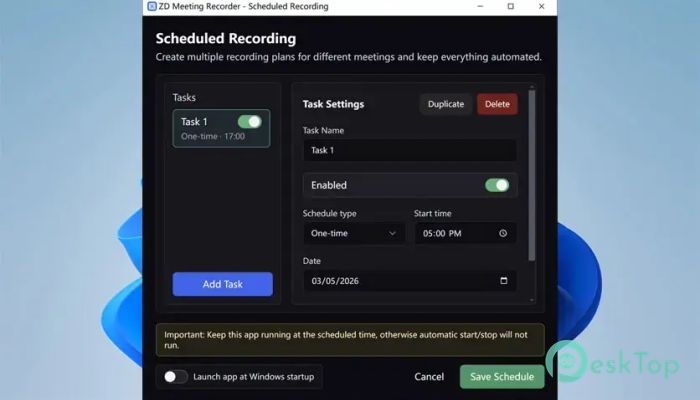
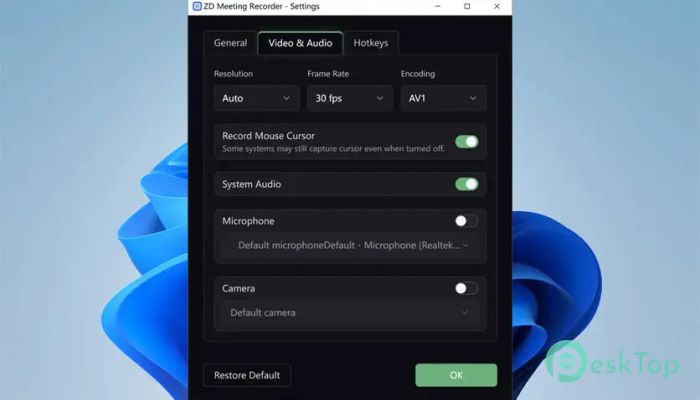
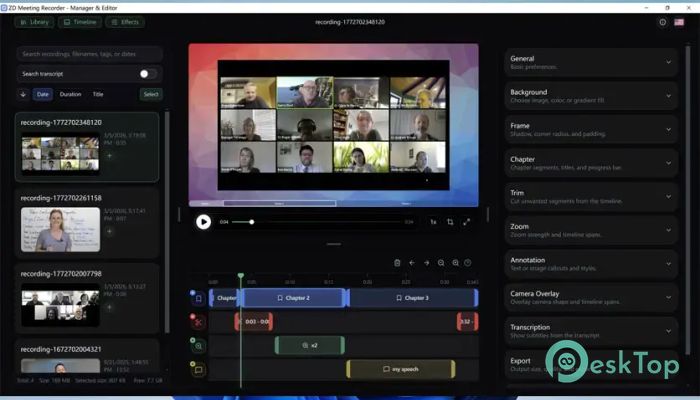
Download ZDSoft Meeting Recorder 1.0.1 for Windows.
ZDSoft Meeting Recorder Overview
Keeping track of online meetings and classes can feel like trying to catch water with your hands. Important details slip away fast, especially during long discussions or training sessions. This software solves that problem by recording everything clearly and turning spoken words into searchable text. The tool is specifically designed for people who regularly attend webinars, online classes, customer calls, and team discussions. Instead of wasting time replaying entire videos, users can quickly search transcripts and jump directly to the exact moment they need. That makes reviewing information much faster and easier. Unlike a normal screen recorder, this solution focuses heavily on meeting workflows. It combines video capture with local AI transcription, giving users more control over both privacy and productivity.Features of ZDSoft Meeting Recorder
Record online meetings, webinars, and training sessions
Generate local AI transcripts directly on the computer
Search transcript text instantly
Jump to exact video moments from the transcript results
Trim and merge recordings easily
Add subtitles and annotations to videos
Create reusable training clips
Supports camera overlays and zoom effects
Privacy-focused local transcription workflow
Simple and user-friendly interface
Dedicated Recording for Meetings and Classes
Many screen recorders try to do everything at once. This one takes a different path. It is built specifically for online communication and learning sessions. That focused design helps it perform smoothly during long recordings without becoming complicated.
Whether someone is attending a business meeting or an online course, the software captures both video and audio clearly. It works well for project reviews, remote teamwork, coaching sessions, and customer support calls.
The recording process is simple. Users can start recording with just a few clicks and let the tool handle the rest in the background. It feels less like operating heavy editing software and more like pressing a reliable digital memory button.
Local AI Transcription for Better Privacy
Privacy is becoming more important every day. Many online services upload recordings to cloud servers for transcription, which can expose sensitive information. This tool avoids that issue by generating transcripts locally on the user’s own machine.
That means internal discussions, company meetings, or personal study sessions stay under the user’s control. For businesses and educational institutions, this approach offers extra peace of mind.
The transcription feature is also surprisingly practical. After recording a long session, users receive searchable text that makes it quick and stress-free to find information. Instead of listening to a two-hour discussion again, they can simply type a keyword to instantly locate the exact section.
Searchable Knowledge for Faster Review
Long recordings can be frustrating when users need to find a small detail hidden within hours of content. This software changes that experience completely.
The transcript search system works like a search engine for meetings. Users can enter a phrase, name, or topic to jump directly to the corresponding timeline position in the video. It removes the endless scrolling and guessing that usually comes with video review.
This feature is especially useful for students revising lectures, teams reviewing project discussions, or trainers building reusable educational content. It turns recordings into organized knowledge libraries rather than forgotten video files on a hard drive.
Editing and Review Tools
Recording is only part of the experience. The software also includes several tools that help users polish and reuse their content.
Trimming allows unnecessary sections to be removed quickly. Merging makes it easy to combine related clips into a single presentation. Users can also add subtitles, annotations, and chapter markers to improve navigation.
The zoom feature helps highlight important details during playback, while camera overlays create a more engaging viewing experience. These options are useful for creating tutorials, employee training videos, or educational lessons.
Instead of feeling like raw footage, recordings can become professional and organized resources ready for future use.
Perfect for Work, Study, and Team Training
Different people use recording software for different reasons, and this tool adapts well to many situations.
Students can record lectures for later revision. Remote teams can archive meetings and project discussions. Trainers can build libraries of educational material for new employees. Customer support teams can store calls for quality improvement and reference.
The software becomes especially valuable when users need to revisit information frequently. It transforms recordings from passive video files into searchable and editable learning assets.
For organizations with recurring meetings and training sessions, this can save a huge amount of time. Instead of repeating the same explanations over and over, teams can create reusable clips and searchable archives.
Easy-to-Use Interface
Some recording applications feel overloaded with menus and technical controls. This one keeps things clean and straightforward. Even beginners can start recording without needing a long tutorial.
The layout is simple, and important tools are easy to find. Users can focus on capturing their sessions instead of fighting with settings.
The software also runs smoothly on most modern systems without demanding heavy hardware resources. That makes it suitable for office computers, laptops, and educational setups.
Why It Stands Out
Many recording tools only focus on capturing video. This solution goes further by helping users efficiently manage, search for, and reuse recorded content.
The combination of local AI transcription, searchable text, and timeline navigation creates a much smarter workflow. It saves time during review and makes recordings far more practical in everyday work and study environments.
Another major advantage is the privacy-first approach. Keeping transcription processing local gives users better control over sensitive information while still providing modern AI-powered features.
System Requirements and Technical Details
Operating System: Windows 11 / 10 / 8 / 8.1
Processor: Minimum 1 GHz Processor (2.0 GHz recommended)
RAM: 2GB (4GB or more recommended)
Free Hard Disk Space: 200MB or more is recommended

-
Program size162.27 MB
-
Version1.0.1
-
Program languagemultilanguage
-
Last updatedBefore 3 Month
-
Downloads11Ralated programs
![ChrisPC VideoTube Downloader Pro]() ChrisPC VideoTube Downloader Pro
ChrisPC VideoTube Downloader Pro![TranscribeKit]() TranscribeKit
TranscribeKit![Vision Search]() Vision Search
Vision Search![DVDFab]() DVDFab
DVDFab![Crynet Showcase]() Crynet Showcase
Crynet Showcase![OVRLEY]() OVRLEY
OVRLEY
 ChrisPC VideoTube Downloader Pro
 TranscribeKit
 Vision Search
 DVDFab
 Crynet Showcase
 OVRLEY