
 Arabic
  English
  Turkish
  Chinese
  Japanese
  Russian
  Spanish
  German
  French
  Hindi
Hindi Download ZOUTLINER for Zbrush 1.0 for Windows
Download ZOUTLINER for Zbrush 1.0 for Windows.
ZOUTLINER for Zbrush Overview
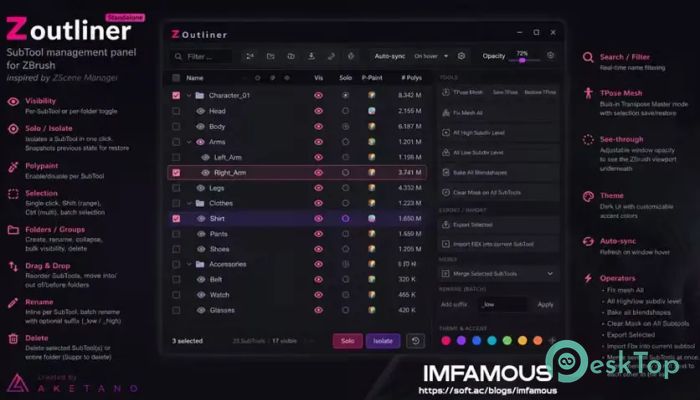
Working with dozens or even hundreds of SubTools inside ZBrush can quickly become confusing. This plugin solves that problem by providing a dedicated management panel inspired by ZScene Manager. It gives artists an organized workspace where they can control visibility, rename items, create folders, merge meshes, and perform many repetitive tasks with just a few clicks. The software is designed for digital sculptors, character artists, and 3D professionals who want to spend less time managing SubTools and more time creating detailed artwork. Its clean interface and practical features help improve workflow without interrupting the creative process.Features of ZOUTLINER for Zbrush
Powerful SubTool Management
The software makes handling large projects incredibly simple. Instead of scrolling through long SubTool lists, you can organize everything in one dedicated panel. Selecting, editing, and managing models becomes much quicker, especially when working with complex characters or environments.
It supports both individual SubTool operations and batch actions, allowing you to work efficiently even when dealing with hundreds of separate objects.
Easy Visibility and Solo Controls
Keeping your workspace clean is important while sculpting. The tool lets you toggle visibility for individual SubTools or entire folders with a single click. This makes it easy to focus only on the parts you need.
The built-in Solo or Isolate feature instantly hides everything except the selected SubTool. It even remembers the previous visibility state, allowing you to restore your workspace without having to manually re-enable everything.
Advanced Selection Options
Selecting multiple objects is smooth and flexible. A single click selects one SubTool, Shift allows range selection, and Ctrl makes multi-selection easy. This works much like selecting files inside Windows Explorer, making the workflow feel familiar.
Batch selection saves time when applying operations to multiple meshes at once, reducing repetitive clicks during large projects.
Folder and Group Organization
The software allows you to create folders for better organization. You can rename them, collapse groups to reduce clutter, change visibility for the entire folder, or remove complete groups whenever necessary.
This organized structure keeps projects neat and makes it much easier to find specific models, especially in detailed scenes with many components.
Simple Drag-and-Drop Workflow
Rearranging SubTools is effortless thanks to drag-and-drop support. You can move objects before, after, or inside folders without using complicated menus.
This flexibility allows artists to organize projects exactly the way they prefer, creating a cleaner and more productive workflow.
Quick Rename and Batch Editing
Renaming dozens of SubTools manually can be frustrating. The tool provides inline renaming for individual items as well as batch rename options for multiple selections.
You can also add custom suffixes like _low or _high, making it much easier to organize low-poly and high-poly versions of your models.
Fast Mesh Operations
The plugin includes several powerful operators that eliminate repetitive work. You can fix all meshes, switch every SubTool to its highest or lowest subdivision level, clear masks across all SubTools, and bake every blendshape with minimal effort.
These automation features save valuable production time while reducing manual errors.
Built-In TPose and Export Tools
The software includes a built-in TPose Mesh mode that works similarly to Transpose Master. It saves your current selection and restores it automatically after editing, making character posing much easier.
It also allows exporting selected SubTools, importing FBX files directly into the current SubTool, and merging several SubTools together even if they are located in different positions within the project.
Real-Time Search and Auto Sync
Finding the right SubTool becomes simple with the real-time search feature. Just type part of a name, and the list instantly filters matching results.
Auto-sync refreshes the panel whenever the window is hovered over, ensuring everything stays up to date while you continue sculpting in ZBrush.
Customizable Interface
The software comes with a modern dark interface that blends perfectly with the ZBrush workspace. You can customize accent colors to match your preferred appearance while the adjustable see-through option lets you partially view the ZBrush viewport underneath the panel.
This creates a comfortable working environment without blocking your sculpting area.
System Requirements and Technical Details
Operating System: Windows 11 / 10 / 8.1 / 7
Processor: Minimum 1 GHz Processor (2.4 GHz recommended)
RAM: 2GB (4GB or more recommended)
Free Hard Disk Space: 200MB or more is recommended
Zbrush: 2026.2.1+

-
Program size25.71 MB
-
Version1.0
-
Program languagemultilanguage
-
Last updatedBefore 2 Month
-
Downloads12
 Paragon Hard Disk Manager 18 Business
 Aescripts MaskMotion
 Aescripts AE Glass
 Aescripts PreFlight
 Aescripts Risograph
 Aescripts Folder Fanatic