
 Arabic
  English
  Turkish
  Chinese
  Japanese
  Russian
  Spanish
  German
  French
  Hindi
Hindi Download Any Screen Recorder 1.0 for Windows
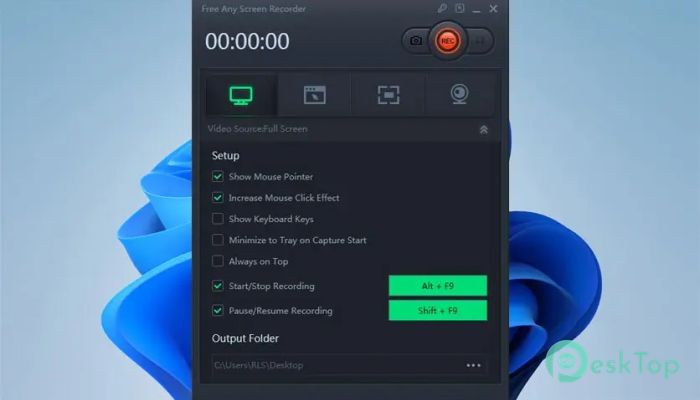
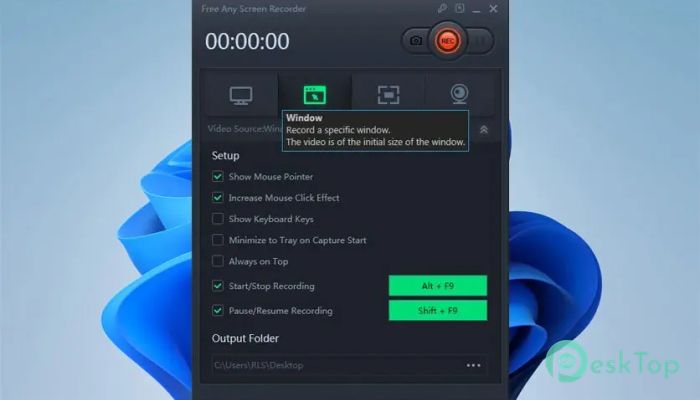
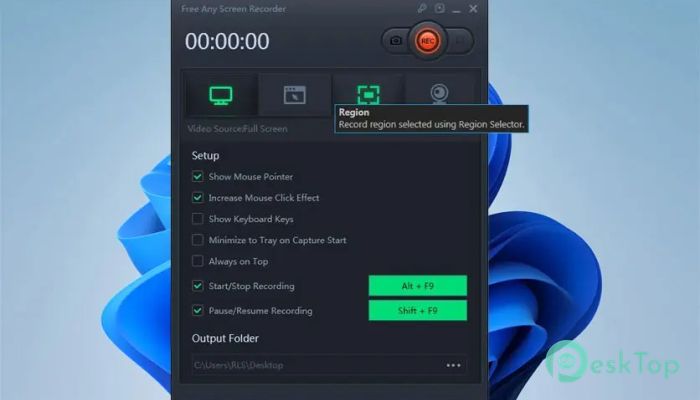
Download Any Screen Recorder 1.0 for Windows.
Any Screen Recorder Overview
Recording your screen has become more important than ever. Whether you're creating tutorials, capturing gameplay, recording meetings, or saving online videos, having a reliable screen recording solution makes everything easier. This software is designed to help users record anything happening on their screen without complicated settings or technical knowledge. The software allows you to record full screen, a selected window, or a custom region. This flexibility makes it suitable for beginners and professionals alike. It also supports recording webcam footage, system sound, and microphone input simultaneously. This means you can create professional-quality video tutorials, presentations, and guides effortlessly. Another great advantage is its lightweight performance. The software runs smoothly without slowing down your computer. Even while recording high-quality videos, your system remains responsive, allowing you to multitask comfortably.Features of Any Screen Recorder
Record Any Area of Your Screen
One of the most useful features is the ability to record any area of your screen. You can choose to record the entire screen, a specific window, or a custom region. This gives you full control over what you want to capture.
For example, if you're recording a tutorial, you can select only the application window. If you're capturing gameplay, you can record the full screen. If you're demonstrating a small feature, you can record only a specific section. This flexibility makes recording more efficient and professional.
Capture Webinars and Online Meetings
Recording webinars and online meetings is very helpful, especially for students and professionals. This software lets you easily capture live sessions, online classes, and virtual meetings.
You can record system audio alongside microphone input, making it perfect for lectures or team meetings. Later, you can review the recording whenever needed. This is especially useful when you want to revisit important discussions or training sessions.
Record Gameplay Smoothly
Gamers often want to record their gameplay to share, review, or create content. This tool makes gameplay recording simple and smooth. It records high-quality video without causing lag or performance issues.
You can also record your voice commentary using the microphone. This helps create engaging gameplay videos for tutorials, walkthroughs, or streaming highlights. The recording process remains stable even during fast-paced gaming sessions.
Webcam Recording Support
Another useful feature is webcam recording. You can record your face while capturing your screen. This is ideal for tutorials, presentations, or reaction videos.
For example, teachers can record lessons with a face camera overlay. Content creators can create engaging videos with face cam commentary. This makes videos more interactive and professional.
High Quality Video Recording
Quality matters when recording videos. This software supports high-quality recording without reducing clarity. Videos remain sharp and smooth even after recording.
You can choose different recording settings depending on your needs. Whether you want lightweight recordings or high-definition videos, the software provides flexible options. This makes it suitable for different use cases.
Simple and User-Friendly Interface
One of the biggest advantages is its simple interface. Everything is easy to understand and use. You don't need technical skills to start recording.
The controls are clearly labeled. You can start recording with just a few clicks. Even beginners can quickly learn how to use the software without any confusion.
Record System Audio and Microphone
Audio recording plays a major role in screen recording. The software allows you to record system sound, microphone input, or both together.
This is helpful for recording tutorials, presentations, and gameplay commentary. You can explain things while recording, making videos more informative and engaging.
Lightweight and Fast Performance
The software is designed to run smoothly without consuming excessive system resources. This ensures your computer remains fast even while recording.
You can record videos while running other applications. This makes it ideal for multitasking and productivity workflows.
How to Record Screen on Windows
Recording your screen using this tool is very simple. First, launch the software after installation. Then choose the recording mode, such as full screen, window, or custom region.
Next, select audio options, including system sound and microphone. After that, click the record button to start capturing your screen. Once finished, click stop to save the video.
The recorded file will be saved automatically. You can view, edit, or share the recording instantly. This quick process makes screen recording easy for everyone.
Useful for Multiple Purposes
This software is suitable for many purposes. You can record online videos, capture lectures, create tutorials, and record calls. It works like a digital camera for your computer screen.
Students can record classes. Professionals can record meetings. Gamers can capture gameplay. Content creators can make tutorials. This makes the tool versatile and practical.
System Requirements and Technical Details
Operating System: Windows 11 / 10 / 8.1 / 7
Processor: Minimum 1 GHz Processor (2.4 GHz recommended)
RAM: 2GB (4GB or more recommended)
Free Hard Disk Space: 200MB or more is recommended

-
Program size5.21 MB
-
Version1.0
-
Program languagemultilanguage
-
Last updatedBefore 3 Month
-
Downloads24Ralated programs
![ChrisPC VideoTube Downloader Pro]() ChrisPC VideoTube Downloader Pro
ChrisPC VideoTube Downloader Pro![TranscribeKit]() TranscribeKit
TranscribeKit![Vision Search]() Vision Search
Vision Search![DVDFab]() DVDFab
DVDFab![Crynet Showcase]() Crynet Showcase
Crynet Showcase![OVRLEY]() OVRLEY
OVRLEY
 ChrisPC VideoTube Downloader Pro
 TranscribeKit
 Vision Search
 DVDFab
 Crynet Showcase
 OVRLEY